
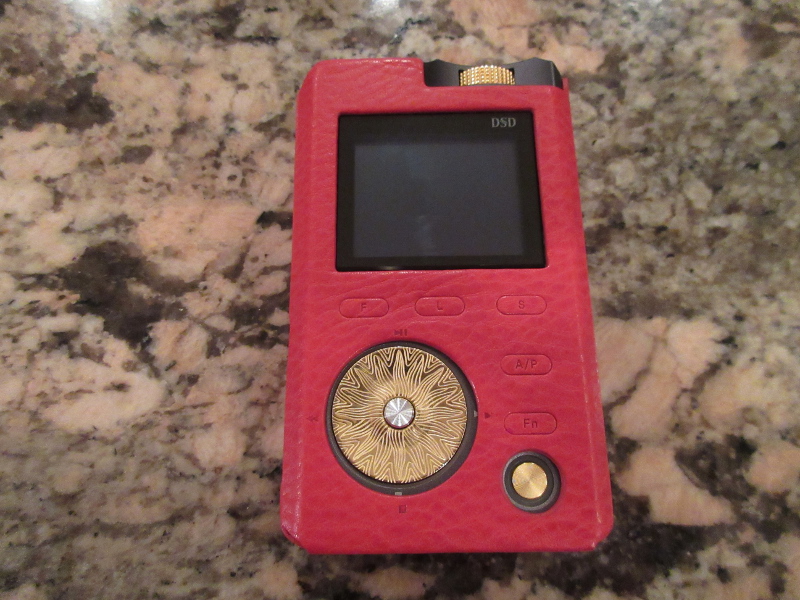
GUI and Setup.
From the moment you power LPG up (very fast start up, thanks to a custom optimized OS) you are greeted by an efficient all-in-one color display layout with everything on a single screen. Starting with a status bar, you get a repeat mode icon in the left corner and battery icon in the right corner with either % or the remaining time indicator (customized in the setup). Bellow that you can see which DSP effect or PMEQ preset is being applied and a horizontal bar graph with L/R channel level, assuming it’s calibrated by Red Book standards from -50dB to 0dB. You also get song’s time duration and current play position, a file info with a file number within a folder, and a file format with an exact sampling rate.
Below that you can see a scrolling file name. While playing you can fast forward or skip the song with corresponding D-pad click, and you can do the same in Pause or Stop. I’m so used to Play/Pause only, it was refreshing to see a Stop button (the bottom of D-pad). The center button of D-pad could be customized to either function as Play/Pause (always easy to access it), or to switch between display views to show a dynamic Spectrum Analyzer of currently played track and with another click to show an album art. Not every album artwork was displayed, so I assume the firmware is a little picky about embedded artwork, and the one it did display was rather pixilated. With low 160×128 resolution of the display, I had no high expectation for it, and for me personally artwork display is not the highest priority anyway, just a bonus.
Above the D-pad, you have File and List buttons to help you view, select, and manage your songs. Pressing File button brings up a folder view of your files on a flash card. This is usually my preferred way of browsing since I have a few album folders and the rest are various tracks in the root directory. Keep in mind, when you have a lot of albums and files – partitioning into folders will be the best way to speed up browsing since you don’t have a scrolling wheel for a faster navigation. Pressing and holding up/down D-pad will enable a faster scrolling through the list. And speaking of the List, the button next to File, in there you will find a Play List selection that will list all the files within a current folder or if you are in the root. Next, you have 3 custom List1/2/3 playlists where you can easily add files by tagging any song when browsing (click the D-pad right and select which custom playlist you want to add the song to). The last choice in the List is “ALL” which lists every single song on your flash card, probably the best place to scroll through when you are tagging files for custom playlists.
Setup button is in the corner, and provides you the access to Play settings, System settings, and Custom settings. Play settings allows you to select Repeat mode (sequence, single repeat, repeat all, and random), Time display (current playback back time or the remaining song time), DSD gain (in increments of 6dB from -12dB to +12dB), Lineout level switch (to adjust or keep fixed LO level, think of it as an adjustable pre-amp gain), and Channel Balance (L/R balance adjustment). Custom setting is a unique way to customize some of the settings. You get a chance to assign a specific functionality to FN key (a button located above Power), I usually assign it to Mute. Also, customize Center key (inside of D-pad) for either Plays/Pause or screen change, as I mentioned before. Furthermore, you can change Volume knob direction between CW and CCW, and Lock volume enable when “hold” is activated.
In System setting under Setup you get Power off time (w/timer switch and power off timer), Auto power off (time), Language selection, Display extinction (timeout), Breathing LED (light ring around power button, enable/disable to save power), Battery display (choice between remaining time or percent indicator), Brightness level (low, mid, high), Battery info (battery level in % and remaining time), Database update (refreshing song list), SD info (showing total capacity, and free and used space), SD speed test (pass/fail to make sure flash card meets 3Mbps requirement), Format (for Fat32 format of flash card), Factory settings (to reset to factory defaults), System info (fw, hw, loader, and boot version, and S/N), and Firmware update option.
Just like with PAW5k, before I get into sound analysis of LPG, there are two more important features I would like to discuss – Parametric EQ (PMEQ) and Acoustic Timbre Embellisher (ATE), accessible from a dedicated ATE/PMEQ button located between Setup and FN.
I have tested a lot of DAPs, some without any EQ and others with Graphic EQ where you have certain amount of bands each at a fixed center frequency and fixed bandwidth. With a graphic EQ you get a nice “graphic” representation with a visual feedback of which band you are adjusting and the amount of the adjustment, but you have no control over selection of a specific frequency or the bandwidth of that frequency. Parametric EQ gives you all these controls where you can customize F0 (center frequency), Gain (level adjustment), Type (Low Shelf, High Shelf, or Band Pass filter), and Q (bandwidth of the filter band). I’m glad that Lotoo recognized importance of PMEQ where you get 8 quality presets covering different music styles and 6 Custom User presets where you can dial in your own settings. Each custom setting gives you an access to modify F0, Gain, Type, and Q, and you can also export and import PMEQ presets to share with others.
Also under the same menu selection, in addition to PMEQ you have ATE digital effects giving you a selection of 7 distinct DSP effects to customize your sound. I actually found some of these ATE effects to be quite usable, especially “Brighter” which works great with warm/dark headphones and “Sweet” to warm up a sound of bright headphones. One thing to note, you can only select one specific ATE effect or one PMEQ preset, but not both at the same time. Depending on your ATE or PMEQ selection, the main playback screen will display the choice right below status bar.
Page 3: Sound analysis, Pair up, Comparison, Conclusion and BONUS Dignis LPG case.

 Twister6 Reviews
I would hardly equate “lower mids are clean and on a leaner side” and “treble is crisp” with the word “neutral.” However I appreciate the review as I now know this is yet another overly bright player to avoid.
LikeLike
Oh, believe me, I also cringe when reading some of my 3+ year old reviews, the reason why I didn’t mirror my old write ups from head-fi, except for this one which i copied over. I guess it’s just a reminder of how far we come in this hobby, learning from an experience of more testing and comparison; I probably need to revisit and clean it up… And yes, it’s not neutral. The more I test and compare other daps, the more I realize that LPG has a little extra emphasis in low end, punching through harder, and a little lift in treble as well. But it still remains one of my favorites and its Parametric EQ is bar none. So, I’m looking forward to check out LPG Touch and hope it’s more “neutral” 😉
LikeLike