
GUI and Navigation.
It’s a challenge to have a functional GUI using 1.54″ display and relying only on touch controls. M0 interface has the Main scrolling horizontal menu with one large icon per screen. Now Playing takes you to a currently playing song. My Music takes you to Open All, My Favorites, Album, Artist, Composer, Playlist, Genre, Frequent, and Recent songs – each one with a vertical navigation scrolling. Folders take you to a folder browsing. And the last two choices are Playback and System settings. You enter menu by tapping on it, and exit to a previous screen by swiping left-to-right. Also, long press on the screen takes you back to the Main scrolling menu.
In My Music and Folder browsing, every song and individual folders have three dots to the right, where taping on it gives you an option to add to Playlist, add to Favorites, or delete song/folder. You can have multiple Custom Playlist, named Playlist1, Playlist2, Playlist3, etc. Or add songs to a common Favorites list either by taping a “heart” icon within Playback screen or from My Music/Folder browsing as described above.
In Sound Setting you have Max Volume, Default Volume, Resume Mode (off, track, location), Gapless (on/off – tested to work great!), EQ (16 genre/sound specific presets, no customization), Gain (high, low), Filter (8 DAC filters), Channel Balance (L/R), Play Mode (list play, repeat track, shuffle, repeat all), and Folder Skip (on/off).
In System Setting you have Update (to refresh tracks), Bluetooth (to enable and select LDAC, aptX, AAC, SBC), Brightness setting, Screen off setting, Idle setting, Sleep timer, USB mode (usb to read the internal card or USB DAC), Clock setting, Volume wheel lock, Double Click assignment (assignment of volume wheel double click to either skip last, skip next, play/pause, or do nothing), DSD mode (D2P or DoP), Output select (Headphone or Line Out), Theme selection (various color themes), Language selection, About M0 (with storage and fw rev info), Factory reset, and System update.
Also, a Notification bar at the top displays play/pause icon, volume level, time, and battery status.


Main Playback screen has 3 views. The main view has a scrolling song name, Play/Pause in the middle and Skip next/prev on the sides, Resume Mode icon in the lower left corner (repeat one, shuffle, repeat all, play list), or Favorite “heart” icon in the lower right corner. Swiping to the next view (swipe right to left) gives you the next screen with scrolling song name at the top, “+” to add to Playlist, “i” for a detailed song info, and shortcut to Sound setting menu. At the bottom of this screen you have a swipe bar to fast forward/back through a song. Third screen has lyrics view, if embedded with a song.


Sound analysis.
M0 has a neutral-balanced sound signature with a brighter tonality. This little DAP has a surprisingly good soundstage expansion with above average width/depth, and average layering and separation of sounds. While any sound description is based on a pair up synergy with headphones, I hear the following common characteristics with many different IEMs paired with M0. The bass has a balanced impact with a deep low-end extension and punchy fast mid-bass, more natural revealing mids, and well controlled tremble sparkle. Treble doesn’t extend too far, but at the same time doesn’t feel rolled off and has a nice definition with a more tamed sparkle.
With M0 tonality being more on a natural brighter side, I was still very pleased with low end extension and impact. I also noticed that dynamics of the sound (vertical dynamics expansion) improves when M0 is switched to high gain. And I found zero hissing, passing Andromeda test with flying colors.

Pair Up.
In my pair up testing I decided to challenge M0 performance with a variety of full-size headphones and different IEMs. All the testing was done with M0 in High gain, where I also noted “V” volume setting for a relative comparison. Please keep in mind, the volume goes up to 100. Also, for cables with 2.5mm termination I used 3.5mm adapter to connect to M0.
Audio-Technica R70x (470 ohm, open back full size, V72) – Here I hear a clear detailed smooth sound, balanced signature, not the widest open back soundstage expansion as I’m used to from other higher end sources, and an average dynamics, layering, and separation. It can drive these headphones loud, not lacking in power, and it’s quite enjoyable though I can hear these are not driven to their full potential. Bass has a good extension, mids are natural, treble is well defined with moderate airiness.
Beyerdynamic T5p2 (tesla full size drivers, V38) – Here, I also hear a clear detailed sound, balanced signature with a revealing tonality. The soundstage is above the average, good layering and separation of sounds. Also, maybe not driven to their full potential but the sound is loud and clear. Bass goes deep, nice sub-bass velvety rumble, mid-bass punches through the mix with plenty of power, mids are clear, treble has a nice crunch and good extension. Dynamics is lacking a bit in this pair up, with sound being a little flatter, but that’s expected.
VE Zen (320ohm earbuds, V60) – In this pair up I hear a wide soundstage, more neutral tonality with a balanced sound signature. I noticed a slight reduction in sub-bass rumble with mid-bass impact being also more neutral. Mids are very natural, with a detailed organic tonality, and treble is well defined with a nice sparkle, but under moderation. This pair up surprised me with a very neutral tuning, even a touch mid-forward in its presentation, and I did enjoy it a lot.
Sennheiser IE800S (DD, V35) – Now, talking about a surprise, this one turned out to be an excellent pair up, very dynamic sound with a wide soundstage expansion, deep sub-bass rumble, punchy fast well controlled mid-bass, neutral lower mids, clear detailed upper mids, and sparkly airy treble. Signature is more balanced, and surprisingly good vertical dynamics expansion where high gain helps for sure.
64 Audio U18t (18xBA, V28) – In this pair up I hear a balanced sound sig, wide soundstage expansion, deep sub-bass rumble, strong mid-bass punch, neutral lower mids, revealing layered upper mids, crispy airy treble. This was another good pair up example which I’ve enjoyed. Not the highest res as I’m used to with summit-fi sources, but it had a very natural tonality with a great retrieval of details.
64 Audio Fourte (DD+3xBA hybrid, V28) – This pair up yields a more mid-forward signature, wide soundstage expansion. Sub-bass extends deep but doesn’t have as much impact in rumble, mid-bass is fast and punchy, but closer to neutral quantity; lower mids are neutral, upper mids are more forward and very detailed, brighter, more revealing; treble has a great definition, bright, with lots of sparkle and airiness. I find the sound to be colder and more analytical in this pair up.
UM Mason V3 (16xBA, V31) – In this pair up I hear a balanced sound signature, wide soundstage expansion, with an overall sound being more revealing and with a little more emphasis in mids. Sub-bass has a deep rumble, mid-bass punch is strong and very articulate, lower mids are neutral, while upper mids are natural and revealing, with treble being crisp, well defined, and airy. Even with a little more emphasis in mids, once you turn dB-Go bass module to fully closed – the bass impact in this pair up is very satisfying.
I found M0 to have not the best pair up with more demanding headphones. There were no issues driving them loud, but you can hear it wasn’t to their full potential. Instead, a pair up with IEMs, especially in high gain, was much better. Especially in high gain, I felt that dynamics was improved.


Page 3: Comparison, Wired and wireless connection, and Conclusion.

 Twister6 Reviews
Jeepers… can’t believe such a small DAP has so many features crammed in.
LikeLike
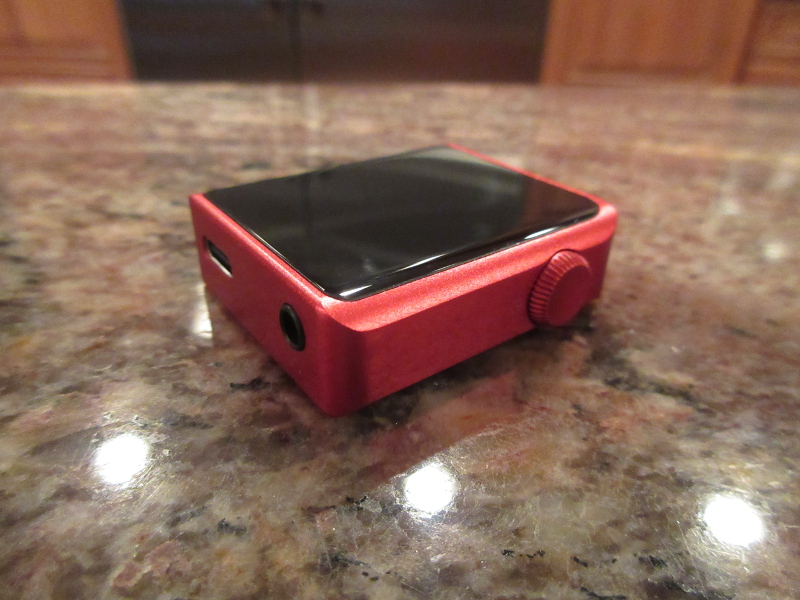
I used to refer to M1 as small. Can’t call M0 small anymore, it’s tiny 🙂 You really have to hold it in your hand to feel it, like a smartwatch.
LikeLike
Did you work out how to change the system settings? When I try to adjust the time or change the double click setting, for instance, I can choose new values but can’t set them and then return to the system settings page. I’ve tried all sorts of swiping and pressing with no effect. Have you managed to do it – if so how?
LikeLike
not sure if I already replied to you question on Head-fi in M0 thread a few days ago, unless it was someone else asking the same question? With time, you just dial the right one, and swipe left to right to go back to Settings menu. The time will be updated. If you are having issues, just wait until next week when Shanling releasing fw1.52 with lots of fixes and optimization of touch screen sensitivity.
LikeLike
Thanks, sounds like someone else is having the same issue. I’ll keep an eye out for the update.
LikeLike
I’m thinking of buying either an M0, or an M2s, as a front end for a Shure KSE1200 (the M2s is a near perfect match, size-wise, for the KSA1200 amp): you’ve heard both via their LO, using an E12A; which sounds better?
LikeLike
M0 has a better DAC implementation, I would go with that. m2s will be easy to navigate since you have physical buttons and can control playback without relying on touch screen, with M0 you can only do volume and program it for either play/pause or skip, and might need to look closer into display since it’s small. With KSE1500 you have their own DAC/amp, with KSE1200, amp only, relying on DAC from the source. IMHO, M2s dac implementation is not ok, but M0 is better.
LikeLike
Very interesting first look!
Since M0 looks like a better buy than M2s, do you think M3s is still a significant upgrade in sound quality (clarity, soundstage, etc.) from the M0?
I live in Canada and M3s price is about 2 to 3 times the M0… I just want to know if, from your perspective, M3s worth it or not (using SE output).
I mostly use Pinnacle P1.
Thanks!
LikeLike
It’s an upgrade, especially when it comes to balanced more powerful output. But typically people get one in addition to the other, not instead of it.
LikeLike
This is small enough to seriously consider creating a wristband accessory for it. It seems like it could actually function as a practical setup.
One thing I haven’t heard commented on is how sweat proof this is. I know some older music devices have turned out not to work for some of my friends/family who sweat a significant amount when exercising.
LikeLike
they do have a clip accessory, a plastic clip to use with M0, though not sure how strong the clip is (have it, but haven’t tested it).
LikeLike
Really appreciate your reviews TW.
Many Thanks!!
I was sure the PAW pico was going to have a superior sound sig so I am glad that you put me straight on this.
Can you share your impressions of the Andromeda with the M0?
LikeLike
Pico is great, but very limited in functionality when compared to M0. Andro and M0 pair up is on a warmer, fuller body side, a little thicker sound, still quite detailed. Soundstage is really wide.
LikeLike