
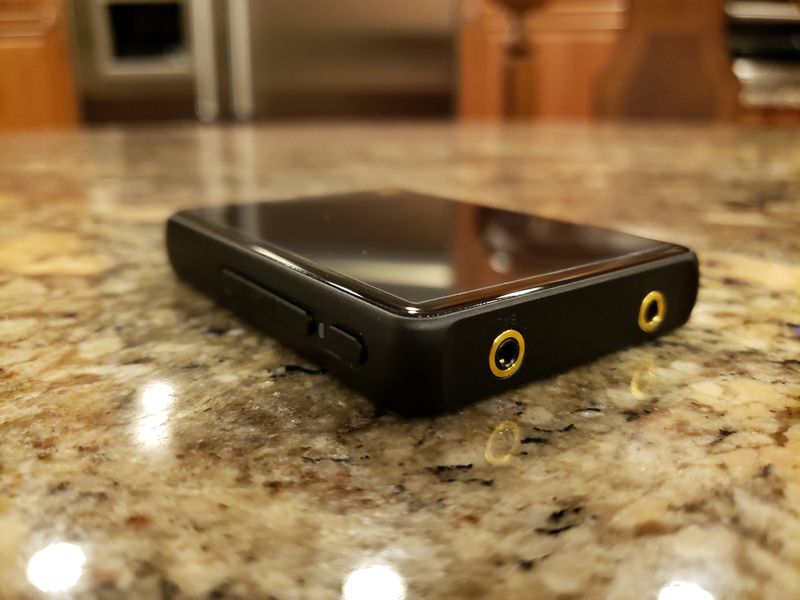
Under the hood.
As I already mentioned, from outside you won’t find any changes, but inside it is a different story.
Probably the only thing that remained the same is Ingenic X1000E CPU, an ultra-low power consumption processor common to many entry-level DAPs. Now, starting with a DAC, Hiby implemented a dual CS43131, to replace R3’s ES9028Q2M. I’m sure it is one of the contributing factors in increase of the play time using its 1600mAh battery. The overall improvement of playtime was quite noticeable, in SE (3.5mm) going from 11hrs to 20hrs and in BAL (2.5mm) going from 9hrs to 16hrs. Of course, as you switch to high res lossless files, especially DSDs, and depending on the amount of screen time and volume level, the battery life will decrease.
Another noticeable change was Bluetooth 5.0 (from previous 4.2 in R3), and support of all the popular codecs, including UAT, LDAC, aptX, AAC, and SBC. Plus, you have to keep in mind that R3 Pro still support dual (2-way) Bluetooth, both as a transmitter for wireless headphones and speakers and as a receiver for wireless DAC/amp application. When it comes to WiFi, R3 supported only 2.4GHz band, while R3 Pro added 5GHz to help with wireless coverage and connections which includes DLNA, AirPlay, and support of built-in Tidal and Qobuz apps.
As it was already mentioned, both R3 and R3 Pro have 3.5mm SE and 2.5mm BAL headphone outputs. R3 Pro single ended output has a similar level of power as R3. But the balanced output went up from 112mW to 210mW with 32ohm load. I will cover more in sound analysis section, and yes, the higher output power level was noticeable.
As far as playback, R3 Pro supports majority of popular lossy and lossless formats up to a native DSD256 decoding and PCM playback of up to 32bit/384kHz, including FLAC, APE, WMA, WAV, AIFF, DSD IOS, DFF and OGG files. Also, very important to note that R3 Pro supports full hardware decoding of MQA which I confirmed with a few of my MQA FLAC test tracks.

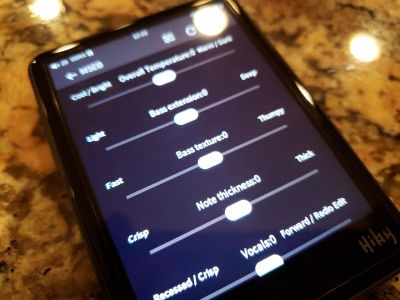
Other features worth mentioning is WebRadio support, though you will have to do your own leg work to find available streaming stations and add it into a txt file to be stored into root directory and accessed from the Playlist. Another feature is E-Books, but it only works with txt files. For active lifestyle, Pedometer is included, though I didn’t find it to be very accurate. Last, but not least, when you are dealing with Hiby OS and Hiby Music app, MSEB sound-shaping effects are definitely worth checking out.
GUI.
By now you had to be living under a rock if you never heard of HibyMusic app. It’s a free app you can install on your phone or other Android based DAP. In R3 Pro, the app is the main GUI of the DAP, integrated into its OS. I’m sure many are familiar with the interface already, but for those who don’t, here is a recap.
The main interface is organized in a logical way where starting at the top you have icon-menu with Settings, Music file sorting/view, Favorites and Playlists, Tidal/Qobuz, and Main playback.


Settings menu has Update database (to scan for music on your card), Receive songs via Wi-Fi (provides URL to send files from another device connected on the same wi-fi), MSEB (10 sound shaping effects based around Parametric EQ, with a very effective finetuning to change the color of tonality, bass impact and articulation, vocals control and sibilance filtering, and airiness of the sound), EQ (10 band graphic EQ, with 8 genre specific presets, and a custom preset), E-Book (being able to load and to read E-books, though only in txt format), Pedometer (to allow recording your steps), Wireless setting (Bluetooth, Wi-Fi, DLNA, AirPlay, and HibyLink), Play setting (everything from play mode to output selection, DSD mode, resume play, gapless, crossfade, replay gain, balance, digital filter, and play through folders and albums), System setting (button operation, time setting and idle/sleep timer, battery percentage display, standby, in-line remote access, status LED, screen settings, factory reset, and fw update), and About.


Under Music file view, you can see all the tracks, select if you want to view specific folders on micro SD card or external usb-storage, and sort by Albums, Artists, and Genres. In Favorites menu you can view files tagged as favorite. In there, you can also see recently played songs. Then, view Playlist menu where you can create new, or save/load playlist, and access Custom Radio (need to have a separate text file with url links to internet radio stations). And last, but not least, view recently added.
Access to Tidal and Qobuz is definitely a unique feature of R3 Pro which makes it stand out from many other small DAPs. You have to press and hold the corresponding shortcut icon which brings up a choice of accessing Tidal or Qobuz. Please keep in mind, this is a custom app which only allows streaming, and not off-line storage. Since I only have Qobuz service, that’s the one I was testing. After you login once, R3 Pro remembers your login info, so you don’t have to enter it every time. Under Qobuz, you have Discover section with access to New Albums and New Playlists, access your Favorites where you can search by albums, artists, tracks, and playlists, and a separate Search.


In the Main playback screen, you can view the artwork of the song, if one is available. Also, you can see the track and the artist name, file info, “heart” icon to tag is a favorite, playback scroll bar to advance through the song and to check the track time, and at the bottom you have playback mode (loop, single song loop, random, and play all), playback navigation buttons with play/pause and skip, and access to pop-up menu with various options like add to playlist, EQ, view album, song properties, and being able to delete the song.

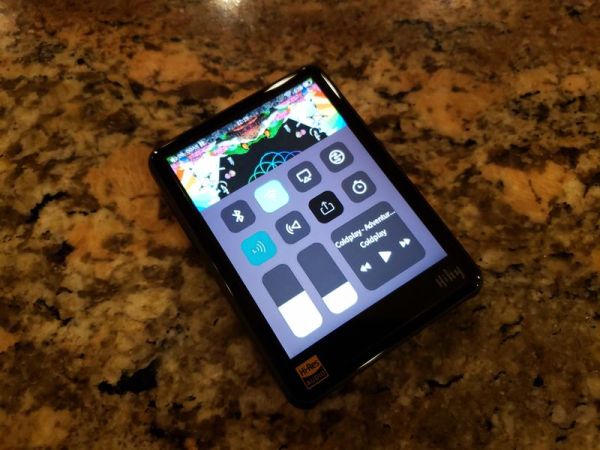
Also, worth mentioning, Notification bar at the top is visible from every screen, and it has lots of info with volume setting, current playback icon, time, wi-fi indicator, and battery with a percentage display (as enabled in settings). You also have access to shortcuts when you swipe up the screen which brings up BT toggle, WiFi toggle, gain select, replay gain setting, line out, and timer. Below it, you have a swipe bar to adjust brightness, volume, and a small window to control the playback of the song with play/pause/skip buttons and the name of the song.
Page 3 – Sound Analysis, Pair up, and Comparison.
Page 4 – Other Wired/Wireless connections, and Conclusion.

 Twister6 Reviews
Damn 😦 I wanted to do a review on a new one with hope of the same meaning getting a newer device to use and review. But anyway I LOVE MY R3 so much nothing is difficult about it other than finding the correct update so it doesn’t crash lol but I love it. It holds all of my music which includes everything I have listened to and enjoyed and all the music I have written, and preformed professionally . I want to get either the R5 or R 6 next
LikeLike
Yeah, R5 is a great update to step up to full Android OS where you can download any streaming app, and right now R5 cost $299, a great deal.
LikeLike
Hi. I use a Fiio X5iii (line out) + Magni 3 amp. I am just looking for a pure comparison between Hiby R3Pro (line out) vs X5iii(line out) as I would only listen to daps via line out and external amp. So if my only concern is to use the R3pro in (line out) then how does it sonically compare with X5iii in (line out). Is R3pro (line out) a big step up from X5iii (line out).
LikeLike
Line Out supposed to be direct output of the dac, but neither of these daps have a real line out, more of a pseudo line out. So you are probably OK with what you have.
LikeLike
Hiby R3 Pro and Cayin N5ii/N5iiS, which is better? And will Shozy BG pair well with both of them? I mainly listen to vocal and instrumental music.
Thanks
LikeLike
“better” is a very subjective term 😉 A picky audiophile with a high res iems will probably go for N5iiS since it has a better technical performance. Others who are casual listeners might find both to sound as good. R3pro can only stream tidal/qobuz while N5iiS can load other apps, but at the same time N5iiS uses old Android releases and some of the apps might run sluggish. Also, I have no experience with Shozy BG.
LikeLike
How is performance compared to Sony NW-A45?
LikeLike
sorry, I’m not familiar with A45 or any other entry/mid-fi sony daps.
LikeLike
Thanks for the nice review. Do you know how R3Pro compares to the Fiio M6? Cheers.
LikeLike
Sorry, never heard fiio m6
LikeLiked by 1 person
No worries. Thanks for the prompt answer.
LikeLike
Hi, and thanks for this nice review.
Do you know what it is “worth” used like network streamer (player) (USB / Coax), for a home instalation, replacing something like Cayin iDap-6 or an Raspi Allo Signature USB Bridge or blue node 2, auralic aries G1 and so on ?
In my home instalation I can use HiByLink on my Android phone so I cand leave the R3 Pro connected to the stand alone DAC.
Qobuz is very imortant to me. Do you know if I can choose the quality of streaming ? My home instalation involve active speakers which can handle 24/96 KHz at the best. So if I stream a 24/192 album can I “block” at 24/96 like in app Qobuz for Android ?
Can we manage every aspect from HiByLink – inclunding Qobuz or Tidal ?
thanks
dan
LikeLike
Sorry, I’m only familiar with a basic DAP/iem setup, that’s what I’m using. Can’t offer too much help with other stuff. And if you do care about Qobuz and Tidal and managing them to full potential, R3 Pro is not for you. It uses a very basic cut down native version of the app with limited functionality, just for streaming. You need to upgrade to android DAP like R5 (and R5 is pretty cheap too, $299) which has Google Play store and you can download Qobuz or Tidal or other full apps, to use it like with your smartphone.
LikeLike
Thanks for your answer.
I think your are right :).
R5 HiByLink (on a android phone) manage only R5 HiBy Music ? Right ? No way to controle Qobuz app on R5 without manipulating the R5 itsself ?
I would like to this 🙂 . Sitting on my sofa, with my android phone and controle Qobuz on R5…. 🙂
I adtmit its a very special need 🙂
I would like to purchase Cayin iDap-6 for my home system but its implemntation of Hiby do not include Qobuz. :(.
many thanks,
Dan
LikeLike
I remember reading your opus#1 review, like others who’ve reviewed it, read it as if it was a game changer dap because of SQ/ value.
Reading upon your comparison of the R3pro vs Opus#1s (both using the same double dac)… do they actually stand head to toe in terms of SQ?
LikeLike
Still does. And price is no longer indicator of what is good or better. There are some $150 entry level daps that sound as good as $700 or even higher. So the big things to distinguish them will be their features, build quality, form factor. #1s was tuned great, but it is so outdated when it comes to everything else…
LikeLike
Hi, minus the android which would you pick between r3 pro and r5 in terms of overall sq. thanks!
LikeLike
I would still go for R5 because in some pair ups sound quality will scale up with higher power which R5 can provide while R3 Pro is lacking a bit behind. R5 just has a much better price/performance ratio due to all these features. But tbh, due to it’s small form factor, while i’m at home I reach out more for R3 Pro, to stream my Qobuz playlists 😉
LikeLike
Had an R5 but not taken by design. Now just got R3 Pro and its amazing for £165 imported from Hiby. I even prefer the sound to the R5. Styling of this follows R6/R6Pro while R5’s strange with its clear end pieces and protruding front/back glass. If you must have Tidal/Spotify/AmazonHD etc. offline storage the has to be thee R5 or higher.
LikeLike
I have an Emotiva PT100 preamp and it has a type B USB input. Also I just ordered a Hiby R3 Pro online and its on the way to my doorsteps as of this writing. My questions are 1) would the Emotiva PT100 and the HIby R3 Pro function when connected thru the USB? 2) what kind of cable will I purchase, would the type C to B printer cable works? Thanks for the review. Keep posting……..
LikeLike
The only way to be 100% sure is to try it, but in theory it should work. Don’t know if they make type C to B printer usb cable, so you might end up using regular USB A to B and get OTG USB A to usb C adapter, that might work.
LikeLike
Your review encouraged me to buy one. And its your review that also serves as my reference on the DAP’s functionality familiarization and adjustments because the manual dont tell it all. Thamks…..
LikeLike
I read with great interest how you used the Hiby R3 Pro as a digital source, connecting it to an iBasso DC01 and to an iFi Micro iDSD BL. I am hoping to do the same and pair the R3 Pro to a Chord Mojo. Would doing so with a USB-C OTG to micro-USB cable work? Wonderful review, by the way!
LikeLike
While I don’t have Chord Mojo, it should work for sure 🙂
LikeLike
Thanks for the encouragement. Will try it out.
LikeLike
Just wanted to let you know that I used a third party OTG USB-C to micro-USB cable and it worked like a charm. Again, thank you for the encouragement!
LikeLiked by 1 person
I do have a couple more questions, and I was wondering if you’d know the answer to them. 1) The R3 Pro is not Android-based and uses the Hiby OS. Would the USB-C to micro-USB cable that I will need to link the unit to a DAC (e.g. Chord Mojo) have to be OTG? and 2) Assuming that the cable that I would need does not have to be OTG, would it be alright to use an OTG cable just the same? I ask because I can’t seem to find the answer anywhere in my hours of research. The Hiby website does not seem to be too useful in this regard.
LikeLike
I don’t have any non OTG short cables, always use OTG ones with R2 and R3 Pro to connect external dongles.
LikeLike
That’s very good to know. Again, thank you for the input! You’ve been most helpful. I appreciate it.
LikeLike
Can I use this to play shuffle on my Tidal playlist?
LikeLike
it has been a while since I used it, but I think you can. I need to charge R3 Pro up, update fw, and revisit it 🙂
LikeLike
Thanks a lot! Let me know the update!
LikeLike