
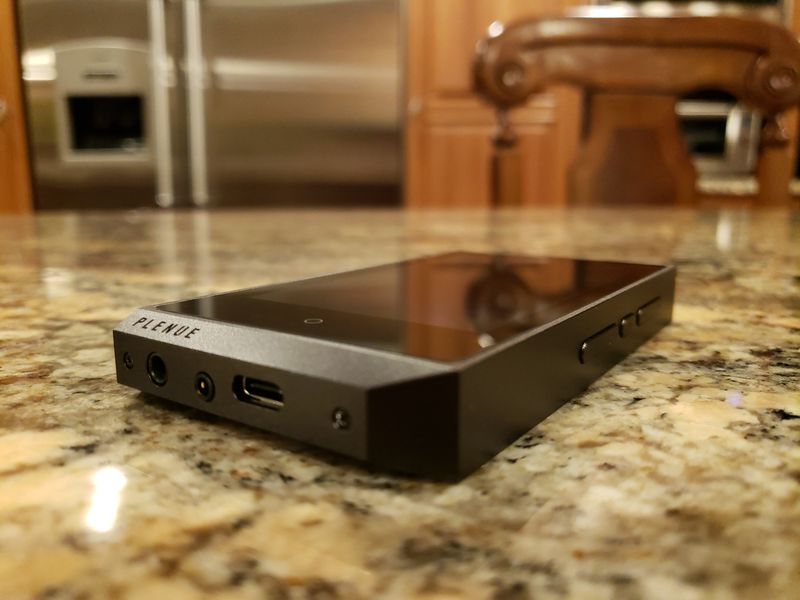
GUI.
If you owned any of the Plenue DAPs in the last 4 years, there is zero learning curve once you turn R2 on. It’s one of the advantages of the closed OS where you can keep consistency in interface between different models and put more focus into the actual sound tuning and exterior design. Of course, there will be some variations driven by a different DAC or some other enhancements, but everything is easy to figure out and very intuitive even for those who are not familiar with Plenue DAPs.
With a few words about the display, I know some might find 480×800 resolution to be not the greatest, but for displaying artwork and other elements of the GUI it was more than enough. It’s not the highest resolution but, for example, the analog needle of level meter display wasn’t choppy and looked very convincing. The AMOLED display is crisp with nice vibrant deep colors. I personally never put too much emphasis into the display quality unless I’m planning to watch videos, movies, or play games, but even for a basic operation a lag in touch screen response can ruin the experience. Here, the touch screen response was on a level close to my smartphone.
When you turn the power on and wait for the database update, the DAP goes into the main playback screen where you will find a clear layout with a very efficient interface. Starting with notification bar, upper left corner will show you icons corresponding to playback modes and selected dsp effects, in the middle there will be a current time, and upper right corner will have a volume level, gain setting (IEM – low, headphone – high), “B” indicator when balanced HO is connected, and a battery indicator, though I wish it would show a numerical value of the remaining capacity.
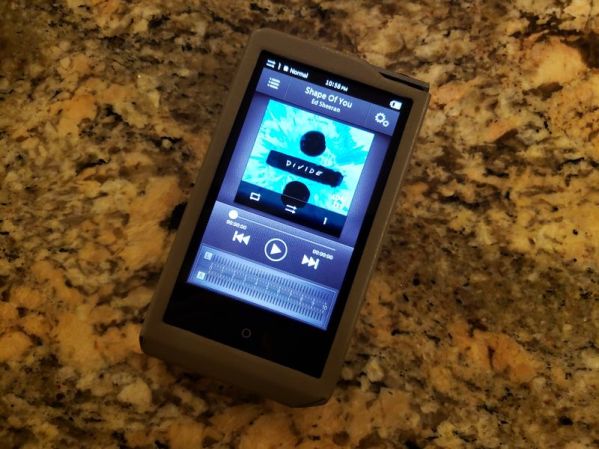
Right below notification bar there is an icon which takes you to Music Selection screen. In there you can navigate up to the top level to select between Folders, Favorites, list of All songs, sort by Artist, Album, Genre, Playlist, and New. Under each selection, you have another icon which brings up either Add to favorites (a song or a folder) or Search using a touch-keyboard with a full alphanumeric search. Next to Music Selection screen icon, you have the area for artist and song name with a scrolling text. To the right is Playback Setting icon which I will talk about separately. I know, it sounds like a lot, but everything is very intuitive and easy to figure out without a need for a manual.
The main screen with an album artwork occupies upper half of the screen, and if there is available lyrics, you will notice a corresponding icon in the upper right corner. Clicking on the album/song art will zoom in to provide you with a more detailed info view about the song format, and while scrolling down from there you will see all the corresponding tags. Underneath the album/song art, you have quick shortcut icons to enable/disable Looping, enable/disable Shuffling, and a choice to play a Single track or tracks from a current Folder or to play All tracks. Below it is a playback control Play/Pause and Next/Prev touch buttons to skip or forward through the track. Also, you have a playback bar to fast forward/back through the track to a desired point by swiping through it, and this scroll bar will be either below or above playback buttons depending on the selected skin. All the way at the bottom, you have L/R channel level meter in either analog needle dial or digital bar displays.


There are quite a few customization options to change the skin of the GUI where you can switch between analog or digital level meter, including turning it off, as well as 6 different skins which affect the layout and graphics of the touch controls. Going back to Playback Setting you will find a plethora of other shortcut options, such as Setting, Adding current track to favorites, selecting JetEffect DSP effects, Replay a selection of the track (lets you select start/stop marker), Activate auto rotation (normal view in a portrait mode, tile view in a landscape mode), select Headphone mode On (high gain) or Off (low gain), Remove silence (gapless), set the track skip interval, Bluetooth On/Off, Select a skin and a level meter, show time elapsed or remaining, and load the background image used in the menus.
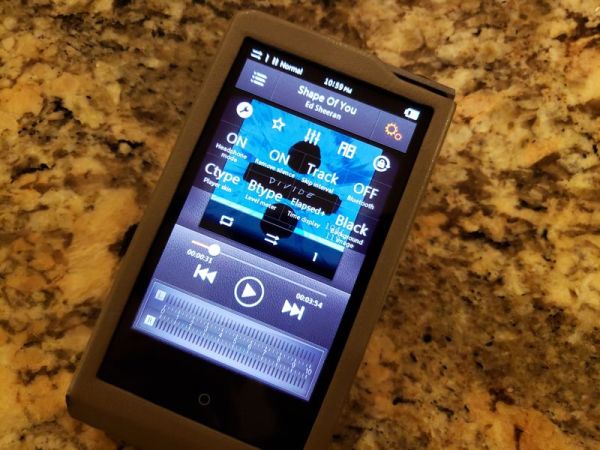
In Setting you have access to select a specific JetEffect preset or to modify your own user preset, Music setting with many options already described in the shortcut Setting menu above. The only addition here is a DAC filter roll-off where you have a choice of Fast Low-latency and Phase-comp, Slow Low-latency and Phase-comp, and Non-oversampling. Display setting has a selection of Language, Brightness, and User Presets (from 4 to 16), and option to show the song change. Timer for a sleep timer, auto off, auto display off, and to set the actual time in notification bar. Bluetooth with all the controls for a wireless pair up.


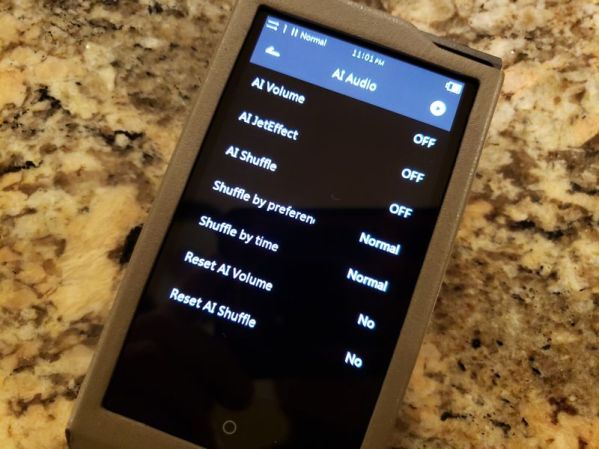
AI Audio with AI volume, JetEffect, shuffle, and shuffle and reset AI options. System setting with selection of Hearing Protection (volume limiter which can be enabled/disabled now), multi-function button assignment (music play screen, browser, settings, or volume), button lock, lock screen (on/off), Multi wheel, L/R Balance, LED (on/off), USB mode (MSC or MSC/DAC), usb DAC power (from PC/smartphone or internal battery), optical output on/off, database update, loading defaults, formatting internal memory, and Info.
AI Audio was already introduced in P2 and PL update, and here are more details about it:
AI Volume – enabling this feature makes the volume between the tracks remain at the same level. Some might have noticed that different audio tracks have variation in loudness, and this AI Volume feature normalizes the levels. But it doesn’t normalize the tracks by compressing them, like it’s done in WM1Z which I personally don’t like. Instead, it’s done in a very transparent way without ruining the dynamics.
AI JetEffect – enabling this feature randomizes JetEffect presets, which I think is done based on the ID tag of the song genre. I wasn’t too crazy about this feature since JetEffect can really alter the sound, while I prefer to be in control of this setting. It’s a fun feature, but if you decide to enable it, make sure to select AI Volume as well because some of the JetEffect presets can really change the volume. When both AI Volume and AI JetEffect are enabled, volume variation is down to a minimum.
AI Shuffle – I’m still trying to figure out how it differs from a regular shuffle, when enabled. It does come with additional settings, where you have Shuffle by Preference (normal, high, and reverse) and Shuffle by Time (normal and high). In my opinion, AI Shuffle is just an enhanced version of a regular Shuffle Play where you have additional controls, such as Preference and Time.
In my opinion, JetEffect 7 DSP effects is the crown jewel of Plenue DAPs. You get a total of 66 presets with 50 pre-defined ones and 16 user-defined. Furthermore, you have access to 10 Band semi-Parametric EQ where each band has 3 selectable values: 63/76/92, 112/135/164, 200/240/290, 350/430/520, 620/750/910, 1.1k/1.3k/1.6k, 2k/2.4k/2.9k, 3.5k/4.2k/5.1k, 6.2k/7.5k/9k, 10.9k/13.2k/16k. You can adjust every band by +/- 12 steps and select bandwidth (Q) of each frequency as normal, wide, or narrow – turning this EQ into semi-Parametric EQ.
Next you have BBE+ effects with BBE exciter/enhancer in 10step adjustment, Mach3Bass 10step bass adjustment, 3D Surround 10step adjustment, and MP on/off harmonic-compression restoration effect. There is also Chorus effect which you adjust in 10steps and can select between 3 chorus, 2 unison, and 3 flange types, and Reverb effect adjustable in 10steps where you can select Chamber, Room, Club, Hall, Auditorium, Cathedral, Stadium, Canyon, or Long reverb types.
JetEffect DSP effects of Plenue DAPs is a great tool if you like to tweak the sound, if you want to fine tune the performance, and if you need a powerful EQ adjustment.


Page 4 – Sound analysis, and Comparison.
Page 5 – Pair up, Other Connections, and Conclusion.

 Twister6 Reviews
Hi
You mentioned the Opus#1 in the review. When I go to the “The Bit” website, there hasn’t been and firmware updates for about 18 months. Are they still trading?
LikeLike
Opus#1 is a history, I mentioned Opus#1s in hte review 😉 But yeah, still an old product thus no fw updates. And, true, they haven’t released anything new in a while.
LikeLike
Thank you for the excellent review. I bought the original Plenue R based on your recommendation. I really like that player it has some firmware issues and the Bluetooth was nonexistent. But the sound was amazing and music was easy to load on the micro card. However I use a lot of Hi-Res files. They say you can use a 252 GB micro card. I found that not to be the case it really only takes a 128. That’s just not enough space if you use a lot of Hi-Res files. So again based on your recommendation I decided to go with the I Basso DX 160. After reading this review I think I made the right decision. The 160 has weak Bluetooth and you have to be sitting right on top of a Wi-Fi spot for the Wi-Fi to work. However the sound is absolutely amazing better than the Plenue R. So I was really curious when I heard the R2 was coming out if that would be worth the extra investment. The main thing I notice is that the memory capacity for the micro card is not changed. So it even if it really does take a 252 card in the I Basso I’m using a 512 GB card with no problems. And while I actually use my streaming more with my LG style 5 which has great sound by the way. It’s nice to have the option with the I Basso and if the sound is just the same and the price is $150 cheaper. I think the I Basso is a no-brainer. Thanks again for the great review.
LikeLike
What brand of micro SD cards are you using? Typically Sandisk is my go to since it works universally with any DAP. Also, did you format it fat32? I read many comments on head-fi and many do use 256GB cards with Plenu daps, some even 400GB. I think the issue with Cowon is that you can browse higher capacity cards by folder, but something in their fw prevents it from indexing higher capacity (indexed when you search by artist, genre, etc). But either way, there are SO MANY choices now in mid-fi DAP market sector, glad you found what you like. DX160 is one excellent DAP as well!!!
LikeLike
Thank you for your reply. Yes I was using Sandisk a 256GB card. The first one worked great. The next couple had a lot of problems. Some things would load some things some would not. So then I tried some other 256 GB micro cards. The exact same thing happen. No I did not do that formatting to fat 32. I’m not sure how to do that. So I tried to contact Cowon. I never heard back from them. So then I contacted the seller. Jet audio I think. They told me to use a 128 GB card. Once I did that I never had a problem. So I think the issue is I need to do that formatting and I’m not sure how. In any case I’m really happy with the DX 160. I recently picked up the Noble Falcon wireless. Best sound I think I have heard out of a wireless headphone. Sounds really good from a LG phone sounds way better with the DX 160. it doesn’t even work with the R hopefully the R2 has better Bluetooth.
LikeLike
Don’t know if it will help, http://www.ridgecrop.demon.co.uk/index.htm?guiformat.htm
LikeLike
Which one do you think is better with the R2 or the P2 Mark 1.
LikeLike
I heard you can get original P2 at a killer pricing now, the same price as R2. So, if pricing is the same, I would go for P2. Otherwise, R2 is really good!
LikeLike
Great review as always , I have been using a good old Plenue D and an AP80 since quiet some time. Looking for an upgrade. I am confused after sleepless nights comparing R2, P2, DX 160 and Dethonray DTR1 ( or anything other better brand model if m missing) I don’t care much about streaming. I am looking for a dap with the best sq. I am sucker for Soundstage, imaging and details. Your help would be much appreciated. Keep up the good work.
LikeLike
the key words you just said “not much streaming, best SQ, soundstage/imaging, and details” – that spells out DX160 🙂 Though you can also stream with it, and Mango app has a killer regular EQ and parametric EQ.
LikeLike
DX 160 has better sq than DTR 1?? Are there any other options that I shud take a look at, if I stretch my budget a bit?
LikeLike
This is not a simple comparison. Dtr1 has a great sound but it will depend which iem or headphones. If it hisses really badly with half of my iems and can’t be used without iematch, but it can drive better some other demanding headphones, how do really do a true a/b comparison? Dtr1 has a great sound, but it will dependent on pair up and if you can tolerate its button clicking for navigation instead of touch screen. If you can stretch your budget, my favorites are LPGT and N6ii w/E02. But we are talking about much higher pricing.
LikeLike
What I liked about DTR is how simple and basic it looks . But the hiss issue might create a serious problem for me cuz I use a wide variety of chi-fi iem’s at the moment. As much as like the looks and old boxy feel of DTR 1, I won’t get a dap just based on that. Sq is my first and most important preference. Battery is the next but I’m willing to sacrifice a bit on that part (coming from plenue d) and focus only on sound. My budget is 600$ and I usually listen to a lotta fast music like metal and sometimes even jazz, ambient, ost. So detailing, separation and Soundstage is a must. LPGT and N6ii is sitting on a place where I can’t reach now 😔 I really enjoyed reading your N6ii review of both the dap and the module. Thankyou for your reply. It really helps a newbie like me and I have to say, your reviews are the best among all the others on internet.
LikeLike
I can sacrifice my love for old school buttons and designs for better sound. If it gives me great sound, I don’t mind touch screen or streaming or less battery life ( hoping I would atleast get 10hrs lol, is that too much to ask?) so going forward beyond all the look and features and functions, what is the best available option in my budget?
LikeLike
I would go with dx160
LikeLike
Vruksha I am also a regular reader of these columns. And I corresponded with him a few months ago. You can read my post. I think you would be happy with the I Basso DX 160. It’s definitely not perfect. But I think it’s going to give you everything you want detailing, separation and soundstage are all done extremely well. There are some minor problems I have the screen seems to freeze up quite a bit but it seems to restart right away. You mentioned battery life the battery life is just okay. It says 10 hours I don’t think you’re really going to get 10 hours, however it charges quickly once you get down to about 25% of battery left recharge it within an hour your back 100%. The touchscreen is very sensitive. So you have to be a little careful with the Mango player as your scrolling through the albums if you accidentally touch it it pops right up. More importantly the Bluetooth and Wi-Fi are not very strong the Wi-Fi you have to be right on top of a signal and the Bluetooth you basically get about 5 feet no more than 10. You even have trouble if you put in your pocket with trying to stay connected. However these are all minor quibbles I think what you’re looking for you’re going to get it at $400 you can use the extra 200 to put into some new IEM’s.
LikeLike
Thanks Raymond! That really helps 👍
LikeLike
Thanks twister6.
LikeLike
Where did you get the lighter coloured case? The only one I see on Amazon is the darker coloured one.
LikeLike
i think it is the same color as original R case… Cowon sent it to me, and I thought it was the only case they sell for R2. Maybe the picture on Amazon is incorrect?
LikeLike
I read your reviews with great interest. Now I am facing a dilemma of choice. Cowon Plenue R2, P2 or M2. Which one would you choose from these three players?
LikeLike
tried to reply a few times, keeps crashing, so not sure if the previous reply showed up… don’t want to retype everything, but M2 is ancient and discontinued, P2 is very old and most likely discontinued as well. They might be selling R2 new, but if you can find Plenue 2 used for a price cheaper than R2, go for it. Though, keep in mind, it is so old, still uses micro usb port/cable.
LikeLike