
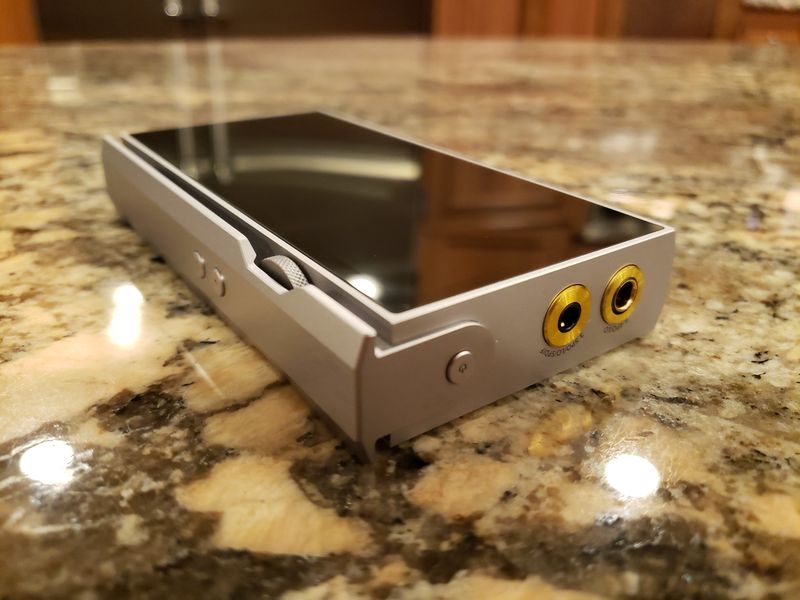
Under the hood.
I usually start this section by mentioning the DAC model, but P6 doesn’t use traditional AKM or ESS Delta Sigma DAC chips and instead has a discrete R-2R resistor array DAC. It literally uses hundreds of high-precision 0.01% tolerance resistors to form the array for Digital to Analog conversion instead of using off-the-shelf DAC chips. Assuming the use of some internal FPGA processor, P6 supports sample rates up to PCM: 24bit 384kHz, DSD: 11.2896MHz (DSD256), and lossy and lossless audio formats: APE, AAC, ALAC, FLAC, WAV, MP3, WMA, DFF, DSF, AIFF, and SACD-ISO.


Another interesting part of the design is a proprietary in-house developed lossless volume control system based on electronic relay arrays, consisting of resistors and switches. With a total of 60 volume steps, when setting volume below 55, the loudness increments 0.5-0.8dB per step. When setting volume above 55, the loudness increments 2dB per step. This exponential volume control is designed to work both with sensitive iems and harder to drive headphones, though with some very sensitive IEMs (like Campfire) I noticed a slight jump going from 8 to 9, while the rest of the volume adjustment was smooth.

Other noticeable highlights of the design spec are the internal storage being 64GB (24bit ECC FLASH) and storage expansion up to 512GB using microSD card. Lithium 4000mAh capacity battery with a playback time of 14-15hrs, as tested. It also functions as USB DAC. Plus, Bluetooth 5.0 which only works as Receiver, meaning you can’t pair up external headphones but you can use P6 as Wireless DAC/amp paired up with your smartphone, tablet, or any other source with BT. And it supports all the popular codecs, such as LDAC, aptX, aptX HD, AAC, and SBC.
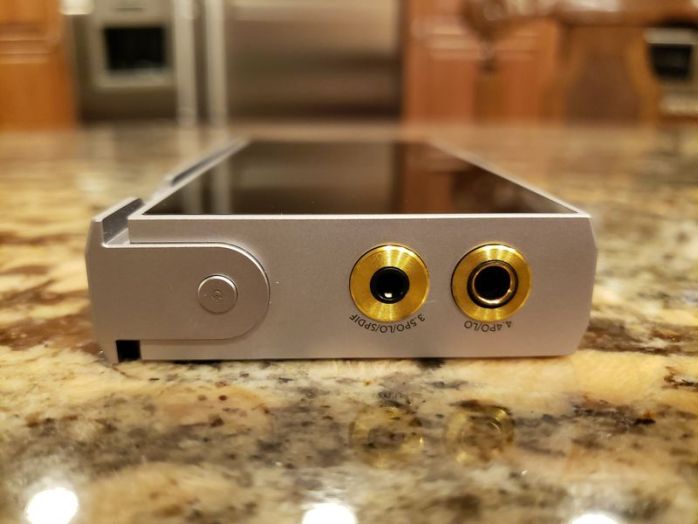
As far as the amplifier section of the design, I don’t know the exact details, but both outputs have a very impressive spec and can drive IEMs and headphones 8-300ohm. 3.5mm Single Ended output is multi-functional with PO/LO/SPDIF, had 0.2ohm output impedance, 2.45Vrms (High Gain) and 1.55Vrms (Low Gain), and loaded output power of 180mW @32ohm, 20mW @300ohm. While high power 4.4mm Balanced output is PO/LO selectable, has 0.4ohm output impedance, 4.9Vrms (High Gain) and 3.1Vrms (Low Gain), and loaded output power of 700mW @32ohm, 80mW @300ohm.
OS / GUI.
P6 features Unix based minimalistic non-touch operating system with a relative fast boot up and shutdown, within 3-4 seconds. By default, the navigation is assigned to volume wheel for fast scrolling and controls with Enter/Return keys underneath. But you also have the option to navigated with media control keys (Next/Prev/Play) or both. This is important to know because due to lack of touch screen, using volume wheel is fast and convenient for navigation but you can only adjust the volume when in Playback screen. So, when you are browsing menus and settings and need to change the volume between the songs or between headphones, you won’t be able to do that until you switch back to Playback screen. Or, when you power up the DAP and it takes you to the main default Explorer window, you have to start playing the song before you can change the volume, and good luck if you were using full size headphones and switched to sensitive IEMs. Thus, I selected to use Media keys for navigation.
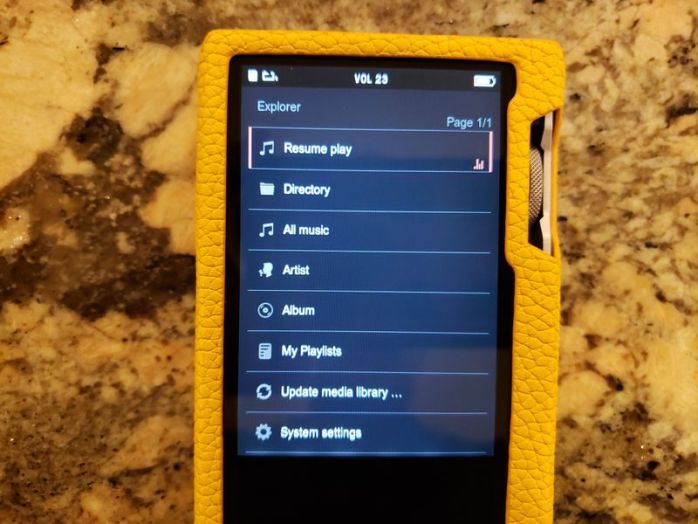
In the main explorer window, you have a choice of Now Playing, Browse by Directory, All Music, Artist, Album, access my Playlist, scan to Update media library or enter System setting. Now Playing takes you to the main Playback screen where you have analog L/R meter at the top, bit depth and sampling rate displayed in the middle, along with gain and EQ preset, and a small thumbnail of embedded artwork along with a song/artist name, track playback time, and file type. If you are used to a touch screen, it takes a little while to get used to button controls because it is very tempting to tap the display. Also, in a Playback screen, pressing and holding Enter key on the right brings up Add to Playlist, Delete, and Exit pop up menu. The same when you are browsing songs, Press and hold of Enter key brings up Add to Playlist option.

In System Setting you have Play Setting with Play Mode (repeat, sequence, repeat all, shuffle) and Folder Skip (on/off), Equalizer where you can ONLY select presets (normal, rock, pop, classic, bass, jazz), Audio Output setting (Gain low/high, Headphone interface SE or BAL, Digital filter with NOS or fast/slow/low latency, Output phase 0/180deg, DSD decoder native or to PCM mode, DoP over SPDIF, SPDIF out on/off, Sound style for custom audio profiles), and Bluetooth setting just to turn it on/off or to clear previous pairing record.


Also, from System setting you can access Advanced setting with Display setting (light time and brightness), Language (English is a 2nd option down if you mess something up), idle Auto Shutdown (from 5 to 30min and to disable), Sleep timer, Key setting (key lock on screen off and Menu navigation key settings), USB connection mode (data or usb DAC), USB audio delay (long or short), USB power supply (to draw power from the host or internal battery when connected as USB DAC), Format Device, and Reset to Default settings. And the last option in System settings is System info with info such as dap model name, fw version and date, S/N, and internal and external storage used/total memory.
Also, at the top of the display you always have a visible notification bar where you can find in the left corner an icon indicating playback status and playback mode, volume level in the middle, and battery icon in the right corner.
I know I said this is minimalistic non-touch OS, but the amount of settings and config options is still very impressive.


Page 3 – Sound Analysis and Comparison.
Page 4 – Pair up, Wired/wireless connections, and Conclusion.

 Twister6 Reviews
Excellent review. I have the P6 and find it to be an amazing sounding DAP with both the Odin IEMS and Meze Empyrean headphones.
I have only used the micro SD card which I loaded directly from my Mac. I have never added music to the card or internal storage directly. To add music to the internal storage do you just drag and drop the music into the P6 when connected to the laptop?
Thanks for your detailed and spot on review. I thoroughly enjoyed it.
LikeLike
Yes, when you connect it to your computer, it becomes visible like external storage drive where you can drag and drop the songs.
LikeLike
Thank you. I was curious as to what small/desktop amp is a good pairing with the P6 and Empyrean headphones in your opinion?
LikeLike
sorry, don’t have too many desktop amps, I’m more into portable setup. Romi Audio BX2 I mentioned in the review is a great little portable amp,.
LikeLike
Thanks for the suggestion for a portable amp to pair with the P6 and Empyrean. I’ll look into it.
LikeLike
Another amp connection question. I got the iFi Zen Can amp and I am clearly doing something wrong. I am connection the P6 3.5mm with RCA cables to the input on the Zen Can. What setting should I change in the P6 for it to send music through the amp?
LikeLike
System setting, audio output setting, SPDIF out -> On. And make sure you are using coax cable with 3.5mm plug that has 4 rings
LikeLike
I have Audioquest Evergreen 3.5mm and RCA interconnect cables. The 3.5mm has 2 rings on it. How does this differ from one with 4 rings on the plug? Sorry for a stupid question. Will this cable not work with the P6 to amp?
LikeLike
Needs 4 rings 3.5mm plug, that’s how the jack is designed because it is combined between audio and digital outputs.
LikeLike
https://extreme-audio-usa.myshopify.com/products/extreme-audio-3-5mm-stereo-4-pole-to-rca-digital-coaxial-audio-connection-cable-for-fiio-x3-2nd-generation-fiio-x5-2nd-generation-and-fiio-x7-6ft this is the cable I’m using, but you can probably find a cheaper one, though this one is good quality.
LikeLike
Thank you for the information and the link for the correct cable I need. Will get one ordered so I can try out my amp.
I appreciate all of your help with this!
LikeLike
Sorry for another question. The Zen Can needs 2 RCA input connectors and the P6 needs one 3.5mm. The link you sent has only one connector for the amp. Are there 2 RCA cable connectors that have the 3.5mm with 4 rings?
LikeLike
Here is an example of the type of cable I need to connect the P6 to the Zen Can amp. Would this work?
https://extreme-audio-usa.myshopify.com/products/extreme-audio-premium-quality-gold-plated-3-5mm-stereo-to-rca-audio-connection-cable-for-high-resolution-audio-players-headphone-amps-smartphones-wireless-headphones-and-tv
LikeLike
Sorry, I totally misread your question. I saw iFi and assumed you were talking about their DAC/amp where you need a digital SPDIF input, but this is amplifier where you need a dual RCA audio input. Dual RCA connection is for amplifier input, the output of P6 internal R-2R DAC will go to 3.5mm Line Out (selected from System settings, Audio output setting, Headphone interface mode, Line output. And if you have headphone already plugged in when selecting Line Out, unplug and plug it again, it will pop up with a message to confirm Line Out) and instead of internal amplifier you will connect to external amplifier. That is audio output, not digital SPDIF output, thus you should be able to use the cable above. I’m using this cable https://www.audioquest.com/cables/analog-interconnects/bridges-falls-series/evergreen with external XI Audio Broadway amplifier and P6 and it works perfectly. But AQ Evergreen is the same as the Extreme audio cable above, just that AQ will be higher quality copper and better shielding.
LikeLike
Perfect. Thank you for that help. I was looking at the Audio Broadway as it is a nice small size. What headphone jack is needed to connect with the output of that amp? Does it take a 4.4mm balanced or something different?
LikeLike
There are 2 versions, Broadway S (single ended, 6.3mm, so you can use with 3.5mm adapter) and Broadway with balanced 4.4mm, but it has too much power for iems. Great thing about this DAP is that it runs on batteries. But Romi Audio Bx2+ is even better, the one I mentioned in my P6 review.
LikeLike
The Romi Audio BX2+ looks great however I don’t think it is available in the States.
LikeLike
“Equalizer where you can ONLY select presets (normal, rock, pop, classic, bass, jazz)”
That is a shame. I’ve been on a kick with AutoEQ measurements and tweaking my IEMs. For some, it’s made a huge difference. Have the PAW 6000 and thinking about upgrading, but feel like the LPGT is too similar (and I wish their PEQ had more range for Q). I really don’t want to buy a high end Android player, but using something like UAPP would certainly give one a lot of EQ power.
Maybe the P6 Pro will get the option for custom EQ? Looking forward to your post on that one, you do great work!
LikeLike
It doesn’t, P6 Pro has identical GUI/OS just wit a touch screen. I should have the review very soon, just too overload with personal stuff now. Many manufacturers believe that a true audiophile source doesn’t need to be tweaked since EQ introduces distortion and other artifacts. Others, like Lotoo have a very high quality Parametric EQ or if you want sound shaping, Hiby app and small hiby OS daps have MSEB or another option is Cowon with their JetEffects. Keep in mind, P6 and P6 Pro have Bluetooth Rx mode, you can pair it up with your phone to use as a high-res LDAC wireless R-2R DAC/amp and do all your sound tweaking on the phone. With L&P, LP6 has a custom EQ, but not P6 or P6 Pro.
LikeLike
I have been in the ‘no EQ’ camp for a long time. Finding professionally (or pseudo-professionally) derived PEQ settings for specific IEMs has changed my mind though. My Rai Penta were okay before EQ, but wow what a difference after EQ. My VE8 on the other hand, I like with no EQ.
That said, I’m still interested in the P6 Pro. Maybe the ideal setup is a cheaper Android DAP for streaming and tweaking, and something like the P6 or LPGT for my owned music collection.
Great point about Bluetooth Rx, although as an iPhone user I think I may be capped with codecs.
Hope you’re doing well Twister, love all your content!
LikeLike
Any information and Ra c cu IEM 182 ohms by oBravo, I heard bad and good reports about it, and that confuses me, don’t know what to believe, However, I own one pair of oBravo iem, eamt 1c and I love it, and it makes me believe that it’s Ra c cu iem it could be better than what I have and I am attempting to get it, please let me know what you know. Thank you
LikeLike
Just replied to your other question after DX300 review. Just search on my site, I have reviewed RA C Cu years ago. They just released RA 21 updated 2021 version. Will try to get a sample from Phil as soon as I’m done with other reviews. And usually reports vary because people look at RA C Cu price and expect a lot more. oBravo doesn’t buy off-the-shelf parts, they design and manufacturer their own drivers, and sell these high end RA C Cu models in low quantities. Thus, cost is high because R&D and Manufacturing is very expensive.
LikeLike