
Design and under the hood.
While RU6 was born in parallel with Cayin’s R01 card for N6ii, I have a feeling RU7 story began in a similar way around the time when they were working on N7. So, Cayin decided to scale down and pack a discrete 1-bit DSD DAC into a small dongle for a portable use with iOS, iPad OS, macOS, Windows 7/8/10, Android mobile and tablets, and DAP devices. Just please, keep in mind that we are not talking about scaling down the whole N7 DAP into a dongle, but rather its essential fully balanced resistor network discrete 1-bit DSD DAC.
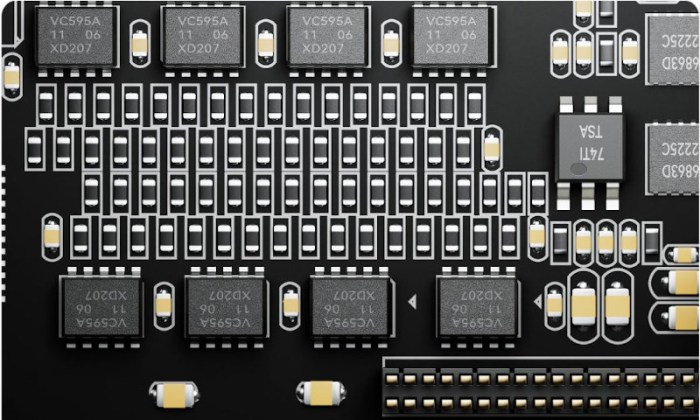
After its announcement, both during N7 and RU7 introduction, I read many questions, including if it is the same or more advanced than R-2R. It is certainly not the same, and has its own unique design architecture with 128 pcs (4-ch x 32 pcs) high precision (±0.1%) low TCR (25ppm/℃ temperature coefficient of resistance) Thin Film Resistors. One noticeable advantage of 1-bit DSD DAC is being able to tolerate a resistor value deviation which is not going to cause a non-linear distortion like it would in R-2R. This becomes helpful in sourcing and matching RU7 resistors. Also, with so many resistors, to minimize the interference, Cayin utilized 2 multi-layered printed circuit boards to separate analog and digital circuits.
RU7 vs RU6:


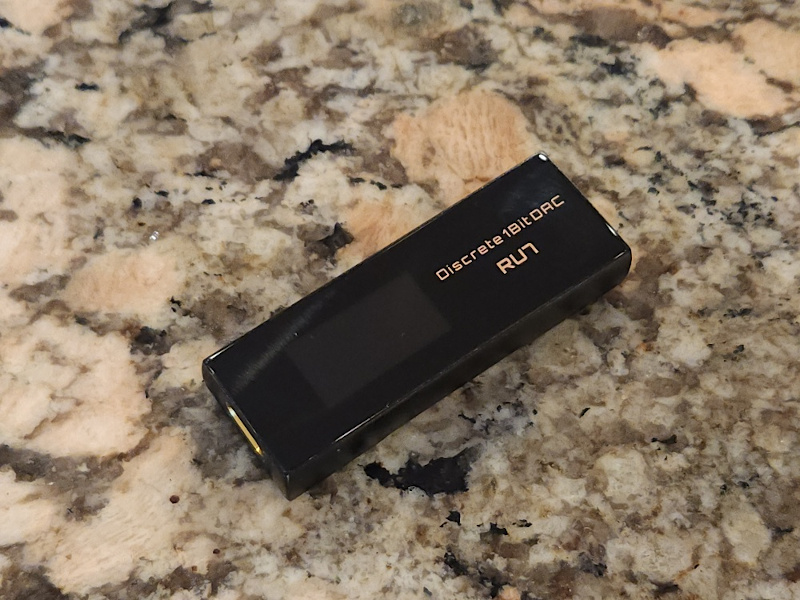
It’s hard to believe how much they stuffed into its CNC aluminum chassis being only 66mm x 24mm x 12mm and weighting only 25g. And, btw, these dimensions are even smaller than RU6. Externally, one end of the device has usb-c port and the other end has 3.5mm TRS single ended and 4.4mm TRRRS balanced outputs. You will also find 3 multi-function buttons, Volume +/- and Mode. In RU7 design, volume buttons are a little longer and grouped together, though it doesn’t matter when inside the case, and a smaller Mode button is next to it. All 3 have a nice tactile response, no rattling, and feel solid with a click when pressed.


On the front of RU7 you will find 0.96” (128 x 64) OLED multi-line screen display to view playback info, such as sampling rate, volume level, gain setting, and PO or LO mode. Wish a selected DSD format would have been displayed as well, but there is so much you can fit in there. Long pressing Mode button takes you into Settings menu where you short press Mode again to step through settings and use Volume +/- buttons to change Gain (high/low), All to DSD (selecting 64, 128, or 256) format, PO or LO output, and Screen Backlight timeout (from 10s to 60s or always on) until you press Mode button again to turn on/off the display.


RU7 doesn’t feature EQ presets or other extra functionality like filters found in some other dongles, making its Setting menu simpler. But, as I will talk about it in Sound analysis, a selection of DSD format does affect the tuning. Also, LO availability (SE 1.2Vrms or BAL 2.4Vrms fixed voltage output) is very unique to any USB DAC dongle.
So, in the heart of RU7 you will find a fully balanced 4-ch discrete resistor 1-bit direct DSD DAC. All the incoming digital audio data, PCM up to 384kHz, will be processed in USB Audio Bridge and sent to Digital to Digital (D-D) Audio Bridge for upsampling to DSD format, user selectable up to DSD256 (64/128/256). In N7 the incoming DSD data was passed right through, while I still need to confirm about its handling here, keeping in mind that RU7 has limited resources in comparison to a standalone N7 DAP.
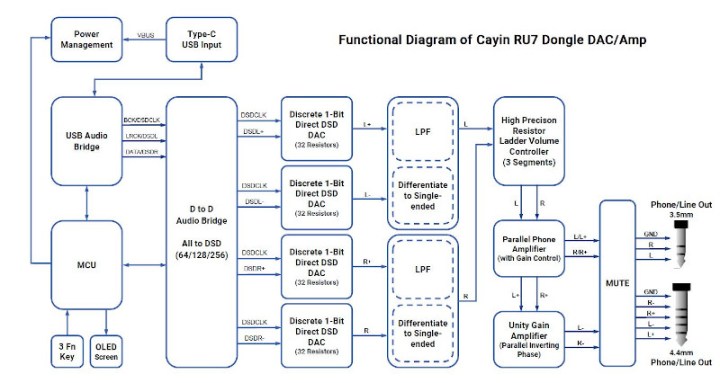
Following the D-D Audio Bridge through a fully balanced discrete path we have 4-ch 1-bit DSD DAC (32 resistors per channel) to process L+/L-/R+/R- separately. The output will go through Low Pass Filter (LPF) and get converted to single ended output (L/R) for Discrete Resistor Volume control developed by Cayin. While having 100-step control similar to RU6, Cayin updated the design to go through only 3 segments of resistors and switching relays. So unlike RU6 where you had 9 segments with a very short audible delay pause (after each segment) to compensate for relay switching pop, here you will only hear it two times while crossing over from 49 to 50 and 79 to 80. Just please keep in mind, for the best sound quality it is recommended to keep digital volume of your source at the max and control the volume from RU7.
The final stage of the design is high power dual phone amplifier for SE output and a second one in parallel as a unity gain inverting phase amp to “convert” it back to BAL output. The output power of 3.5mm SE is 160mW @32ohm (0.5ohm output impedance) and 4.4mm BAL is 400mW @32ohm (1ohm output impedance). For USB dongle, that is a high output power to drive even some of the demanding headphones, though you do need to keep in mind that you are using the external battery from your source, so everything comes at a cost.
And speaking of this “cost”, all-discrete design and DSD upsampling will require more current drawn from your source’s battery since RU7 is just a dongle powered up from the host. It’s not an issue when using RU7 as USB DAC connected to your Windows PC/laptop or MacBook. Also, probably less concern when using with a tablet or iPad due to their larger capacity battery. But with a smartphone there will be a higher drain, especially going up from DSD64 (170mA) to DSD128 (190mA) and DSD256 (230mA) per my measurements. While idling, Cayin RU7 enters a power saving mode which draws only 50mA.
Another thing to be aware of, while Android phones don’t have a limitation of the current draw from the OTG connected device, iPhones do. With most of the IEMs I tested even in high gain and DSD256 I didn’t find any issues, but as you are using more demanding headphones and push the volume higher (in high gain and DSD256), you could hear stuttering using iPhone (only). There are many ways to mitigate this problem. Switching to DSD128 or 64 is one way, using another cable such as ddHiFi MFi07S worked for me as well with ATH-R70x. Or, you can use very compact single piece ddHiFi TC28i Pro (lightning) or TC28C Pro (usb-c) splitter/adapter which allows you to connect the dongle and a separate power charging cable at the same time. The latter solution will prevent your phone (Android or iPhone) from fast battery draining, even on the go since you can use a portable battery pack. But for iPhone I still recommend using MFi07S cable along with TC28i Pro adapter. Unfortunately, this is iPhone-only limitation while using high power external devices.


Page 3 – Sound analysis.
Page 4 – IEMs/Headphones Pair up.
Page 5 – Comparison and Conclusion.

 Twister6 Reviews
I’d love to hear more about the differences between the RU7 and the RU7 paired with the C9.
Thanks!
LikeLike
In general, C9 is a very powerful amp that will color the sound. RU7 by itself has plenty of power for most of the iems and even some harder to drive headphones. Adding C9 will enhance it (more output current, even higher power, choice of solid state and dual NuTube “coloring”) which adds more body to the sound and changes pair up synergy depending on what you are trying to drive. Keep in mind, C9 will hiss with as sensitive iems. So for more sensitive or average iems to keep the sound more transparent and with deeper blacker background, perhaps stick with RU7. But at the end of the day, it is up to you and how you want to refine the sound.
LikeLike
Hi Twister6, Great review, thank you!
With ddHiFi TC28i Pro and mFI07S, were you able to use the iPhone to drive the Cayin RU7 to at least Vol:50, High gain, DSD256?
I am currently using iPhone 11 Max Pro with Cayin RU6 and ddHifi mFI09S. I get stuttering / music cutting out at Vol:55, High gain. With the TC28i Pro, I wonder if it is the phone being charged or the Cayin RU7. Thanks!
LikeLike
Which iems or headphones? Actually, just tried iPhone XS MAX with TC28i Pro, RU7, and Meze Empyrean headphones, RU7 DSD256, volume up to 65, high gain, no stuttering.
LikeLike
Thanks – I was using Fatfreq Maestro Mini on EA CODE23 on the iPhone 11 Max Pro and Cayin RU-6, vol.: 55-65 and high gain. The music would stutter or cut out when the bass kicks in. I reckon its due to the iPhone limitation. I’ll give this a try then.
LikeLike
Thank you for the excellent review of RU 7. Here’s what I wanted to ask you : I have sennheiser i 900 headphones and they are constantly plugging, even in DSD 64 mode after volume level 45. I have already ordered the ddHIFi adapters you mentioned, but I am not sure about the success of the future design. Are the sennheiser such a big load for the iPhone? Perhaps the purchase of a cheap android phone is necessary? I listen to the Qobuz streaming service.
LikeLike
I don’t have IE900 to try it, thus hard to tell. DSD64 at volume 45 shouldn’t give you a problem. Have you tried using RU7 with your laptop, just a sanity check with IE900 without iPhone current limitation problem.
LikeLike
Thanks for the quick response. Yes, I used on windows 11, via Ruun, no problems with either Sennheiser or Audeze LCD 2 in any modes. I also noticed that when streaming higher resolutions the plugging comes faster. Nevertheless, as a person with a long experience of listening to classic high end systems, I recognize the baby RU 7 as an excellent result. But the situation with the iPhone is extremely frustrating, and there are no reviews about it except yours.
LikeLike
Hi, thanks for the nice review ☺️
I read the short comparison with the ru6 (which I own)!
I wonder if switching to ru7 is a valid update, I read that the treble is less brilliant in 7, do you mean that it can be less “”””ringing “”””? I find it hard neither in the instruments nor in the voices with “s” and “c” (like rammstein and ghost) in ru6, although it is quite sharp and it seems to me that ru6 has the voices quite close up too! is ru 7 smoother?
thanks (sorry for the mistakes I use google translate)
LikeLike
Thanks for the extensive review. I just got mine this week and am currently testing it with my various earphones and headphones. While I like what the dac can do, I want to know if during your testing, you encountered occasional short delay/pause during playback, i.e. similar pause to the one would encounter when increasing volume passing the volume segment. For each playback, I would experience 2-3 delays. Just for reference, my files are mostly flac with 24/44.1 or higher resolution and DSD64, and I’m testing the dac using my Mi9. I wonder if this phenomenon would change later on after further burn-in. Your input would be very much appreciated.
LikeLike
Mi9, is that a phone, Android? I assume? What payback app are you using? Does it happen with every app? Have you tried using RU7 with another source, maybe your laptop to see if it happening in there as well?
LikeLike
Yeah, running it from android phones (LG v50 and Xiaomi Mi9) using HiByMusic and UAPP with USB exclusive mode. There are some differences in the audio output, but the pause is there. It may have to do with the USB audio setting. I will play more with them. However, on LG V50 music player, there was no pause, but it is not outputting bit-perfect when it comes to certain files. So, I thought I’d give it more burn-in time since I didn’t do it in the beginning at all. Reading reviews here and there, it seems others have given 70+ burn-in time. On windows, currently it gives pops and clicks sounds like what you’d encounter when playing an LP back in the days (don’t know if turntable still doing that these days since I haven’t used one in aeons) truly analog sound. 😀
Thanks again for your reply. I take it you didn’t experience the pause based on your response.
LikeLike
Okay, I figured out why this happened: DSD mode has to be set to DoP for this device. Though the specs say there’s support for DSD64, 128, and 256, it does not offer native dsd decoding support. Changing the DSD mode in my app to DoP solved this.
LikeLike
Hello, nice review there. Planning to upgrade from dap to dongle. I said upgrade because it seems like it on the ru7. But of course I’m not sure, just an assumption. I’m currently using my old dx160. And the dap is no longer performing well with so many issues, planning to go phone dongle setup. My question would be does my plan make any sense? Or dx160 will still stand superior against ru7 phone setup. Thanks! Appreciate the review and your response if ever.
LikeLike
Well, considering you will be using RU7 with your smartphone, this probably does qualify it as an upgrade over DX160, in both the sound and “system” performance since your smartphone will be faster and more robust running the latest apps.
LikeLike
Hi Twister,
Went to most of your publications here and want to say CONGRATS. Great info with details and comprehensively presented.
Now, regarding the RU7 – I am having the RU6 and love it, also I have the Hiby RS2 and Mojo2. Is it worth getting the RU7 or I’d better save more and got to N7 or DX320?
The dilemma b/n N7 and DX320 is also quite big for me.
Please, advice! I listen mainly rock & metal (Deep Purple, White Snake, WASP, OZZY, Metallica) but I am also a big fan of Pink Floyd, Santana and Moby, Robert Miles. Not too much fan of female vocals like Adele, Agillera, … I value extremely big soundstage replay and balance (fair neutrality) – I hate too much (sub)bass or too much treble, and too forward (in the face) vocals but like clear nuances and details. My favorite ‘modern’ IEMS are Z1R, MMK2, Helios.
Thank you in advance!
LikeLike
Hi,Thanks for the great review. I was wondering if you know if the current iPhones that have a USB-C instead of Lightning connector still have the iPhone current limitation problem. Was that a Lightening-specific issue or is that an Apple issue in general?Thanks in advance!
LikeLike
From all the comments on head-fi in RU7 thread, I have not come across anybody with issues using RU7 with new iPhones. So, let’s assume it works OK?
LikeLike
I have an iPhone 15 with USB-C and haven’t run into the current limitation problem. The problem I do have is rapid battery drain. I’ve ordered a DDHiFi TC28C Pro from AliExpress to solve the problem.
LikeLiked by 1 person
Hi,
Thanks for the reply. Glad to hear you’re not having the current limitation problem with your iPhone 15, but the rapid battery drain is definitely a bummer. Good to know the DDHiFi TC28C Pro offers a solution, but it kind of affects the portability for on-the-go use if you also have to carry around a power bank.
LikeLike
Hi,Thanks for your reply. Glad to hear you’re not having the current limitation problem with your iPhone 15, but the rapid battery drain is a bummer. Good to know the DDHiFI TC28C Pro is a solution, but it kind of affects the portability if you also have to carry around a power bank.
LikeLike