

Under the hood.
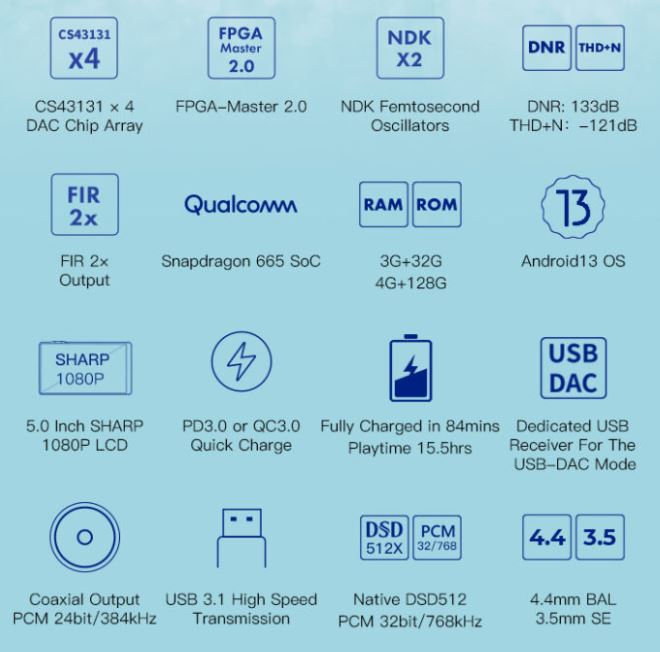
In the heart of the DX180 design iBasso used quad CS43131 DAC chips from Cirrus Logic MasterHiFi series. For the reference, DX170 only used two of these chips. Also, iBasso implemented a fast Qualcomm Snapdragon 665 SoC 8-core processor. Two versions of DX180 will be available, one with 4GB LPDDR4x RAM, 128GB ROM, and the other one with 3GB of RAM/32GB of ROM. The DAP uses optimized Android 13 OS with impressive benchmark scores, matching AnTuTu 3D Benchmark results of other top-performing 660/665-based DAPs. Also, in a relative comparison, DX180 3D benchmark performance is 240% higher than DX170. When it comes to playback, it supports most of the lossy and lossless formats up to 32bit/768kHz and DSD512, including APE, FLAC, WAV, WMA, AAC, ALAC, AIFF, OGG, MP3, MQA, DFF, DSF, and DXD.
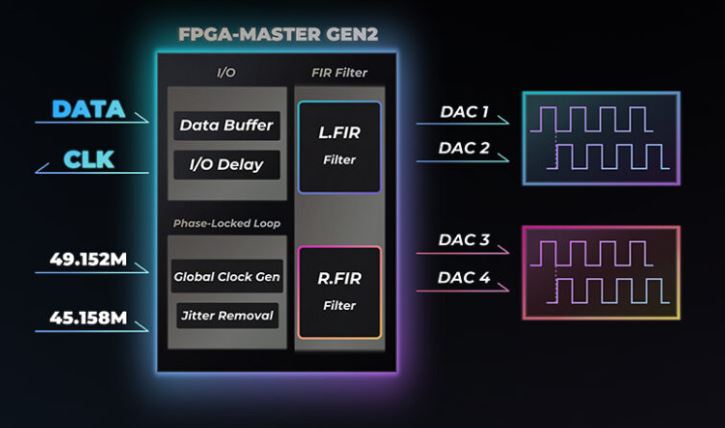
Another highlight of the design is the in-house developed FPGA-Master 2.0, their audio system controller which has been enhanced and updated to Gen2. iBasso spent years developing and perfecting their FPGA-Master code to make it function as an audio system controller to offload SoC processing by directly requesting audio data, as well as syncing and generating all audio clocks to reduce the jitter. The FPGA-Master 2.0 is also able to enhance the performance of quad CS43131 DAC chipsets by being able to run in synchronous parallel output mode or FIR 2x mode. In FIR 2x mode, they implemented a precise control and adjustment of the DAC’s clock and data independently through the “delay parallel” of DACs to form a hardware analog FIR filter.
Furthermore, the DX180 USB-C port supports USB 3.1 standard and also includes a dedicated USB receiver for low latency USB-DAC mode. The Wireless connection is covered by Bluetooth 5.0 with all the popular codecs (SBC, AAC, aptX HD, LDAC) and WiFi 802.11b/g/n/ac. WiFi gives you a choice of dual-band 2.4GHz and 5GHz. I found the WiFi signal performance to be very strong, with the SpeedTest app showing results of 192Mbps DL and 21Mbps UL speed. Not sure if they implemented the same enhanced wifi dual antenna arrangement as in their flagship DX320 model, but DL/UL numbers were even better than on my Galaxy smartphone.
You will also find a 3.8V 3200mAh Li-Po battery which needs about 1.5 hours of charging and yields an excellent playback time, thanks to lower power DAC chips. In my testing from 4.4mm BAL output in low-gain, I was getting a consistent 14.5 hours of playback time, and when I switched to high-gain, I was still able to play from 4.4mm BAL output for 13+ hours. According to iBasso, if you are using Line Out output, which bypasses the internal amp section, you can easily get 30 hours of playback time. I would expect similar if you are using DX180 as a digital source with SPDIF output to drive the external DAC/amp like D16.
One would think that for an entry-level model optimized for better battery performance, the output power will be scaled down. But that was not the case with DX180. Its 4.4mm BAL PO (1.1ohm output impedance) has a max output level of 6Vrms with a max output power of 690mW @32 ohm. The 3.5mm SE PO (0.6ohm output impedance) has a max output level of 3Vrms with a max output power of 281mW @32 ohm. The Line Out of corresponding ports was set to 4Vrms (4.4mm) and 2Vrms (3.5mm). When you read further down, in the Pair-up section of my review, you can see there were no issues with my IEMs, keeping the noise floor dead quiet without any hissing with sensitive monitors, and having enough power to drive demanding headphones with plenty of overhead margins.
GUI.
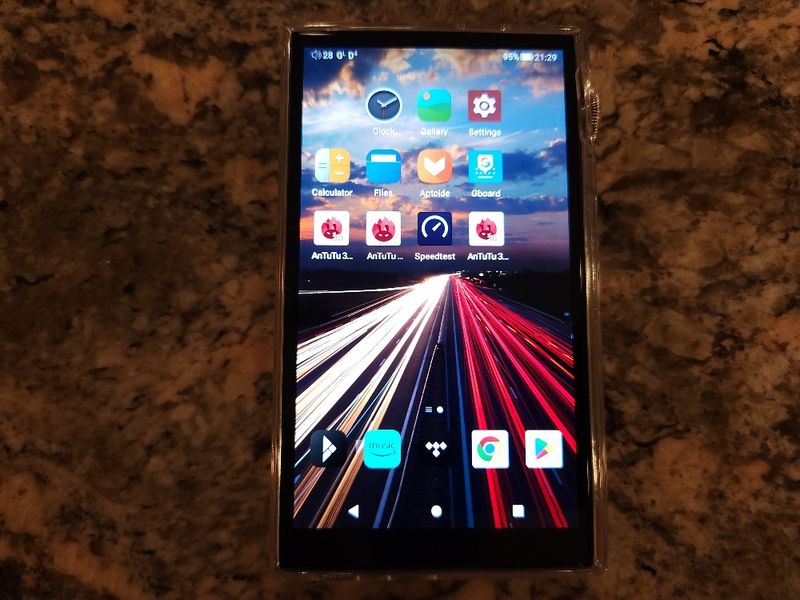
Unlike other upper-end iBasso DAPs, DX180 doesn’t have a dual boot system where you can switch between Android and Mango OS. Here you have Android OS only, and it comes with highly optimized Android 13, bypassing SRC at the system level. As I was writing the review, I had to think for a moment whether Google Play Store was already pre-installed or if I had to side-load it. In previous iBasso DAPs, I usually used the pre-installed APKPure app to get Google Play and then go from there. With DX180, Google Play was already preloaded and ready to go!
I also noticed that DX180 comes with an updated version of the Mango app, v3.7.7. A few things were updated since v3.4.1 which is used in their latest DAPs, and it feels like the interface is smoother and faster. Of course, we are dealing here with 665 SoC and Android 13, thus performance improvement is expected.
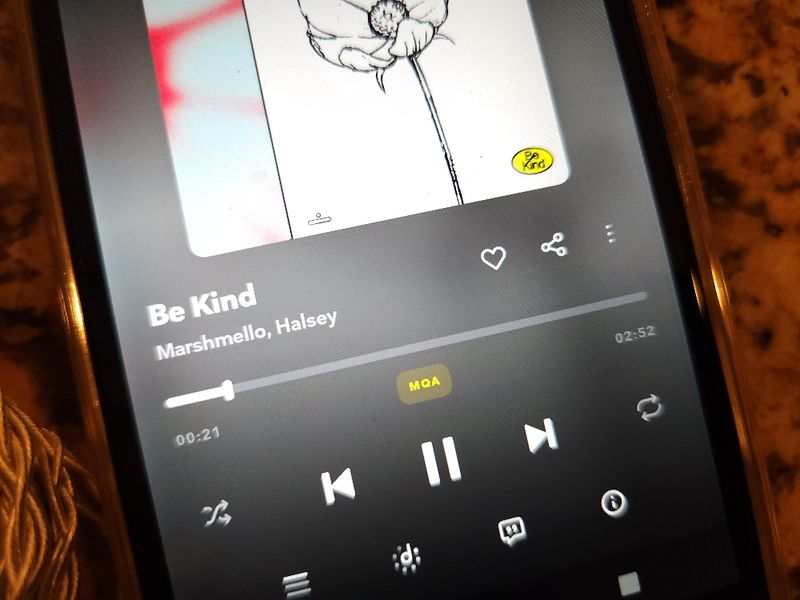
After opening the Mango Android app, the view of the embedded song/album artwork, if one is available, looks very sharp (no pun intended) on the DX180 Sharp 5” display. If embedded artwork is not available, a default image is displayed. The main playback screen has a more logical layout where you swipe the artwork display left/right to skip between the songs, and access song search and file management from a shortcut in the upper left corner and settings from a shortcut in the upper right corner. Another useful feature I appreciate is in the lower right corner of the artwork window where you have a 3-dot shortcut to bring up the Now Playing list of songs to scroll through.


Below the artwork, you have track info (bit/rate/format) and a time scrub bar to advance through the song which you can tap anywhere to skip. Below it, you have a shortcut on the left to provide more detailed info about the song (including adding to the playlist or deleting), and another shortcut on the right to switch between playback modes (play in order, repeat list, shuffle, repeat current song). Play/Pause and Skip next/prev buttons are big enough and located at the bottom.
To access music search and track management, you click on the shortcut with 3 horizontal lines in the upper left corner of the Mango playback screen. From there, you swipe left-to-right to view All Music, or sort by Album, Artist, Genre, Playlist, or Now Playing. You can also select file management from internal or external storage and access song search. Any song you long press will give you an option to Play, Next Play, Add to a playlist, or Delete. You also have a setting (3 vertical dots on the right) to select sorting options for the displayed list. With this latest Mango app update, the navigation takes a minute to get used to, and then you quickly realize it is more logical than in the previous version. Plus, all the way at the bottom you have a small area to see the currently playing song and to control its playback with the play/pause button. Tapping on it takes you back to the main Playback screen.


In the Settings Menu, you have access to Gapless (on/off), Gain (low/high), Play mode (order, loop, shuffle, repeat, folder play), EQ (on/off, brings you to Graphic/Parametric EQ screen), L/R Balance, 2 Digital filters (D1-D5), Media Scan, Unplug Pause, USB DAC, Bluetooth DAC, Display settings, Sleep timer, and System info.


Notification bar swipe down is also helpful where besides the usual WiFi, Bluetooth, Auto-Rotate, and Theme shortcuts, you can also change PO/LO, switch between 5 Digital Filters, change the gain, FIR setting (2x/NOR), and SPDIF turn on/off SPDIF output from 3.5mm port.

EQ.
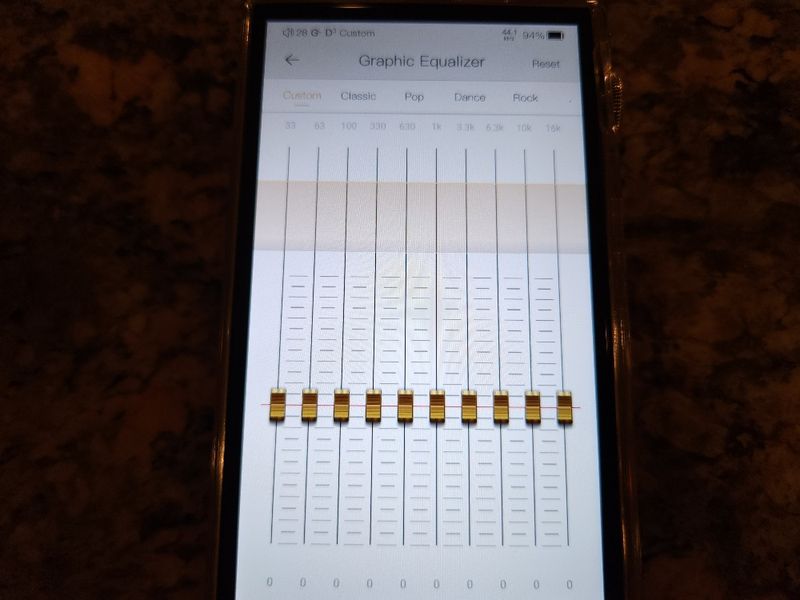
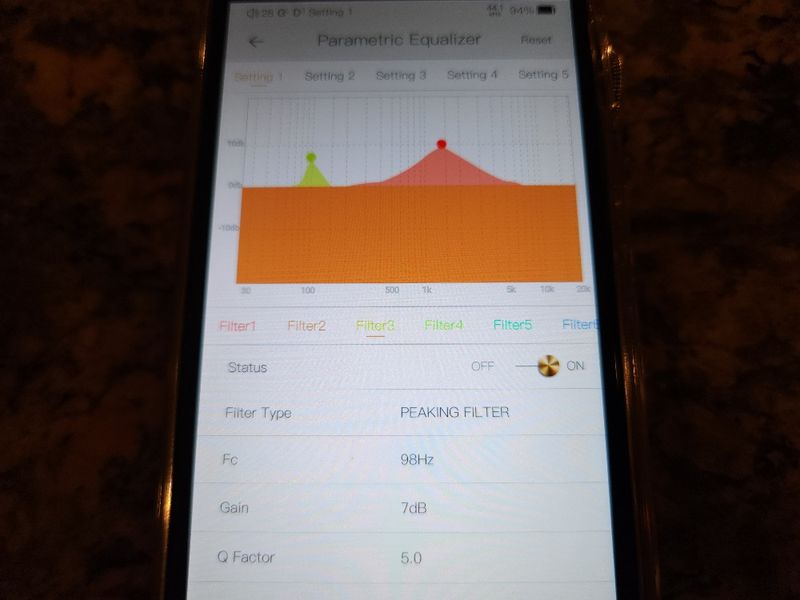
DX180 offers a traditional Graphic EQ (EQ) where frequency bands are fixed, and you only adjust the gain with a slider. You also get Parametric EQ (PEQ) where you have more control over which frequency is being adjusted, the bandwidth of the frequency being adjusted, the type of filter used to adjust the frequency, and of course the gain of the adjustment. This EQ is part of their Mango Android app, not system wide. Here are my observations while testing EQ and PEQ.
Graphic EQ (EQ)
- When enabled, the volume is dropped to create extra headroom for band adjustment (to avoid clipping).
- Relatively clean 10-band EQ adjustment (33, 63, 100, 330, 630, 1k, 3.3k, 6.3k, 10k, 16k frequency bands).
- Whenever you adjust a band, you can see it being shown graphically above the EQ sliders, great visual feedback.
- 5 genre-specific presets are included where each one could be adjusted further and reset to its original state.
Parametric EQ (PEQ)
- Includes 6 custom preset settings.
- When enabled, volume doesn’t drop.
- While adjusting, I didn’t hear any distortion.
- Each preset setting has 8 assignable filters/frequencies to shape the sound where a different color on the screen represents each one.
- Filter types: low pass filter, high pass filter, band pass filter, notch filter, all-pass filter, peaking filter, low shelf filter, high shelf filter. To me, the peaking filter was the most useful.
- Each filter has: Fc (center frequency, from 33 to 16k), Gain (-20 to 20 dB), and Q factor (0.3 to 20) where a smaller Q makes the bandwidth wider, and a bigger Q makes the bandwidth narrower.
- Fc and Gain could also be adjusted on the touch screen by dragging the pointer left/right and up/down.
- The sound is adjusted/updated in real-time as you move the filter peak and frequency.
Page 3 – Sound Analysis and Pair up.
Page 4 – Comparison, Wired/Wireless Connection, and Conclusion.

 Twister6 Reviews
Great review thank you. A lot of times you explain the differences you here between the D filters. Did you notice any? Was D3 your preferred D filter? Did you notice any difference between the FIR filter being normal and X2?
Thank you, Don
LikeLike
The changes are more subtle here. Also, it will depend on which IEMs you are using and how fast its drivers can respond to transient changes of the notes. I just went back and listened again and can summarize it as (though don’t expect that you might hear the same):
D1 (Fast Roll off) – the sound has a faster pace, sounds tighter
D2 (Short Delay, Slow Roll off) – the sound has a more laidback pace, sounds relaxed
D3 (Short Delay, Fast Roll off) – the sound has a more laidback pace, sounds tighter
D4 (Slow Roll off) – the sound is more laidback and has a slightly fuller body
D5 (NOS) – the sound is smoother, less articulate (not as tight), notes have longer attack and decay
FIR NOR vs 2x – 2x has notes tighter, snappier, with a faster transient response of notes on/off
LikeLike
About the EQ In this DAP – It’s not a part of the system / It’s a part of the Mango Player app! In my use case, it’s important!
LikeLike
yes, that is correct, it is not system wide EQ, but rather Mango app based. I have reviewed so many iBasso daps, and they are all the same, so I stopped mentioning it. But it is a good point, and I just added it back in the intro of my EQ section of the review 🙂
LikeLike
Hi, thanks for the review. I saw a review on Head-Fi yesterday of the DX260. It said that it was better in every sonic respect than the Lotoo GPT. I know that you have heard both. Is the DX260 really better than a player 3x its price? Grateful for your thoughts.
LikeLike
Not sure if I got out of that review that 260 is better than LGPT in every aspect. The reviewer was just describing pair up synergy of his favorite iems with a number of different DAPs, talking about his personal sound preference. Depending on how you reading into that, almost makes it sound like $400+ M11s is the same or better than $3.5k+ DX320Max Ti 😀 I only had 260 for a short period of time, and it is a nice warmer tuned analog quality DAP.
LikeLike
Thanks for the very good review. I use the IEM FiiO FA9 on a FiiO Q3 DAC with my iPhone and I am actually satisfied with this combination. Do you think that the FA9 on the iBasso DX180 plays out its potential much better than on the Q3? I’m only concerned with the sound, not the differences in operation.
LikeLike
It would be hard for me to answer this question since I don’t have FiiO products. But in general, FiiO products, especially the low end stuff like q3, are not considered to be of audiophile quality. DX180 performs on a high audiophile level where it can go up to the performance level of many DAPs up to $1k, so I have no doubt it will be an upgrade for you. Besides. it’s a standalone fast android DAP with unlimited access to apps, so you don’t even have to bother with your iphone and external dac/amp.
LikeLike
Great review. Do you consider the dx180 a huge upgrade coming from dx160 soundwise? I still love my dx160 but the ui is sluggish and battery life drains so fast even on standby mode.
LikeLike
I would upgrade it without blinking an eye.
LikeLike
What would be a viable upgrade to the dx180? Currently have the dx180 and n3 ultra.
LikeLike
What do you think of the DX300 in 2024/2025?
Some of them used are going for prices as low as DX180. Both use 4 cirrus dacs, different models though. I wonder if the update in FPGA and Android version makes a noticable sonic difference.
And the 300 having 2 separate batteries for analog and digital, how does that fare against the newer DAPs, in particular their latest DX180.
Is the DX180 just like the DX300 for less than half the price?
Thanks for all the reviews.
LikeLike
Haven’t touched dx300 in a long time, ibasso has new releases every year, multiple times a year. I might have to go through boxes to find it for this comparison. A few things to keep in mind, just because it uses similar dacs the amp design is still different and dx300 has modular design to switch between different amps. But the bigger problem here is aging battery, those won’t be easy to replace unlike in their upcoming dx340 or latest releases. I would be cautious about it. After 3+ yrs, these batteries are not in the best shape.
LikeLike
Thanks for a swift reply.
The 300 has a much higher power output versus 180. Therefore I kinda thought that the 300 should accompany fullsized planar headphones such as Aryas better.
The quality of the battery certainly is an important factor for a used Dx300. If I do find one that is not used much for 400-500 USD. I wonder how it would compare to Dx180.
Please let me know if you are able to run it back with the 300 🙂 There is not much to find about the Dx300 in 2024
LikeLike
and that brings us to another important point. They could sound similar while using easy to drive IEMs, but DX180 will fail to drive more demanding planar headphones (most likely it will) while DX300 won’t have a problem… Planar headphones need current, not just voltage. And some of these dap output power calculations are based on paper using voltage numbers without accounting for the need of a current source to drive planar cans to their full potential. So, yeah, if you find DX300 with “low mileage”, that could be a good deal. Plus, you will be able to upgrade with other amps, like their NuTube amp card.
LikeLike
Hello thanks for the review. If I was going to upgarde my dx180 to something in the below 2k price range. What is a dap you would recommend. Currently considering the se300.
LikeLike
why would you consider an old closed android slow SE300 when iBasso is about to release a new flagship DX340, open android (and dual boot OS switch to pure-audio Unix without android), high power output, fast performance, for around $1700 with a modular amp design and the same discrete DAC as in their D16 dac/amp. DX340 going to be a beast and probably the best upgrade path for you.
LikeLike
Hello;
I follow your articles closely as a music lover. I am torn between Fiio m11 plus or Fiio M23 and Ibasso DX180. I mostly think of integrating it into my own hi-fi system. Of course, it will be used outside as well. The device structure, sound quality and ease of use are also important of course. What is your opinion when compared to these devices in general and as a whole?
Thank you, I wish you good work.
LikeLike
sorry, not familiar with fiio products. Used to review them many years ago, but they only like to deal with reviewers who promote and praise their products, so… Plus, most of my readers never ask me about Fiio DAPs since they are usually not considered to be of a higher audiophile level. As far as DX180 goes, it’s a great little dap with a very impressive price/performance ratio.
LikeLike