

Pro to the Max!
PROS: smooth analog performance of dual ES9039MS Pro flagship DACs, big expanded soundstage, solid build with mesmerizing back panel design, fast Android 12 performance (665 SoC, 6GB RAM, 128GB ROM), MQA 16x, DSD1024 and PCM768kHz support, hi-res 5.9” screen, 3.5mm/4.4mm PO and LO with a powerful BAL output, quality protective case.
CONS: higher price and more weight relative to R6 Pro II.
The product was provided to me free of charge for review purposes in exchange for my honest opinion.
The manufacturer’s website: Hiby. It is available for sale directly or from authorized retailers like Musicteck.
Intro.
Unlike some other manufacturers with only three main DAP models covering the entry, mid-fi, and summit-fi levels, Hiby’s line-up of DAPs expands further in each of these tiers with various models, some even updated annually. It could become a bit overwhelming due to so many choices. However, some might also find it helpful depending on your budget which lets you narrow it down to what you are looking for and decide if you are willing to move up in features and sound quality to the next model for a reasonable upgrade fee. At least that’s how I interpret their current DAP products portfolio.
I also have to admit that in the last few years, I have focused more on Hiby’s flagship DAPs and missed some of their lower-tier releases. But it was hard to miss hearing about their R6 Pro II from two years ago which received a lot of positive feedback even from those audiophiles who only focus on top flagship gear. I didn’t get a chance to test the R6 Pro II, but when Hiby recently announced the new model in the R6 Pro series, the R6 Pro Max, my curiosity got the best of me and I decided to check it out. In addition to it, I also got a chance to borrow the original R6 Pro II for comparison.
After spending a month testing this latest Hiby DAP, I would like to share what I have found with my readers.
Unboxing and Accessories.
Pro Max arrived in a nice compact box with cover art on the packaging sleeve reminding you of the wavy design of the Pro II release. The cover of the box also had a stamped wave artwork to continue with the same theme. Under the cover, surrounded by a secure foam cutout, in addition to Pro Max, you will also find a quality usb-c to usb-c cable, usb-c to usb-A adapter, extra screen protectors, a quick start guide, warranty card, and a sturdy elegant pleather case. The cable has a heavy-duty construction with thicker wires (by appearance) to handle 40W PD3.1 fast charging, and I was happy Hiby didn’t forget that some people still use older chargers with full-size usb-A output thus providing the adapter.


I always recommend using a protective case with a DAP to enhance the grip, though it’s a shame to hide the Pro Max design under the cover. Pro II was thinner and lighter, so you can argue about keeping it naked, but the thicker and heavier design of Pro Max would benefit from the protective case. I was glad the case didn’t hide the split dual-side slanted curves of the Pro Max, actually highlighting it along the back stitching. The DAP slides in from the top, fitting in securely, and has all the top and bottom ports and side buttons open for easy access. Only the microSD port on the left side was covered, requiring a removal of the case to physically access it.


Design.
Pro Max is 147.5mm x 75.2mm x 21.8mm and weighs 425g, being 140g heavier and almost 7mm thicker than Pro II. One of the main contributing factors to the additional weight and thickness has to be due to a bigger battery, going from 5000mAh to 8200mAh, and titanium-aluminum chassis vs aluminum-only Pro II. The rest remained nearly identical, including the location of all the ports, buttons, the same display size, back panel design, and width/height dimensions, so Pro II users will be very familiar with it.
As already mentioned, according to Hiby, Pro Max stepped up from a Pro II aluminum-only chassis to a more premium titanium-aluminum material. However, the design of the back panel remained the same, using an aluminum panel with mesmerizing splashy 3D-effect waves at the bottom half of it. Then, a sliver of the shiny edge of the “shore” on the right side in the middle and a carbon fiber “sky” above it with both under the glass piece. Plus, the upper left and lower right slanted edges have signature split curves, making it especially comfortable for left-hand use. Furthermore, Pro Max is available in black or baby-blue color finishes.


The focus of the Pro Max front design is around a gorgeous 5.9” IPS 1080p HD display, the same as in Pro II and R8ii. The glass screen (the latest Corning Gorilla glass, oleophobic coated) covers edge-to-edge from top to bottom and side to side. It looks like a screen protector was already applied, and you get some extras. The touch screen supports multi-finger gestures and double-taps to wake the sensor.
While it is a basic rectangular shape DAP with a glass touch screen occupying the front, the custom back panel that wraps around the sides adds unique design touches to this audio player. Nothing is at the top, just a flat metal surface. On the right side, you will find a combined up/down single volume button with a tactile click response, a separate power button above it, and a multi-function status LED above it. The left side has a spring-loaded micro-SD card slot (up to 2TB), followed by a separate skip forward button below it, and a combined play and skip back single button. I realized that the left and right sides have symmetrical button layouts, but I was a bit confused with playback controls on the left side. Typically, you have 3 separate buttons with Play in the middle and Skip buttons above and below it. The confusion came from having a separate skip forward button and combined play and skip back below it. I got used to it after a short while but still was constantly reminded as I was switching between different DAPs. I guess we are creatures of habit.
At the bottom, you have 4.4mm BAL (4.72Vrms, 697mW @32ohm) and 3.5mm SE (2.39Vrms, 179mW @32ohm) headphone ports to the right, and 4.4mm BAL and 3.5mm SE Line Out ports to the left, which btw is the same position as in Pro II but opposite to R8ii. One thing to keep in mind, 4.4mm BAL output power doubled in comparison to Pro II. Each port has a dedicated functionality without a need to switch between PO/LO. In the middle at the bottom, you have usb-c (USB3.2 gen 1) multi-function port for charging (40W, PD3.1 fast charging), data transfer, USB DAC in and Digital Out, and Coax Out with an optional custom cable.


Under the hood.
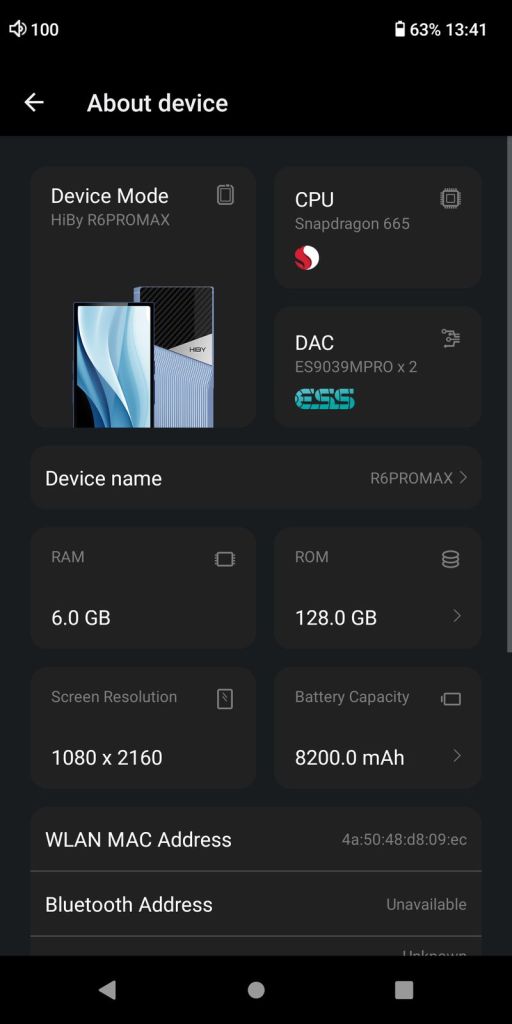
In the heart of Pro Max, you have dual ES9039MS Pro flagship DACs from their 32-bit ESS SABRE family. The system still runs on Qualcomm Snapdragon 665 and optimized Android 12. It comes with 6GB of LPDDR4 RAM, 128GB of internal storage, and a microSD card expandable up to 2TB. This was an upgrade with an increase over the 4GB RAM/64GB ROM found in Pro II. The open Android 12 OS features Direct Transport Architecture (DTA, systemwide bit-perfect audio) and support for USB DTA (bit-perfect USB audio). Pro Max interface is as fast as other 660/665-based DAPs I tested with a similar AnTuTu 3D Benchmark score. All the popular audio formats are supported, including MQA 16x hardware decoding if you still care for it. Plus, Pro Max supports the max sample rate of up to PCM 768kHz and DSD1024.
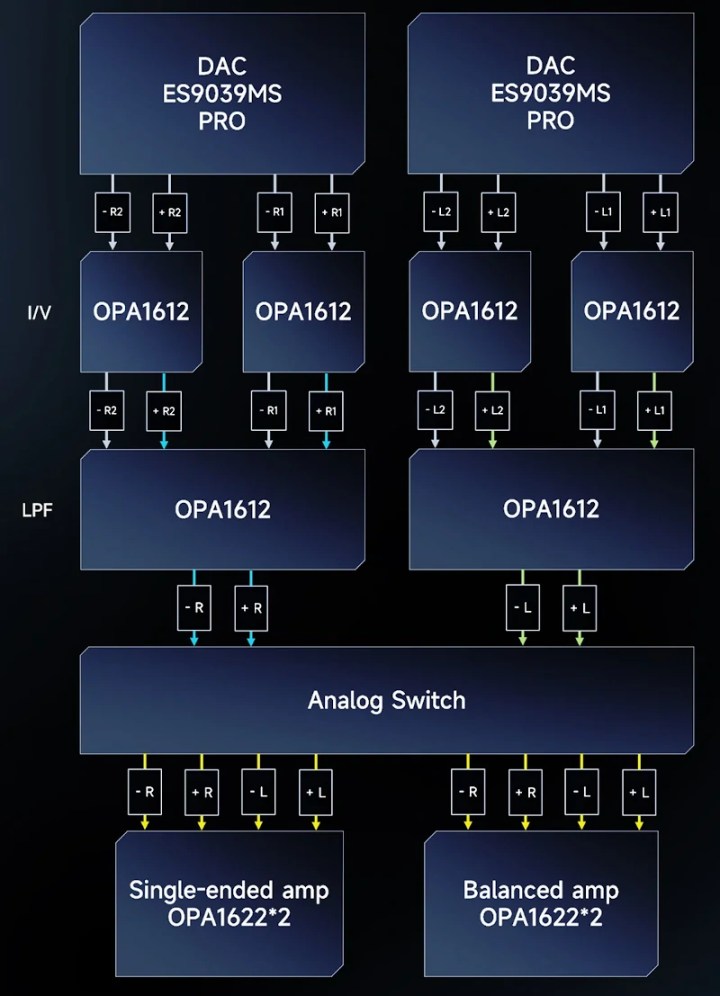
The analog section of the design follows each ES9039MS Pro DAC (one for the Left and another for the Right channels). The I/V section includes 4x independent TI OPA1612 SoundPlus OpAmps, the LPF section with another 2x OPA1612, and then the AMP section with 2x independent TI OPA1622 SoundPlus high-performance OpAmps paired with four juicy ELNA electrolytic caps. These four sections of DAC, I/V, LPF, and AMP were partitioned and isolated in layout to minimize interference, including a four-way independent power supply/filtering system.
As already mentioned, Pro Max features a beautiful 5.9” Display with Corning Gorilla Glass. This is a hi-res 1080p HD display with 2160×1080 resolution, widescreen 16:9 aspect ratio, and high pixel density. Plus, it features an oleophobic coating and detection of double-tapping to wake up the screen. This is a great feature since you can turn the display on by double-tapping it, giving your power button a break.
Other standard features are dual-band WiFi with a support of 2.4GHz and 5GHz, Bluetooth 5.0 with two-way support of all popular hi-res codecs, including aptX/HD (transmit only), LDAC, and UAT, and two-way Bluetooth pair-up with wireless headphones/speakers (as transmitter) and to your smartphone (as receiver) to function like a wireless BT DAC/amp. Also, as already mentioned, the USB-C port (supporting USB3.2 gen1) is multi-functional for charging, data copying, USB DAC functionality, Digital out, and SPDIF output to bring out a Coax signal with the optional custom cable.
And last, but not least, Pro Max features a large capacity 8200mA battery, almost double that of Pro II, supporting fast 40W PD3.1 charging, faster than 18W PD2.0 implemented in Pro II. You can see a lot faster charging when using PD chargers. In my best-case scenario battery test using average sensitivity IEMs at a normal listening level in high gain from 4.4mm BAL output with WiFi/BT off and the display mostly off, I was getting close to 9.5hrs of playback time. Not bad at all considering the use of two flagship ESS SABRE DACs.
OS / GUI.
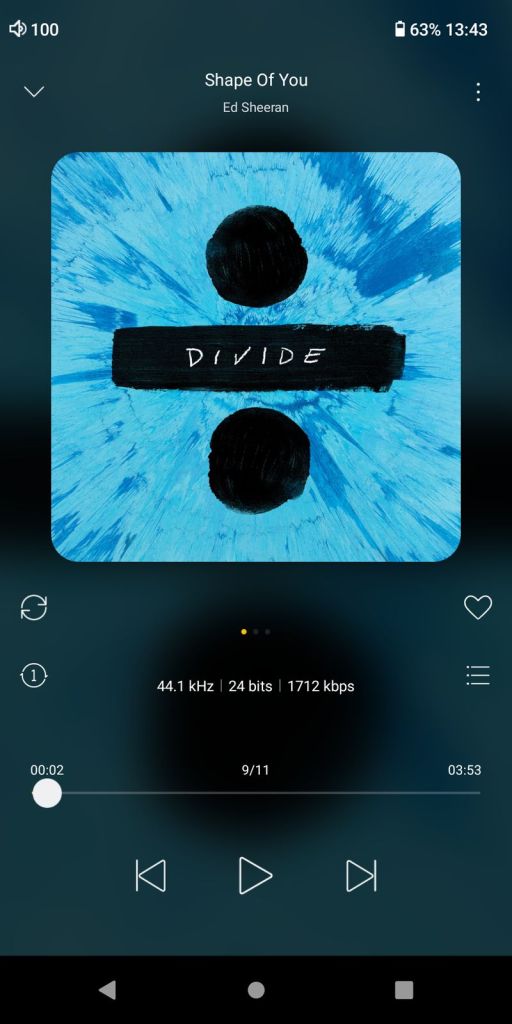
I spend extra time discussing GUI details in my Android DAP reviews, while here we are still dealing with a popular default HibyMusic app that many are already familiar with. Thus, there is no need to repeat myself. All Hiby Android DAPs come preloaded with the HibyMusic app, a regular version of which you can download and install on any smartphone or tablet device for free. Pro Max comes with the latest Professional Edition version of HibyMusic, v2.1.2.
While being the open Android DAP with preinstalled Google Play, you can install any app depending on its compatibility with a device. You must be aware that some devices or geographic locations have limitations set by Google on what you can download and install. If you run into such a problem, you could visit the APKPure website to download and sideload apps. Another VERY important point. If you have to do a factory reset, either from Settings/System or through Android Recovery while re-starting the device and holding the Skip button (above Play) to get into Android Recovery (and then Power + Skip to get into the Recovery menu), after the reset, you might not find Google Play until you go to Apps section and scroll down to Enable Google Play Store.
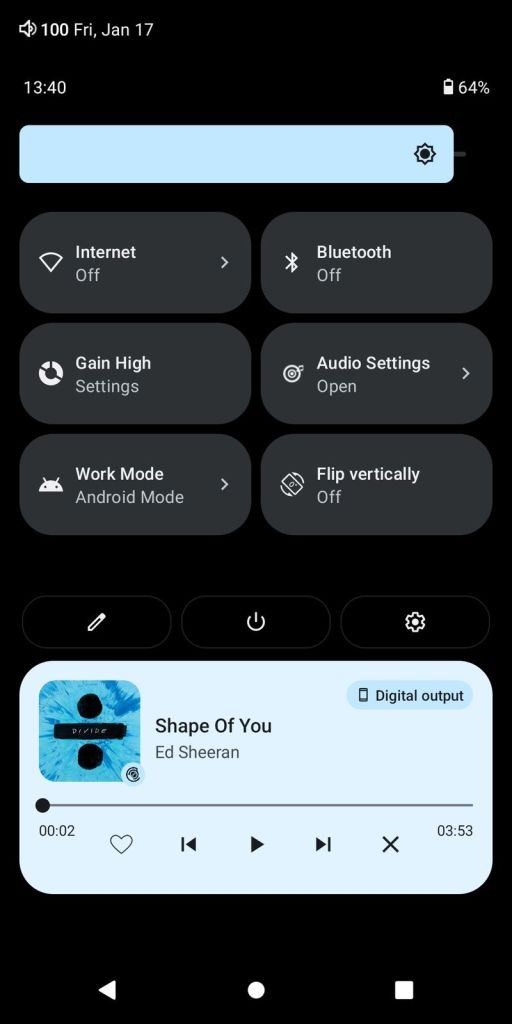
Relative to Android Settings, straight from the pulldown Notification bar you have access to different shortcuts, including the Audio Settings menu shortcut where you can select a digital filter, change the Gain (low, mid, high), Download and select plugins, access global MSEB (MageSound 8-ball DSP sound effects – very effective for sound shaping), access new PEQ (new Parametric EQ), select DSD gain compensation, Channel balance adjustment, Max volume cap setting, MQA decoder (enable/disable), and SPDIF and USB digital volume lock. The MSEB and PEQ settings are system-wide and should work with any audio application. You will also find a Gain setting shortcut in the notification bar.


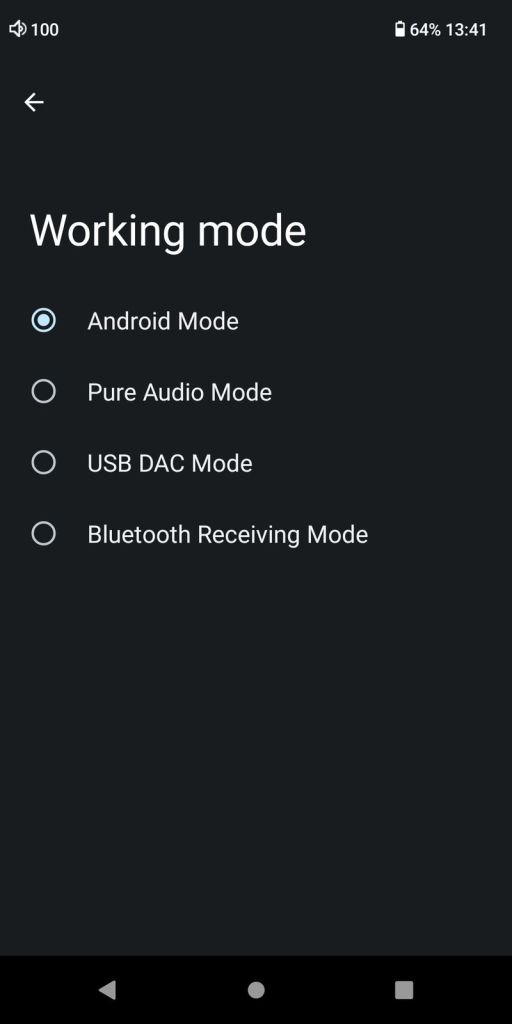
Another essential menu you can access from Notification shortcuts is Work Mode, which can be found in Settings as Working Mode. In there, you can access Android Mode with full DAP functionality including streaming, Pure Audio Mode which makes HibyMusic the main interface and disables access to other Android apps, USB DAC Mode to bring up the DAC interface when Pro Max is connected through USB to an external source, and Bluetooth Receiving Mode which turns Pro Max into a wireless DAC/amp.
There are a few other interesting menu options that some might not be familiar with or forget about. For example, under the Battery setting, there is an Idle Shutdown feature where you can set a timeout to shut down the DAP after idling for a predefined period. Hiby has it in their other Android DAPs as well, but not everybody remembers to enable it which comes in handy when we treat the DAP like a smartphone and forget to turn it off. Under Security, you can configure the Lock-screen button settings. In Settings under System go to Gestures to configure System navigation (gesture or traditional 3-button), enable Swipe 3-fingers down to take a Screenshot, and enable Double-click to wake up. These are all very useful features.
Also, after you install the HibyCast app on your phone, you have access to HibyCast, which allows system-wide remote control of the DAP from another device, such as your smartphone. Just make sure it is enabled under Apps in Settings when you scroll to the bottom of the screen.
Page 2 – Sound Analysis, Comparison.
Page 3 – Pair up, Wired/wireless connections, and Conclusion.

 Twister6 Reviews