

Next Gen Modular!
PROS: modular design, each audio motherboard offers a finetuned DAC/amp combo, Gen2 modules with quick-release latches for faster exchange, solid build, optimized Android 12 performance (665 SoC, 6GB RAM, 128GB ROM), compact design with hi-res 5” screen, 3.5mm/4.4mm output ports, quality protective case.
CONS: cost of additional modules, some modules have phone-only output (no LO).
The product was provided to me free of charge for review purposes in exchange for my honest opinion.
The manufacturer’s website is Cayin. It is available for sale from authorized retailers like Musicteck, where it can be purchased with either or both of the modules.
Intro.
When I heard about the Cayin N6iii release, it didn’t surprise me as much because this update was overdue. The only surprise was the timing of this release a few months ahead of CanJam NYC. I had to go back and search for my original N6ii review and found it was published over 5.5 years ago. Despite being an Android DAP, N6ii stayed in the spotlight for years thanks to its modular design with 6 different DAC/amp cards including the original one which came with N6ii, followed by 4 additional DAC/amps, and a unique LO-only card. Cayin also released a special edition N6ii Titanium DAP with one of their most popular R2R modules. I was glad they continued with the modular design and moved forward with the next-gen N6iii.
Some improvements, like Snapdragon 665 (from the original 425) and 6GB RAM and optimized Android 12 (vs original 4GB of RAM and Android 8.1) including the latest BT/wireless protocols are expected in today’s new DAP release. But other changes like moving up to a 5” display (from the original 4.2”), offering 128GB of internal storage (vs original 64GB), and a higher capacity 9,000mAh battery (vs original 5,900mAh) were welcomed and appreciated additions. A new lower profile and more seamless integration volume wheel with a format/bitrate light indicator added a premium touch to the design. And I was pleased to see a quick-lease latch mechanism with Gen2 audio motherboard cards in N6iii.
As I often mention in my Cayin reviews, their new products always implement and integrate audio tech drawn from their previous releases, with N6iii being no exception, implementing what they have learned from N7, N8ii, and N30LE in a new modular motherboard design, especially with E203 card. One of the reasons this review wasn’t published earlier is that I was waiting for the E203 card availability in addition to the stock C201 module. In my opinion, the best way to appreciate the added value of a modular design is by talking about the difference in sound tuning and functionality each card brings. After spending the last month testing Cayin N6iii with its C201 and E203 audio motherboards here are my findings.
Unboxing and Accessories.
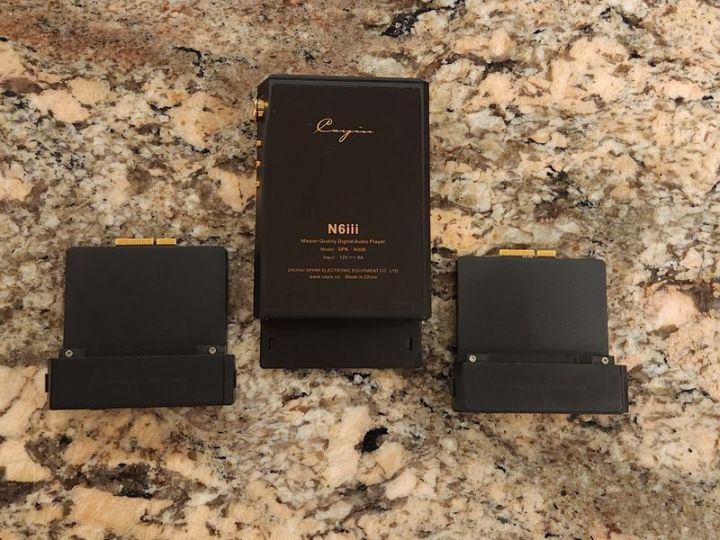
Relative to their other higher-end model releases, I assume Cayin wanted to make a statement with a less flashy packaging presentation of N6iii. Don’t get me wrong, it arrived in a nice compact box with the N6iii model number printed on the cover and a secure foam cutout around the DAP under the cover. You will also find a quality usb-c to usb-c cable, tempered glass screen protector, printed manual, and a nice leather case. All the essentials are here, and the only thing you might need to get extra is their custom usb-c to COAX cable if you want to use N6iii as a transport to drive the external DAC with SPDIF input. The included cable has a heavy-duty construction with thicker wires (by appearance) to handle PD2 fast charging.


I usually recommend using a protective case with a DAP to enhance the grip. The one included was in black, not too bulky, with a premium textured PU leather material, and a stitched line around the back panel surrounding the metal insert with cutouts for air circulation. One noticeable change here is that Cayin updated the font of their “Never be the Same Again” slogan. It never bothered me, but I remember a few people on Head-fi questioned the original font. I guess Cayin listens to and considers every comment from their customers no matter what.
The DAP slides in from the top, fitting in securely. To ensure a snug fit around the wheel, the right side of the case halfway down on the back is cut open with an edge attached magnetically to the back panel. Realizing that users will take the DAP more often in and out of the case to exchange the modules, I find it a rather clever design to put less strain on the case around the protruding volume wheel. The bottom, top, and sides of the case have generous openings for easy access to all the ports and buttons, nothing is covered.


Design.
N6iii is 126 x 77.8 mm x 23 mm and weighs 350g, crafted from 6063 aluminum alloy. Considering the modular design of the DAP and large-size battery, I find this audio player quite compact and pocket-friendly. The original N6ii was also considered to be very compact for its design, using an even smaller 4.2” display. Today, regardless of the entry, mid-fi, or summit-fi level status, DAPs are getting bigger and heavier, with many featuring 6” and larger displays. N6iii strikes a perfect balance in size and weight, and I find its 5” display perfectly adequate for the DAP’s playback/streaming functionality without a need to squint your eyes.
The focus of the N6iii front design is around a 5” TFT 1080p FHD display with a relatively slimmer bezel compared to the N6ii. As previously mentioned, a tempered glass screen protector is optional, though included with accessories. The chassis has a usb-c multi-function port at the top, supporting PD2 fast charging, with digital USB audio in (DAC)/out (transport), and an embedded COAX interface. Next to it at the top, you have a spring-loaded microSD card supporting up to 2TB. On the left side, you will find a power button at the top, in gold which makes a nice contrast to the black DAP chassis. The right side, carved with a curve line running down, has a new lower-profile gold wheel and a format/bitrate light indicator behind it. Most of the time I was able to adjust the wheel with my thumb from the back, but sometimes due to its low profile, I had to use two fingers to get a better grip. Below it, there are three evenly spaced gold playback buttons with a nice tactile response. All these buttons and the volume wheel are crafted from brass, feel cold to the touch so you know it’s not a plastic, and use a real gold PVD finish.


At the bottom is where you insert and remove the new Gen2 audio motherboard module, using a quick-release latch mechanism with two buttons easily accessible on the left/right sides. The mechanism seems to be very robust and secure, and I found it very easy to handle with one hand. Once latched in, there is no room for wiggle, nothing is rattling, and I never had an issue while pulling on the cable when removing IEMs/headphone plugs. I went back and forth between C201 and E203 cards a dozen times as I was comparing different IEMs and headphones. It worked in a true plug-and-play fashion without a need to power down the DAP.
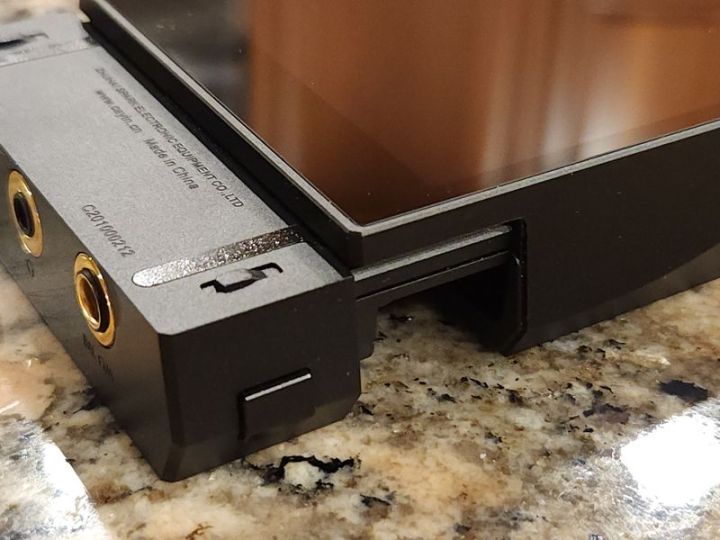
Cayin implemented a dedicated microcontroller that interacts with SoC every time a card is inserted making all the necessary custom adjustments and monitoring relative to that card. Since this is not just an amp card but a DAC/amp board, each one requires more interface customization, and so far, I found it to be quite robust in my plug-and-play testing. Also, each DAC/amp card will be custom not only to its selection of components but also its functionality, resulting in different ports, like C201 having separate 3.5mm PO and LO pots and shared 4.4mm PO/LO port while E203 having a separate 3.5mm and 4.4mm PO-only ports.
These new Gen2 cards will not be backward compatible with Gen1 because the audio motherboard PCB was increased by over 30% to give more room for the components. Also, a new naming was implemented with these motherboards, such as the first stock card being C201 where “C” corresponds to Cirrus Logic DACs, while the next released card is E203 where “E” corresponds to its ESS DAC. I will talk more about each card design and spec in the follow-up section of the review.


Under the hood.
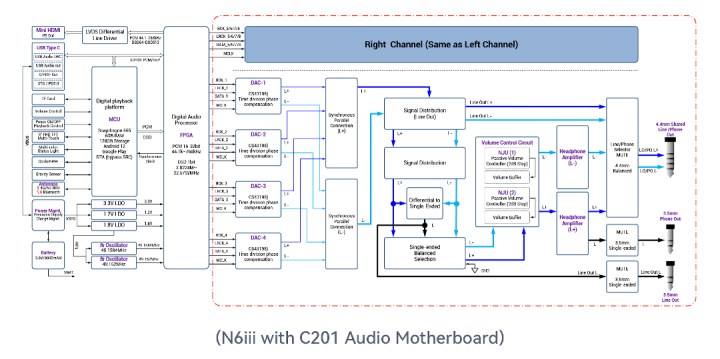
The updated system of N6iii runs on Qualcomm Snapdragon 665 with an optimized Android 12. It comes with 6GB of LPDDR4 RAM, 128GB of internal storage, and a microSD card expandable up to 2TB. This was a noticeable upgrade over the original N6ii with an increase over the 4GB RAM/64GB ROM and 425 SoC. The open Android 12 OS features Direct Transport Architecture (DTA, systemwide bit-perfect audio). N6iii interface is as fast as other 660/665-based DAPs I tested. As expected, all the popular audio formats are supported. This is part of a common Digital Playback Platform of the N6iii which interfaces with a Digital Audio Processor block controlled by a custom FPGA, feeding PCM (up to 32-bit, 768kHz) and DSD (1-bit up to 22.5792MHz) data through FPGA for decoding into the DAC input of the corresponding audio motherboard module.
As already mentioned, N6iii features a 5” Sharp TF screen with Corning Gorilla Glass 3. This is a hi-res 1080p FHD+ display with 1080×1920 pixels resolution. Plus, it features a detection of double-tapping to wake up the screen. This is a great feature since you can turn the display on by double-tapping it, giving your power button a break. Other standard features are dual-band WiFi with a support of 2.4GHz and 5GHz enhanced by a customized looped antenna beneath the top panel. Bluetooth 5.0 with two-way support of all popular hi-res codecs, including LDAC, and UAT. Also, as already mentioned, the USB-C port is multi-functional for charging, data copying, USB DAC functionality, Digital out, and SPDIF output to bring out a Coax signal with the optional custom cable.


N6iii features a larger capacity 9000mA battery, almost double that of the original N6ii, supporting 18W PD2.0 fast charging. The battery run time will depend on the audio card design, gain setting, volume level, playback format, ports used, etc. For example, with C201 using average sensitivity IEMs at a normal listening level in high gain from 4.4mm BAL output with WiFi/BT off and the display mostly off, I was getting close to 13.5hrs of playback time. Under the same test conditions, while using E203 and switching between Class A and Class AB, I got a little over 8hrs of playback time. The difference here is based on different DACs types and different amplifier designs.
The C201 audio motherboard features parallel full-differential matrix DAC with low-power 8x Cirrus Logic CS43198 32-bit DACs, the reason its battery performance is so impressive. Each DAC works in MONO mode with four of these grouped into one stereo channel where two of these groups create a full-differential output. Another noticeable feature is high-precision Cascade Volume control using 4x NJU72315 passive volume chip, and high-current parallel headphone amp using 4x popular OPA1622 audio op-amps. C201 card features separate 3.5mm PO (0.5ohm, 260mW @32ohm) and LO (2V max) ports, and a shared 4.4mm PO (1ohm, 700mW @32ohm) and LO (4V max) port.
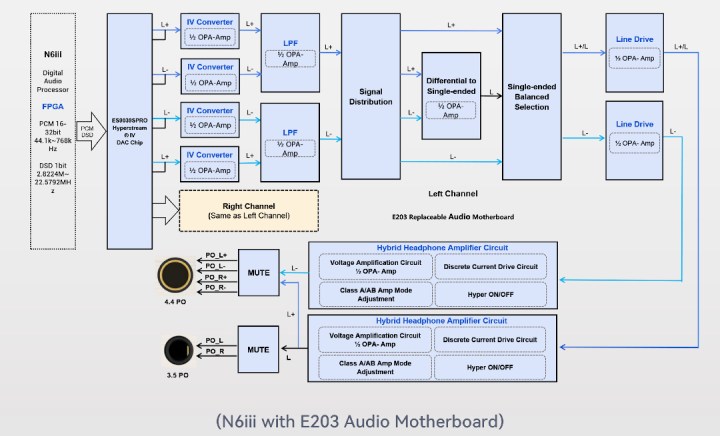
E203 audio motherboard features a high-end flagship ES9039SPro DAC which has an 8-channel independent current output path followed by independent 8-ch I/V (current to voltage) conversion ckt, and fully symmetric LPF (low pass filter) and Buffer Driver ckt. E203 follows the dual amplification operation (DAO) hybrid amplification circuit design found in their N30LE and C9ii devices using OPA1612 op-amps and discrete BJTs. It features Class A and Class AB, and a separate Hyper Mode which is based on Class A with a static current adjustment and other precision tweaks to maximize the performance. With enough room to cover only the phone output ckt, the focus of this card’s design was to provide only 3.5mm PO (0.4ohm, 400mW @32ohm w/Hyper) and 4.4mm PO (0.8ohm, 900mW @32ohm w/Hyper).
OS / GUI.
I spend extra time discussing GUI details in my Android DAP reviews, while here we are still dealing with a popular default HibyMusic app that many are already familiar with. Thus, there is no need to repeat myself. All Cayin Android DAPs come preloaded with the HibyMusic app and the Cayin version of HibyMusic which is a cutdown version of the original. You can download and install a regular version of HibyMusic on any smartphone or tablet device for free. N6iii comes with the latest Professional Edition version of HibyMusic, v2.1.3 which I recommend over Cayin’s cutdown version of it.

While being the open Android DAP with preinstalled Google Play, you can install any app depending on its compatibility with a device. You must be aware that some devices or geographic locations have limitations set by Google on what you can download and install. If you run into such a problem, you could visit the APKPure website to download and sideload apps. Another VERY important point. If you have to do a factory reset, either from Settings/System or through Android Recovery while re-starting the device and holding the Skip button (above Play) to get into Android Recovery (and then Power + Skip to get into the Recovery menu), after the reset, you might not find Google Play until you go to Apps section and scroll down to enable Google Play Store.


Relative to Android Settings, straight from the pulldown Notification bar you have access to different shortcuts, including the Audio Settings menu shortcut where you can select a digital filter, change the Gain (low, mid, high), access new PEQ (new Parametric EQ), Channel balance adjustment, Max volume cap setting, MQA decoder (enable/disable). PEQ setting is system-wide and should work with any audio application. I was surprised not to find an MSEB global setting. You will also find a Gain setting shortcut in the notification bar. Other settings were specific to the audio motherboard you are using. For example, Class A/AB and Hyper mode will not be available with the C201 module, only with E203.


There are a few other interesting menu options that some might not be familiar with or forget about. For example, under the Battery setting, there is an Idle Shutdown feature where you can set a timeout to shut down the DAP after idling for a predefined period. Cayin has it in their other Android DAPs as well, but not everybody remembers to enable it which comes in handy when we treat the DAP like a smartphone and forget to turn it off. Under Security, you can configure the Lock-screen button settings. In Settings under System go to Gestures to configure System navigation (gesture or traditional 3-button), enable Swipe 3-fingers down to take a Screenshot, and enable Double-click to wake up. These are all very useful features.
Also, after you install the HibyCast app on your phone, you have access to HibyCast, which allows system-wide remote control of the DAP from another device, such as your smartphone. Just make sure it is enabled under Apps in Settings when you scroll to the bottom of the screen.
Page 2 – Sound Analysis, Comparison.
Page 3 – Pair up, Wired/wireless connections, and Conclusion.

 Twister6 Reviews
Thank ypu for the nice review. I have one question. How does n6iii with c201 to n7. I am Looking for a more revealing Player and cpnsider n6iii or ibasso dx340
LikeLike
if you are looking for a more revealing tuning, C201 should do the job!
LikeLike
Hi Twister, first i wanted to thank you all your wonderful work here, you don’t know it but through these years you’ve help me a lot with different decisions!
That said, i’ll go direct with my doubt. I know that you have a deep experience with some of the gear i want to ask you about, so i hope it will make it easier, a short answer is enough:
Just in terms of sound quality, which dap would you recommend between Cayin N7, N6iii or a second hand Lotoo Paw Gold Touch?
It’s the Lotoo still a king or the 2025’s mid-hi gear has reduced the gap with 2018’s top gear?
I’ll use it with Meze Empyrean and Audeze lcd i4 at home and Campfire Atlas and probably Legend X on the go (you can infer the sound i like, i’d like a source not too warm to compensate the warmth of my planars and raise a little bit the details in them, not so worried about the iems)
Thanks in advance for your answer!!!
Daniel
LikeLike
N6iii with stock c201 audio board probably will work better for you per your sound requirements. LPGT is fine, but GT2 next gen has a cleaner performance, though the design is not as compact as the original LPGT. Also, N7 will be warmer than N6iii/C201.
LikeLike
Thank you very much, i ordered one, let’s see what happens!
LikeLike
Hi
Please revisit with r202 board, also vs SE300
Cheers
LikeLike
I just got R202, but had SE300 on loan many years ago. So, can’t revisit that one.
LikeLike