
Under the hood.
The original SP3k and SP3kM featured a HEXA design with 6 AKM chips, which included 2x AK4191EQ filters/modulators to process the digital signal of D/A conversion (digital filter with sigma-delta modulation and oversampling processor), and 4x AK4499EX DACs for analog conversion and processing, creating a 1:2 ratio architecture. As I mentioned in my SP3k review, it is more common to see ckt boards with a partitioned layout of analog and digital circuits. Here, the DAC chip is partitioned into two separate chips to improve the purity of the analog signal, lower the noise and increase the SNR, and lower the clock jitter by separating the digital and analog portions of the clock. In SP4000, A&K refined this architecture to a 1:1 ratio, implementing OCTA design with 4x AK4191EQ and 4x AK4499EX DACs, allowing each 4491 processor to be paired with 4499 DAC, handling every signal separately.
SP4000 vs SP3000
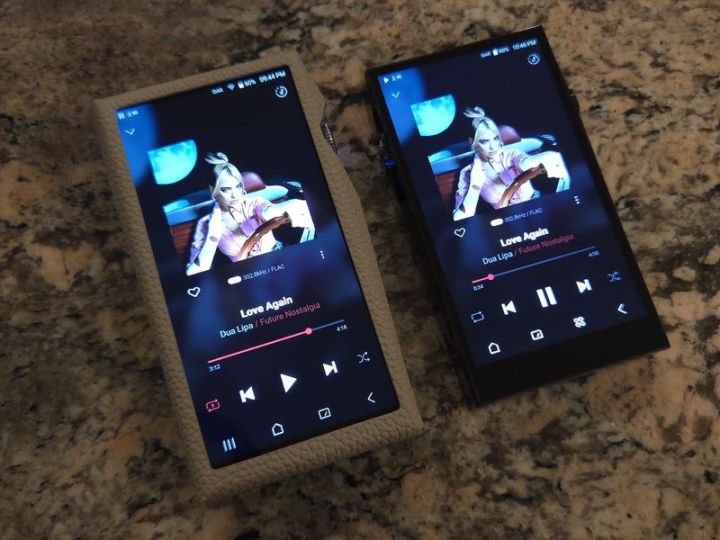
The touch display went up from 5.46” (1920×1080) to 6” (2160×1080). SP3kM shrinking in size made sense as a pocket-friendly alternative, but I’m unsure about the logic behind the increase in display size here. I can only speculate that with open access to download and install any app from the Google Play store in SP4k, a bigger display will unlock a more common smartphone user experience. Another thing I noticed is something I haven’t experienced with other SP-series models. While inside the case, swiping down the notification bar in SP4k was a bit challenging, with some hits and misses. Without a case, it wasn’t a problem, but with one on, my finger had to be closer to the top edge of the case while swiping it down. I think this issue could be resolved in software by allocating a wider touch swipe area at the top of the display. Hopefully, A&K will address it.
SP4k GUI has been upgraded to the next gen. Still, the overall interface speed is similar to the SP3k/T/M due to the exact implementation of the octa-core Snapdragon 6165 SoC processor, similar to Snapdragon 665. Plus, you get 8GB DDR4 RAM. While the DAP still features a typical, optimized closed Android A&K interface, now you can also access the Google Play Store to download and install any app. There is plenty of processing power to do audio decoding while supporting all the popular lossy and lossless formats, such as WAV, FLAC, WMA, MP3, OGG, APE, AAC, ALAC, AIFF, DFF, and DSF, with PCM rates up to 32bit/768kHz and DSD rates up to 22.58MHz (DSD512). Also, you have MQA playback support that covers Tidal Masters, Local files, External USB, and MQA-CD (ripped).
The output voltage/power seemed to be increased, especially the balanced output. The single-ended 3.5mm PO has an output impedance of 0.7 ohms and 4.1 Vrms, whereas the balanced 4.4mm (5-pole, ground connected) has an output impedance of 1.4 ohms with a maximum of 8.2 Vrms based on unloaded measurements. Also, the new High Driving Mode (HDM) was introduced, with twice as many OpAmps arranged in parallel, meaning that it will increase the driving current. Don’t want to speculate, but I was under the impression that HDM was enabling this additional opamp arrangement. As before, each port can be changed to Line Out, and 3.5mm also supports optical out. The internal storage remains at 256GB, likely because more people stream content than play local files, and you can expand it further with a micro-SD card, per A&K, tested up to 1.5TB. The dual-band WiFi (2.4/5GHz) remains, and Bluetooth (BT5.0) support includes not only aptX HD but also LDAC protocols for 24-bit playback over Bluetooth (Rx and Tx).

There were other noticeable design improvements, such as the implementation of a pure copper shield (a 9.9% purity shield can) to block various noise and electromagnetic interferences. Then, the implementation of newer LDO voltage regulators for further noise reduction, up to 97%. Another thing I found to be interesting is the implementation of Any Layer HDI (High-Density Interconnect) PCB technology, which is more common for thinner and more densely populated smartphone PCBs. This technology allows for the precise design of complex circuitry within a compact space, allowing for the minimization of signal loss and noise coupling. A&K also mentioned the implementation of Enhanced Signal Alignment (ESA) technology to minimize group delay between different frequencies of the sound. Of course, it all sounds good on paper, but it needs to be translated into the actual sound performance, which I will cover in the following sections.
The battery capacity increased from 5,050mAh to 6,780mAh, but the real test maximum playback time has decreased. Plus, the newly adopted SP4k Advanced DAR utilizes a combination of software (Restoration) and hardware (Upsampling) technology for upsampling, in both PCM and DSD modes. As many may recall, when SP3kM switched from hardware to software DAR, the playback time was reduced by a few hours. In SP4k, the DAR upsampling remains hardware-based, but software-based restoration takes a toll on the battery life.
In my best/worst-case test scenario, playing hi-res files in the loop with the display mostly being off (just turning it on to check the battery status), from 4.4mm BAL output at a normal listening volume, here is what I get (HDM refers to high driving mode):
- DAR/HDM/WiFi off, local hi-res playback: 8hrs 20min
- DAR on, HDM/WiFi off, local hi-res playback: 6hrs 45min
- DAR/HDM on, WiFi off, local hi-res playback: 6hrs 40min
- DAR/HDM/WiFi on, streaming playback: 6hrs 20min
In the SP3kM review, I suggested keeping DAR off to extend the battery playback time. After reading my sound analysis section, you will see why I recommend keeping DAR on in SP4k, biting the bullet, and living with a reduced battery playback time.

GUI.
The SP4k UI update, as part of the A&K 4th-gen interface, is now at v4.5, and it feels similar to the SP3k version, though there are some new additions. But overall, when it comes to A&K DAPs’ user interface, once you are familiar with one, you will feel at home using the rest because they share a similar interface, from the 6” SP4000 down to their smaller 3.6” display SR35 models. The 4th-gen interface update marked a significant improvement in ergonomics, while the 4.5th-gen further refines it.


When you start the player, the greeting screen has a carousel where you can swipe through and access your songs in alphabetical order. It’s a fun way to view the song’s artwork along with other info, and it is very fast as you swipe through it. As you swipe right->left above or below the carousel of artworks, you have a Media Category Browser screen to view your Songs, Album, Artist, Genre, Playlists, Folder, Favorite, HD Audio, and CD Library. Then, Settings and Category allow rearranging the order of categories above and turning off the home screen carousel. By the way, when enabled, the Home button at the bottom of the screen takes you to this home screen carousel, and every time you touch the Home button, it randomly brings up another song. I wish there were a way to assign a different screen to the Home button, but if you turn off the Home carousel view and rearrange Media Categories, touching the Home button will always bring you to the first selection in that list. I know it is probably hard to visualize just by reading this, but playing with it is a lot of fun, especially since the GUI is quite responsive.


In the carousel screen, below the carousel itself, there is an App Drawer shortcut which I wish were at the bottom of the screen, like in the previous 4th-gen GUI. At the bottom of the screen, you have four shortcut buttons, open App/Screen to close any of them (as part of the “open” Android functionality), a Home button which I already talked about above, the VU meter button (the same three selection of VU meters as in SP3k), and a Back button. Above it in the Main Home screen, you have a Playback control strip with the name of the currently playing song/artist and Play/Pause and Skip controls. Tapping on it or swiping it up brings up a familiar Playback screen window where the embedded artwork occupies the top half of the screen, and clicking on it expands the view and shows lyrics if one is available. Swiping this window down brings you back to the main home screen. Below it, you get a summary of the song format (bit depth, sampling rate, file type) and a shortcut to tag the song as Favorite or another 3-dot shortcut with additional functions. Then, you have a song artist/title and a scrub bar to advance through the song. Playback touch controls are underneath that, along with Play mode controls.


Swiping down the notification bar gives you access to shortcuts to access various controls, which you can toggle on/off or long-press to get to their corresponding Settings screen, if available. Here you have Wifi, Bluetooth, DAR (Digital Audio Remaster), High Driving Mode, EQ, Crossfeed, AK Connect, Line Out, XLR, Replay-Gain, Settings, and more. You can edit which shortcuts are displayed here and change their order. At the bottom of the open notification bar, you also have Brightness control. The full Settings window has more controls, partitioned into sections. Other controls you can find here are to select Bluetooth Codec, Roon Ready switch, AirPlay, EQ, Crossfeed, DAR setting, change DAC filters, L/R balance, Gapless, ReplayGain, Line Out, and Playback setting. Other usual controls for A&K CD Ripper, USB Mode, Audio output format, S/PDIF Conversion, Car Mode, setting Volume limit, enabling Double-Tap Screen to wake, and enabling/disabling LED indication. And the typical date/time change, language and keyboard selection, timer settings, FW update, System info, and System Reset.


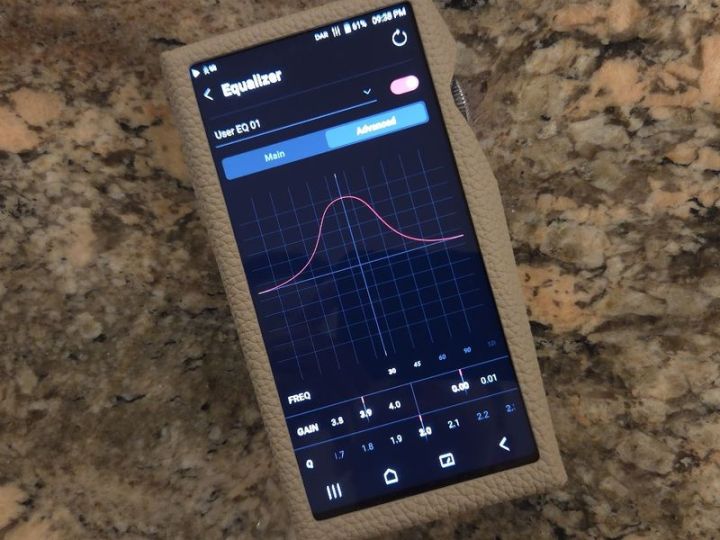
EQ is a big deal for some audiophiles, and here it hasn’t been changed. There are no genre-specific presets, but you have A&K collab IEM-specific presets for Odyssey, AURA, and NOVUS, and you can add many custom EQ presets. The EQ interface has two modes: Main and Advanced. In the Main, you have standard Paragraphic EQ sliders for 20 bands (30, 45, 60, 90, 120, 180, 250, 380, 500, 750, 1k, 1.5k, 2k, 3k, 4k, 6k, 8k, 12k, 14k, and 18k) where you can either slide the bar or use a precise 0.1 adjustment, as well as scrolling through available frequencies. As you adjust, the changes are reflected in the lower right corner, showing the overall shape of EQ. Switching to Advanced transforms EQ adjustment into a Semi-Parametric EQ, providing a full GUI view of the EQ shape. This includes FREQ band selection (with 20 options), Gain selection in 0.1 and 0.01 steps, and Q bandwidth. Since the band’s frequency is fixed, I consider this to be semi-parametric EQ.
When I read about SP4k having an open Android, I thought it would be just like other Android-based DAPs, making it look like you are using a smartphone without a “phone” part. If you didn’t care about apps and enjoyed your audio-only playback on SP3k, using SP4k will be no different. All that Android stuff running behind the curtains of 4.x gen GUI in SP3k is still there in SP4k, maybe more now, but who cares because you don’t have to see or deal with it since SP4k still feels like a music-only playback DAP with its custom, non-Android-looking interface. This makes SP4k not much different in its interface, layout, and operation than SP3k. The only significant difference here is that you have a shortcut to the Google Play Store, allowing you to open it and install other apps. Previously, in SP3k, you could only install approved streaming apps from a whitelist. Now, this “whitelist” is unlimited.


Page 3 – Sound Analysis, Comparison.
Page 4 – Pair up, Wired/wireless connections, and Conclusion.

 Twister6 Reviews
Hey! Would you say that AK’s top‑of‑the‑line SP#K series offers the most detailed sound with IEMs available now and in the near future?
LikeLike
SP models are part of their flagship series, so they are putting all the best tech and their top tuning into that model. Relative to their other DAPs, I think it does offers the most natural and detailed sound.
LikeLike
Thanks for the great review.
Regardirg the Macbeth. Did you hear major changes with/without using the HDM.
many thanks!
LikeLike
If I understand correctly, HDM in SP4k enables extra set of opamps in parallel config. That will increase the current drive of the amp output. Usually, higher current will have a greater effect on demanding headphones, including planar magnetic ones. With IEMs, not so much, though it will depend. Personally, I didn’t hear major changes with Macbeth IEMs here. But, there is a noticeable change with and without DAR.
LikeLike
Your review was exceptionally thorough and detailed. I have a question that has been on my mind, and I would greatly appreciate your expert opinion.
I’m very curious whether you could provide a comparison between this DAP and the N8II purely in terms of sound quality.
Tnx
LikeLike
SP4k background is darker and LO is superior (so far, the best LO output I heard from any dap I tested). In terms of tonality, N8ii uses a “brighter” tonality ROHM DAC so when you add NuTube texture to it, surprisingly it brings it closer to SP4k sound. N8ii is discontinued, for a while now, but in general it is a more revealing, micro-detailed, sparkly up-top source, while SP4k is smoother and more “analog” in a natural kind of way.
LikeLike
Hello,
I’m not specifically looking for a DAP, so is there any laptop setup (transportable or not) you have heard that you can recommend that sounds similar as the SP4000 and is equal/better in sound quality? (I mainly use IEMs although I do have headphones).
I saw some options but I don’t know if they are on the same level of sound quality as SP4000 (e.g., Chord Hugo 2, iBasso D16 Taipan, Questyle Sigma Pro/Sigma, etc.)
Thanks!
LikeLike
SP4000 is one of the top portable sources available at the moment. There are many dongles and usb dacs out there, and if you can get a used D16 at a good price, considering some are upgrading to D17 now, go for it.
LikeLike
Thanks. I forgot to mention that if SP4000 edges out D16 or D17, I do not mind getting SP4000 even for laptop use. Do you prefer the sound of SP4000 or D16 more?
LikeLike