
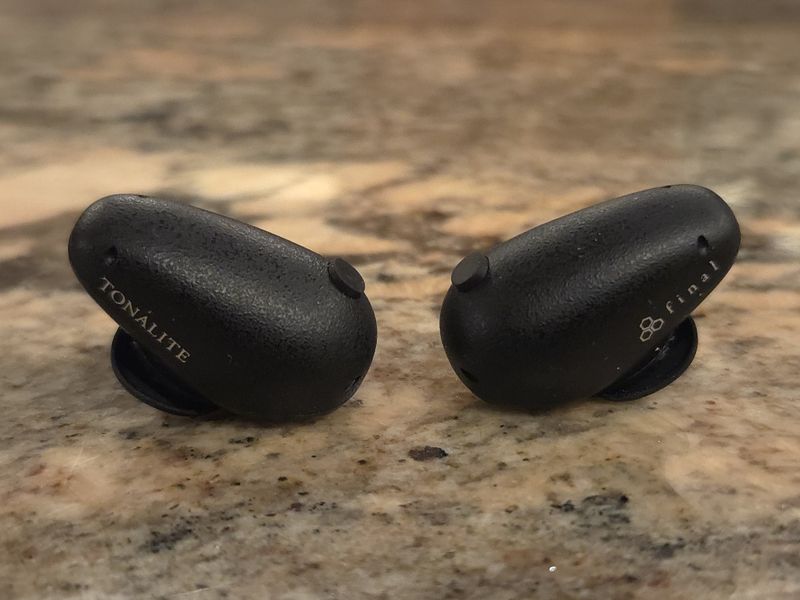
There is nothing lite about Tonalite!
PROs: custom sound tuning based on the 3D head scan, spacious soundstage expansion, natural resolving tonality with a strong technical performance, excellent active noise canceling implementation, secure and comfortable fit, comprehensive app with lots of settings and quality EQ, good battery life, wireless charging of the case, and new Fusion-G eartips.
CONs: the head scan calibration process takes a bit of time, and only one custom EQ preset can be saved.
The product was provided to me free of charge for review purposes in exchange for my honest opinion.
Manufacturer website: Final. Originally, made available to order through a Kickstarter campaign. Available now for sale on Amazon.
Intro.
It is rare for me to be writing a TWS review. Ironic, because most of my reviews focus on high-end IEMs and DAPs, yet every day I spend more time with wireless earphones, using them for conference calls and listening to music in the lab at work, while exercising, or doing chores at home. Unlike my kids, I’m 100% Apple-free, so don’t expect catching me with “white stems” sticking out of my ears. The TWS I have been using for the last 2-3 years were from Final, switching between the ZE8000/mk2 and ZE3000, until a month ago, when Final sent me a pair of their latest Tonalite TWS earphones for review, which were recently launched on Kickstarter.
Now, why would such an established, well-known audiophile company like Final need to launch a crowdfunding campaign? Simply because they decided to expand their “crowd” reach beyond the audiophile world, introducing something new and different: personalized timbre earphones using Digital Twin Audio Simulation (DTAS) to customize the sound through 3D head scanning. We are not talking about an MRI scan or making an appointment to see the audiologist. And, it’s more advanced than Apple’s Personalized Spatial gimmick. Instead, Final developed a portable, user-friendly method to perform acoustic simulations of the listener’s individual ear and head geometry to personalize the sound of Tonalite.
As a bonus, they added powerful active noise-cancelling tech, an app with lots of settings, different touch control options, and high-quality EQ, throwing everything at it to appeal to both audiophile and general consumer crowd, while keeping the price relatively competitive to other high-end TWS releases, and still costing a fraction of the price relative to high-end wired IEMs. So, did Final succeed in this new chapter of their next-gen TWS journey by combining hardware, software, and even a cloud server to collect, process, and send data back to the device through an app? Let’s see what I found after spending the last 3+ weeks testing Final Tonalite TWS earphones.
Unboxing and accessories.
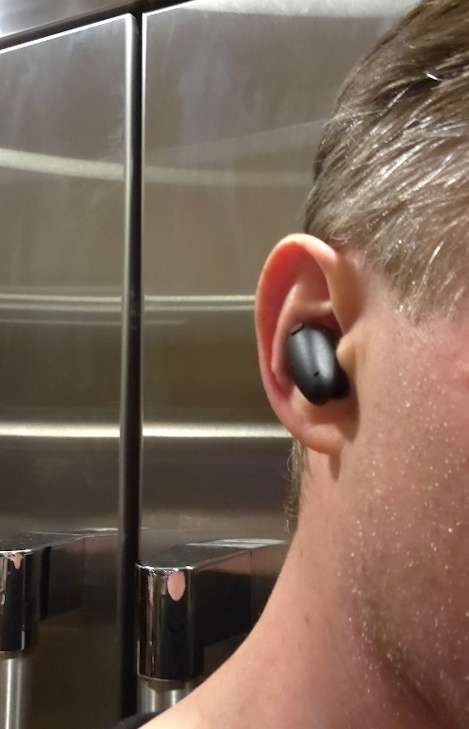
While the Tonalite is a unique product from Final, its unboxing experience felt a bit Apple-like, based on my previous experience “unboxing” my daughter’s AirPods. A compact white cardboard box with compartments and smaller white boxes for accessories, and even a form-fitted white tray for the Tonalite with its charging case, will feel familiar to those who use Apple products. There is a detailed quick manual with lots of helpful info, and other accessories. Included were new Final Fusion-G tri-brid eartips in four sizes (S, M, L, LL), made from three different materials and, to the touch, feeling like a composite mix of foam and rubber. These were very comfortable to wear during extended listening sessions, never irritated my ears or made them sweat (even during heavy workouts), and kept Tonalite shells secure in my ears while providing decent noise isolation. For extra security, two sets of adjusting rings (S, M) were also provided, placed around the base of the nozzle to ensure a more secure fit as you move around – they also work great.


In the same box with extra eartips and adjusting rings, a set of replacement dust filters was provided. These are used over the nozzle tip to protect from earwax and dirt buildup. These dust filters can also function as a “sound filter” if you stack them up, as I have used in the past with A8000. Another peculiar box, with the DTAS accessory kit included, contained an elastic black headband and a set of AR marker stickers for 3D head scanning.


I guess you can consider a charging case as part of the included accessories; even so, it is essential to Tonalite functionality. The charging case is small and rounded, like a pebble fitting in the palm of your hand, and has a lid at the top that swings open 180 degrees for easy access when removing and replacing the earphones. The case stands upright, so it is easy to put it on a wireless charger, which it supports (at the bottom), along with a wired usb-c charger connection on the back. With the lid open, you will find a small, well-hidden pair-up/reset button that blends into the case itself. Also, on the right side, you will find 4 LEDs that indicate the charging progress and the case’s battery capacity.


Design.
The design of Tonalite earpieces is very slick and ergonomic. It’s not as extreme as ZE8k with its rather unconventional outside-stem design and custom eartips. And it also doesn’t have the traditional IEM shell design of the original ZE3k, which resembles that of the A- and B-series. Tonalite shells have a smooth, rounded, pebble-like design with a unique, tactile, rubbery-textured dot toward the back of the faceplate. I found this “dot” handy when removing the earpieces from the case, helping me grab them more securely, especially given the strong magnet holding them in place. Plus, it worked as a guide since the touch-control area is right next to it, helping you to locate it faster. I also appreciated the different touch-control pre-defined options you can choose in the app, although you can’t customize them yourself.
You can also spot four pinhole ports at the front and the back of the shell, corresponding to 3 × Infineon IM73A135 MEMS Microphones and 1 × Talk Microphone per side. As already mentioned, adjusting rings go at the base of the nozzle. The nozzle itself has a decent lip for secure eartips placements, and at the tip, you can add/replace the dust screen filter. Overall, the shells were very comfortable to wear for extended periods and stayed secure as I moved around. They are also water-resistant, rated IPX4. I tried different eartips as well, but ended up coming back to the stock Fusion-G tri-brid eartips, using their large (L) size for the best isolation and the most secure, comfortable fit.
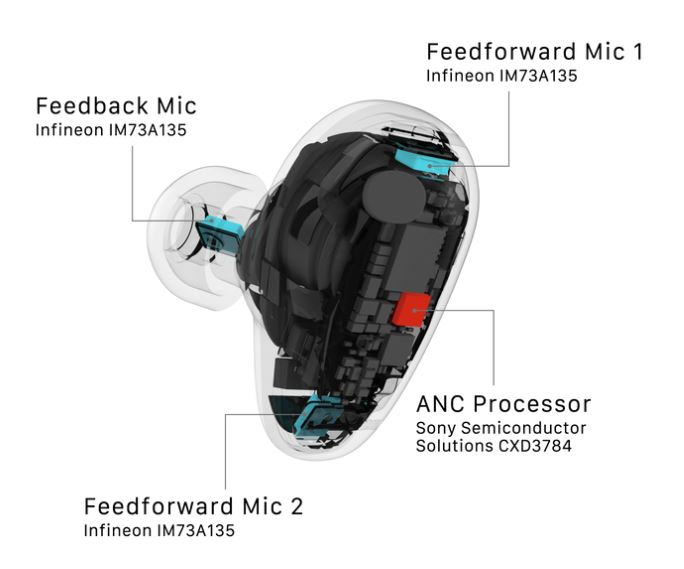
Under the hood, in addition to the mentioned microphones, there is also a low-power Bluetooth audio processor from Airoha, the AB1585 model, supporting Bluetooth 6.0 with SBC, AAC, and LDAC codecs and A2DP, AVRCP, HFP, and HSP profiles. And, ANC functionality is handled by the Sony Semiconductor CXD3784 processor. At the heart of the Tonalite audio performance is Final’s 10mm f-CORE dynamic driver, the sound tuning of which will be a focus of my sound analysis section, further down the review.
Regarding the battery capacity, the earpieces have 100mAh, while the charging case has 700mAh. I didn’t time the earphone playback, but according to Final, the General tuning with Sound Quality noise reduction will yield close to 9 hours, and then two more charges for up to 27 hours of total playback time with a case. Switching to deep Noise Reduction will lower the earphone playback time to 5.5 hours. Under the Personalized tuning, where only the Sound Quality noise reduction is accessible, you get close to 7 hours of playback time from the earphones. As mentioned, you can charge the case with earphones in it using either the USB-C charging port or wireless charging.


The fit.
The app.
The Final Tonalite app is different from their Final Connect app, which covers all of their other TWS earphones. I mean, the app looks similar, but it is a separate app for Tonalite and probably any other future Final TWS supporting the DTAS calibration process. As you start the app, the main screen will show the earphones, along with battery indicators for the left and Right earpieces and the case. Unfortunately, it’s just a bar indicator without the actual %. You will see a percentage indicator for Tonalite, and a remaining battery (without details on whether it is the left or right earpiece) under the BT settings on your phone. I asked Final why they decided not to include the individual remaining battery % in their app, and they explained that smartphone OS estimates this value, which may differ slightly from the actual device value. To eliminate the confusion, Final decided not to show the % value in their app. While I understand the reasoning behind it, I still think it would have been a great idea to include it.
The rest of the app layout is straightforward. Under the DTAS link, you can switch between General and Personalized sound settings. It’s also where you would start the calibration. Once your profile is created, you can also adjust the coefficient curve; the default is “-6”. You can lower it to “-8” or raise it to “-4”. You can also create a Guest Profile. Noise Control sets the active noise-canceling mode, where, under the General profile, you can choose between Noise Canceling with Sound Quality (which preserves the original sound quality) and Noise Reduction (for deeper noise reduction). Volume Step optimizer, the same as in the regular Connect app, is a setting that optimizes volume adjustments in finer increments around your typical listening volume. Multipoint connection allows Tonalite to be paired with two sources simultaneously.
10-band Paragraphic EQ covers 31Hz, 63Hz, 125Hz, 250Hz, 500Hz, 1kHz, 2kHz, 4kHz, 8kHz, and 16kHz, adjusting each band by +/-6dB in 12-steps (0.5dB each). Unfortunately, there are no genre-specific presets, and no multiple custom presets. You are only allowed to save one custom preset, although I believe Final will have multiple custom presets available in the future. Touch Controls has three types of touch control patterns for audio playback and phone calls, and you can select whichever you feel more comfortable with, including turning them off altogether. Firmware Update will search for the latest hw firmware for your earpieces, and download it to upgrade it. In the last month of my using Tonalite, there were three fw updates, and a few app updates, meaning Final is actively fine-tuning everything.
One more “hidden” menu is in the upper left corner, the three horizontal bars that bring up the detailed User Manual, app language setting, and the actual Settings where you can change Gain (low/high), LDAC (on/off), and Low Latency gaming mode (on/off). Keep in mind that even after enabling LDAC, you will still have to select it in your phone’s Bluetooth settings under the Tonalite device.


Page 2 – Calibration, Sound Analysis, Comparison, and Conclusion.

 Twister6 Reviews