
Under the hood.
Hiby has been perfecting its Darwin architecture design since RS6, through RS8 and even R8ii, with RS8ii introducing the 3rd Generation of this FPGA platform. With this being an RS-series release, you can still expect to see R2R DAC being utilized for PCM file processing, going through the FIR Filter (adjustable Impulse Response filter), Oversampling 32x (boosted from 16x in RS8, to remove any sound aliasing artifacts), and nonlinear Harmonics control (to increase some harmonics and to make the sound more natural). The significant change here was in the handling of R2R DAC, where in RS8, they implemented the Linearity Compensation algorithm (to compensate for the non-linearities of the R2R resistor network). In RS8ii, they used R2R resistor modeling by measuring the on-board R2R network and performing D/A conversion based on these measurements to achieve higher accuracy. Such resistor modeling was made possible by the Darwin III FPGA’s high computational power. To put it in perspective, the RS8ii FPGA contains 100k logic units and 212 high-speed DSP modules, compared to the RS8, which had only 1/5 the computational power.
A few other significant improvements were implemented, including using higher-performance CMOS switching in the resistor network during the on and off states. They also optimized the power architecture to use independent supplies for each channel to eliminate crosstalk artifacts, resulting in lower noise and cleaner reference voltages. Another newly added feature was Adaptive amplification, which combines the Class A and Class AB. You still have independent A and AB modes, which can be adjusted manually in 64 steps. But while sampling the audio signal ahead of time, Hiby came up with a clever, patented Adaptive Amplifier routine that adjusts the amp’s power output by switching to Class A when needed and back to Class AB to relax the output. Such dynamic amp operation can reduce the power consumption and heat dissipation.
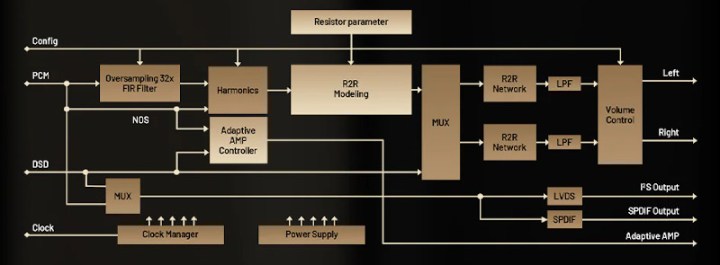
Plus, you still have DSD decoding, which bypasses all that by following a different signal processing path. Hiby’s block diagram also shows a Non-Oversampling (NOS) mode, which usually bypasses the FIR Filter and Oversampling blocks, but as of fw 1.50, it hasn’t been implemented yet. The overall Darwin III R2R/FPGA DAC architecture supports DSD1024, PCM1536, MQA 16x (if you care), and mp3, wav, ape, flac, fsf, dff, iso, cue, wma, ogg, aac, opus, aiff, the same as in RS8.
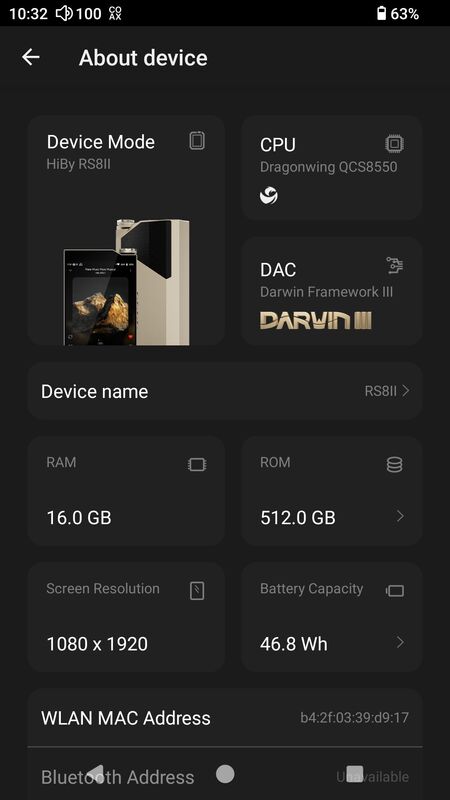
Outside of audio processing improvements, RS8ii stepped it up BIG time with a new SoC, Qualcomm Dragonwing OCS8550, based on the Snapdragon 8 Gen II platform, with 16GB RAM (LPDDR5-4200MHz), massive 512GB internal storage, and microSD expansion (up to 2TB). To put it in an objective perspective, I ran my usual AnTuTu 3D benchmark test, and RS8ii’s performance was 6x higher than that of any other Snapdragon 660/665 Android DAP. From a subjective perspective, using the RS8ii felt on par with my Galaxy S25 smartphone.
As already mentioned, RS8ii features a generous 5.5” Display with 1080×1920 resolution. Other standard features include an advanced high-speed WiFi 7 MIMO, Bluetooth 5.3 with Tx support for all popular hi-res codecs, including aptX/adaptive/lossless/HD, LDAC, AAC, and SBC, and Rx (turning RS8ii into a wireless DAC/amp) supporting LDAC, AAC, and SBC. Also, as already mentioned, the USB3.2 gen 2 Type-C port is multi-functional for charging, data copying, USB DAC functionality, Digital out, and SPDIF output to bring out the coax signal with the included custom cable. You even have access to the I2S port, if your desktop equipment supports it.
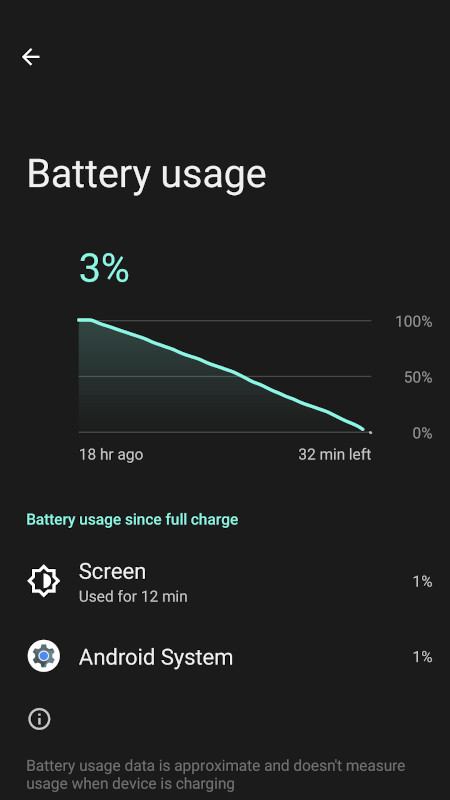
Even the battery section of the DAP was redesigned, with Hiby being one of the first DAPs to use a high-voltage, series-connected, large-capacity (46.8Wh) battery with two 6,000mAh cells, resulting in a total nominal capacity of 7.8V/6,000mAh per 2-cell design. It also supports a fast 12A charging current under the PD3.0 high-speed protocol with either 20V/4A, 15V/3A, 12V/3A, 9V/3A, or 5V/3A charging. In comparison, the previous RS8 used a more common parallel connection with two 6,000 mAh cells, for a total nominal capacity of 3.87V/12,000 mAh per 2-cell design, and max 5A charging. In my testing, with 4.4mm BAL output, Class AB amp, High Gain, Turbo enabled, local playback, and the screen mostly off, I achieved 18 hours of playback. This is the best-case scenario, which I tested under fw 1.30, in multiple tests. Using streaming, instead of local playback, will reduce the time. Then, when I switched from Class AB to Class A, the time was reduced by almost half. I know that fw 1.50 introduced many optimizations, so I’m planning to rerun the test, especially under the Class A amp setting. But in general, I was happy with Class AB performance in my everyday use.
OS/GUI.
I usually take my time discussing GUI details in my Android DAP reviews, and here we are still dealing with a popular default HibyMusic app that many are already familiar with. Thus, there is no need to repeat myself. All Hiby Android DAPs come preloaded with the HibyMusic app, a free version of which you can download and install on any smartphone or tablet. RS8ii comes with the latest Professional Edition version of HibyMusic, v2.1.6.


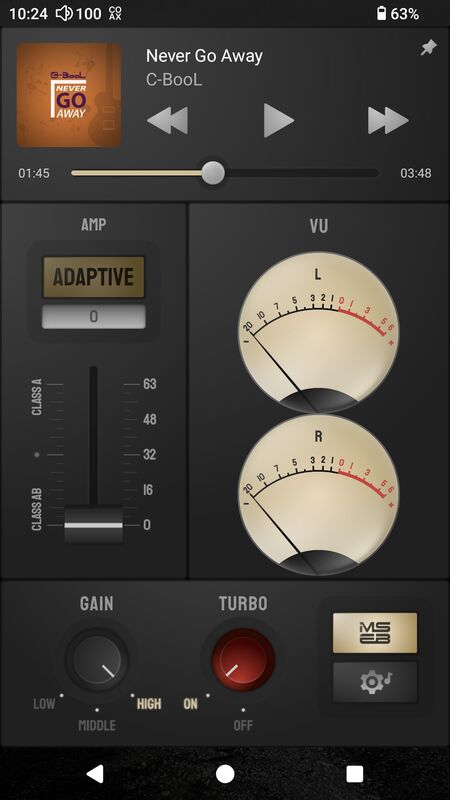
The highlight here, and a huge surprise, was when you swipe the main Android screen to the right, and reveal a screen panel with a multi-function GUI that has a bird-eye view of the currently playing song (from either HibyMusic or any other app, including streaming) with access to playback controls, AMP section to adjust between Class A or AB or select Adaptive amp, Gain setting, Turbo setting, shortcut to MSEB and Audio settings, and L/R VU meter. Clicking the VU meter brings it to the front of the screen, and you can lock that view (pin in the upper right corner). You can also lock this GUI panel using the pin in the upper-right corner.
I wish there were shortcuts to the Darwin Settings and Sankofa menu, in addition to the MSEB and Audio settings. This became my go-to screen when using RS8ii.
As an open Android DAP with Google Play preinstalled, you can install any compatible app. You must be aware that some devices or geographic locations have Google-imposed limitations on what you can download and install. If you run into this problem, you can visit the APKPure website to download and sideload apps. Another VERY important point. If you have to do a factory reset, either from Settings/System or through Android Recovery while re-starting the device and holding the Skip button (above Play) to get into Android Recovery (and then Power + Skip to get into the Recovery menu), after the reset, you might not find Google Play until you go to Apps section and scroll down to Enable Google Play Store.
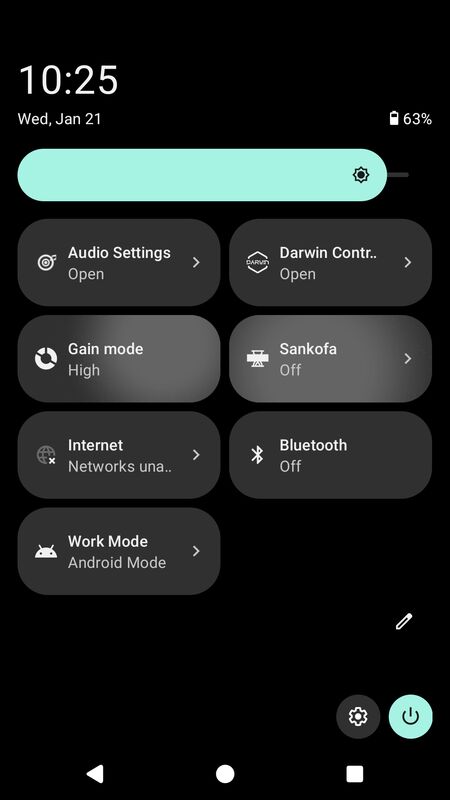
Relative to Android Settings, straight from the pulldown Notification bar you have access to different shortcuts, including the Audio Settings menu shortcut where you can select AMP setting, Digital Out, Audio I2S output mode, Line Out setting (for 3.5mm shared output), Turbo Mode enable, change the Gain (low, mid, high), Download and select plugins, access global MSEB (MageSound 8-ball DSP sound effects – very effective for sound shaping), access PEQ (Parametric EQ), select DSD gain compensation, Channel balance adjustment, Max volume cap setting, Volume Control setting, MQA decoder (enable/disable), and SPDIF, I2S, LO, and USB digital volume lock. The MSEB and PEQ settings are system-wide and should work with any audio application. You will also find a shortcut for the Gain setting in the Notification bar.


Another essential menu you can access via Notification bar shortcuts is Work Mode, which is found in Settings as Working Mode. In there, you can access Android Mode with full DAP functionality, including streaming, Pure Audio Mode, which makes HibyMusic the main interface and disables access to other Android apps, USB DAC Mode to bring up the DAC interface when RS8ii is connected through USB to an external source, and Bluetooth Receiving Mode, which turns RS8ii into a wireless DAC/amp.

The Darwin Controller shortcut provides access to the Harmonic Controller, adjustable from 0 to 255. Also, the Low-Pass Antialiasing filter setting menu with Darwin Default, Linear Phase Sharp Rolloff, Linear Phase Sharp Late Rolloff, Linear Phase Short Ring, Linear Phase Short Ring Late Rolloff, Minimum Phase Sharp Rolloff, Minimum Phase Sharp Late Rolloff, Minimum Phase Short Ring, Minimum Phase Short Ring Late Rolloff, 0th order hold NOS, and Darwin Ultra filters. The interesting thing is that RS8 also had 11 filters, with identical graph representations of each, but named as Default and 1-10. RS8’s Darwing Controller menu had other settings, including customized presets, but I’m not sure whether RS8ii will have them or if Sankofa AI is the replacement. RS8ii Sankofa page has tabs for MD, Reel-to-reel, Cassette, CD, and LP presets, with only MD presets available for now. One thing to note: RS8 had an NOS setting, as mentioned in the RS8ii block diagram, but it hasn’t been implemented yet.


There are a few other interesting menu options that some might not be familiar with or might have forgotten about. For example, under the Battery setting, the Idle Shutdown feature lets you set a timeout to shut down the DAP after it has been idle for a predefined period. Hiby has it in their other Android DAPs as well, but not everybody remembers to enable it, which comes in handy when we treat the DAP like a smartphone and forget to turn it off. Under Security, you can configure the Lock-screen button settings. In Settings > System > Gestures, configure System navigation (gesture or traditional 3-button). Enable Swipe 3-fingers down to take a Screenshot, and enable Double-click to wake up. These are all very useful features.
Also, after you install the HibyCast app on your phone, you can access it to control the DAP system-wide from another device, such as your smartphone. Just make sure it is enabled under Apps in Settings when you scroll to the bottom of the screen.
Page 3 – Sound Analysis, Comparison.
Page 4 – Pair up, Wired/wireless connections, and Conclusion.

 Twister6 Reviews
The comparision with SP4k is bit off imho. It was very obvious for me that SP4k is much higher res dap with better imaging and staging in direct A/B with Storm, HEX and APX OG. I am not sure if its about higher res transducers that can show that difference, but the RS8ii lacked that special sauce factor for me that some daps got.. it was good though, just not 3.5-4k good.
LikeLike
Are you talking about RS8ii with fw1.50, burned in for 150hrs or something else? RS8ii with the latest fw1.50 is night and day in comparison to what people heard at CanJam shows a few months ago with a beta fw. I literally had to redo the sound analysis of RS8ii twice, first time when they updated to fw1.30, and then to fw1.50. Fw1.50 raise the resolution and retrieval of details, making RS8ii treble response more revealing, to the point where you need to switch back from Class AB to A if you want to match SP4k. Also, you need to make sure Harmonic Controller is set to 255, just like DAR has to be on. Ultra Filter completely changed from beta to 1.3 to 1.5, totally different sound. Thus, make sure we are comparing the same thing. And of course, there is pair-up synergy dependency with your particular IEMs.
LikeLike
I’m on the fence between the SP4000 and the RS8ii. Based on everything I’m reading, it sounds like the RS8ii may be the better option given the recent firmware updates.
How is the Line Out on the RS8ii compared to the SP4000?
LikeLike