

Wireless/wired connections.
The duplex wireless connection of M2s, the same as N3, is a very cool feature. You can either connect M2s to your phone or connect headphones to M2s, but not both at the same time since headphones can simply pair up with a phone directly without M2s being in the middle. And thanks to its low sensitivity Bluetooth transceiver, I was able to use wireless headphones > 55ft away from M2s, in open space across the room.
Connecting headphones wireless to M2s was fast and easy. Here, I have it with a pair of JAAP wireless sports earphones which I have been using a lot lately:
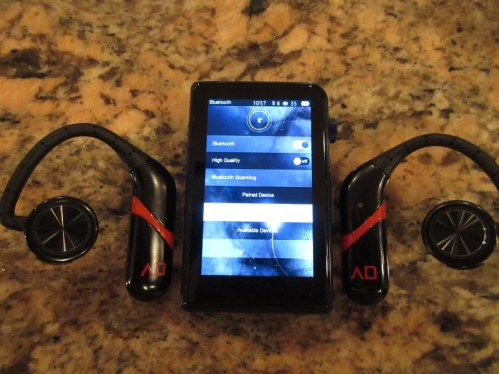
Pairing it up with my smartphone was also a breeze, and I made sure to enable High Quality mode. Not sure if I hear a difference when it’s disabled/enabled, probably need more listening comparison. The beauty of this pair up is turning M2s into a Bluetooth wireless DAC where you can stream audio from your phone (Spotify, Tidal, Pandora, etc, or just a music playback) and listen to your headphones connected wired to M2s.


HibyLink is a new feature, where your smartphone becomes a remote display controller of your DAP. To take advantage of this feature, you need the latest version of Hiby audio app which supports HibyLink. Once enabled on M2s and your Smartphone, after successful pair up you can control the playback of your Shanling DAP straight from a comfort of your smartphone large touch screen – very convenient, considering small footprint of M2s which you can hide in the pocket.


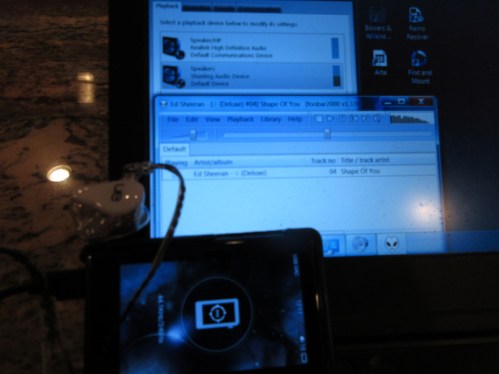
If you got an older computer/laptop and want to improve your audio listening experience, you can use M2s as USB DAC after installing USB driver found on http://shanling.com/download/List. It’s certainly convenient if you have a need for it.
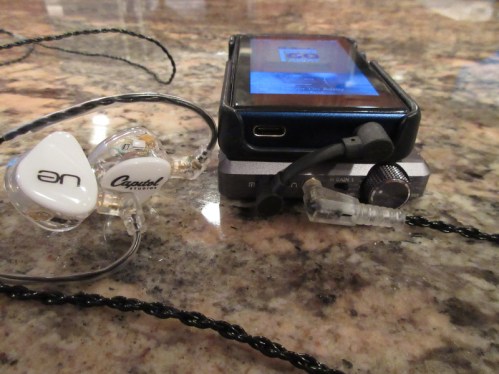
M2s can also be used as a digital transport to drive an external USB DAC. For this you will need usb-C to micro-usb (or full usb) cable. I recommend staying away from usb-C adapter, and look for a quality short cable if you are dealing with a portable USB DAC like HA-2 or Mojo. I found no issues using this particular Black Sheep Merino custom cable which I recommend. In pair-up of M2s and HA-2, I found the sound to be a little brighter and crisper, due to AKM vs ESS DAC signature difference, while still being resolving and transparent.


And of course, the most fundamental connection is using M2s Line Out output to connect to an external portable amplifier. HO and LO ports are shared from a single 3.5mm output, you have to remember to select it in Settings, and also remember to switch it back because it stays enabled even after the power down. Using M2s with E12A portable amplifier, I found the sound to be very expanded (soundstage), with a great transparency and a neutral resolving signature. One of the advantages of LO pair up is being able to have HO with a low output impedance, depending on the spec of the portable amp.
GUI.
When you start M2s, you are greeted with a familiar Menu selection, something you have seen in many other non-Android DAPs by FiiO, Cayin, and Shanling. No surprises here since Hiby fw/sw is behind this release, which mean that many will feel like at home navigating through M2s menus. Starting from the top, Now Playing will bring you the currently playing track, and My Music helps you sort by recent plays, open all, list of tagged My Favorites, as well as Album, Genre, Artist, or the Playlist. File Browser takes you to microSD card or OTG expansion storage, where you navigate by directories (my personal preferred way). As mentioned before, navigation is easy and under control using a scrolling wheel and pushing it to select the song or the settings.
Play Setting has an extensive selection of options with Maximum volume limit and Default volume setting, Resume mode (off, or by Location in a song or the Track itself), Gapless Playback or Fade in/out (both working quite well), 10 Band EQ with +/- 6 dB adjustment and different genre specific presets or a custom EQ setting. You also get 2 levels of gain setting, Low pass filter mode (steep or gradual, per AKM DAC setting), Gain replay, Channel Balance, Play Mode, and Folder skip on playback (on/off).
In System Setting you have a lot more options, including different ways to update the music, Bluetooth menu/setting, Backlight setting, auto-shutdown and sleep timer, different options for Screen locked operation (where you select which hw button function to enable), resume play, a few different Themes, Clock setting (always visible in notification bar and in the lock screen), USB mode (DAC or usb data), DSD output mode, HO/LO output selection, Language, About M2s, Restore factory settings, and System update (fw).


The main Playback screen will have the clock, volume level, and battery status in notification bar (notification bar is visible from every screen). Then, you have a large area of the screen dedicated to artwork of the song, if available, and at the bottom you can see info about the song format, the file index number from the directory or folder, the time scroll/scrub bar with a current time position and a total track time, the Song/Artist name, and Play mode on the left side or Favorite “heart” indicator on the right side. While in Playback screen, press’n’hold Volume wheel brings up a shortcut menu with Play Mode, Add to Playlist (either My favorites or a Custom playlist), Play and System settings shortcuts (per description above), and Delete file option. Also, press’n’hold of Return button in Playback screen takes you to the main “front page” menu.


Overall, all the menus and settings are easy to navigate, self explanatory, with lots of options, and a fast learning curve even for those who are not familiar with Shanling, FiiO, or Cayin DAPs. One unique feature worth mentioning is a Lock Screen with a Clock. When you turn the screen off and then back on, you are greeted with a lock screen which you can unlock by pressing the power button once. When you are exercising/working out, I find it to be a very convenient feature to see the time.
Page 3: Sound Analysis, Comparison, Pair-up, and Conclusion.

 Twister6 Reviews
Hi can you compare it to colorfly c200?
LikeLike
C200 is much brighter in sound and more colder in tonality. But the biggest problem with C200 is lack of fw updates and relatively minimalistic functionality.
LikeLike
How would it match up to beoplay H9’s?
Thanks
LikeLike
I’m not familiar with H9, but I assume you are talking about wireless connection? That should be fine, but wired – M2s is not as high res, M3s scales up in sound quality. Maybe even look into their new tiny M0, that one supports a lot of wireless codecs and sounds damn good!
LikeLike
M2s. The audio quality is on par with iPhone 4/5/6. Low/High Gain modes are equal from SQ perspective. Steep lowpass filter should be preferred. One minor tech. issue spotted. Audio measurements that matter – http://soundexpert.org/articles/-/blogs/audio-quality-of-shanling-m2s
LikeLike
This is quite an old DAP by now ;), there are better options out there, especially with low output impedance so it won’t mess the sound, unless you are using iematch.
LikeLike