
Under the hood.
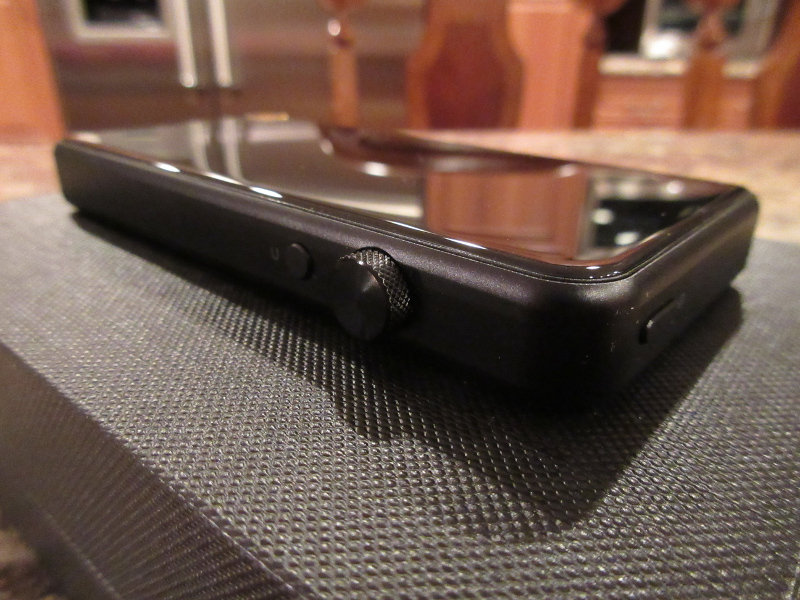
As mentioned already, you will find HD Retina screen with 3” display at 480×800 pixels 300PPI resolution. There is also a glass on the back of the DAP, leaving an all-metal CNC frame with a sandblasted coating surrounding the top/bottom and the sides of it. Another unique element carried over from M2s design is Japan imported ALPS multi-function wheel with a rating of 500,000 presses and 100,000 turns.
Despite its relatively small footprint, M3s is packed with a lot of features, which is a noticeable upgrade from M2s. Now it features a dual AKM AK4490EQ DAC, along with an optimized balanced design with 4-way LPF circuit (using two MUSE8920 opamps) and a 4-way amp circuit (using two AD8397 opamps). The design also features high accuracy dual crystal oscillators, 4 Panasonic FC audio capacitors and 4 Panasonic polymer tantalum capacitors, and two OMRON relays providing a circuit protection for single-ended and balanced outputs.
And speaking of outputs and headphone amp, the single-ended 3.5mm output is still rated at 130mW into 32ohm load, while balanced 2.5mm output now boosts the power to 230mW into 32ohm load, damn good for a small DAP. Also, Shanling took their customer feedback very seriously about output impedance, and now both outputs are under 1 ohm.
With all this hardware under the hood, M3s is capable to support hardware decoding of DSD256, PCM384kHz / 32bit support include: MP3, WAV, WMA, FLAC, AAC, ALAC, APE, ISO, DSF, DFF and other lossless audio formats, plus a support of cue, m3u, msu8. Just keep in mind, DSD is supported in wired connection mode with headphones plugged in. When you switch to Bluetooth wireless headphones, DSD files are not supported due to bandwidth limitation, which makes sense.
As part of Bluetooth wireless connection, you get two-way BT4.1 with AptX codec support. This is Duplex BT mode where you can pair up M3s with BT wireless headphones or pair up M3s with your Smartphone or another DAP supporting BT to act as a wireless Bluetooth DAC. This could come very handy to stream Spotify or Tidal from your Smartphone, transmitting it wireless to your DAP. Or, you can use Hiby audio app with HibyLink to control your M3s remotely.
As I mentioned already, no internal storage is available, but you can use microSD card up to 256GB, and I suspect the latest 400GB should be supported as well. Last, but not least, the internal 2600 mAh lithium battery will give you close to 13 hours of playback with mp3/flac files at an average listening volume. Listening to DSD files or with BT enabled will reduce the battery life, as expected. Also, full charging takes a little over 3 hours with 5V/2A charger.
GUI.
When you start M3s, identical to M2s, you are greeted with a familiar Menu selection, something you have seen in many other non-Android DAPs by FiiO, Cayin, and Shanling. No surprises here since Hiby fw/sw is behind this release, which mean that many will feel like at home navigating through M3s menus. Starting from the top, Now Playing will bring you the currently playing track, and My Music helps you sort by recent plays, open all, list of tagged My Favorites, as well as Album, Genre, Artist, or the Playlist. File Browser takes you to microSD card or OTG expansion storage, where you navigate by directories (my personal preferred way). As mentioned before, navigation is easy and under control using a scrolling wheel and pushing it to select the song or the settings.
Play Setting has an extensive selection of options with Maximum volume limit and Default volume setting, Resume mode (off, or by Location in a song or the Track itself), Gapless Playback or Fade in/out (both working quite well), 10 Band EQ with +/- 6 dB adjustment and different genre specific presets or a custom EQ setting. You also get 2 levels of gain setting, Low pass filter mode (sharp, slow, short delay sharp, and short delay slow, per AKM DAC setting), Gain replay, Channel Balance, Play Mode, and Folder skip on playback (on/off).
In System Setting you have a lot more options, including different ways to update the music, Bluetooth menu/setting, Backlight setting, auto-shutdown and sleep timer, different options for Screen locked operation (where you select which hw button function to enable), resume play, a few different Themes, Clock setting (always visible in notification bar and in the lock screen), USB mode (DAC or usb data), DSD output mode, HO/LO output selection, Language, About M3s, Restore factory settings, and System update (fw).


The main Playback screen will have the clock (can be turned off), volume level, and battery status in notification bar (notification bar is visible from every screen). Then, you have a large area of the screen dedicated to artwork of the song, if available, and at the bottom you can see info about the song format, the file index number from the directory or folder, the time scroll/scrub bar with a current time position and a total track time, the Song/Artist name, and Play mode on the left side or Favorite “heart” indicator on the right side. While in Playback screen, press’n’hold Volume wheel brings up a shortcut menu with Play Mode, Add to Playlist (either My favorites or a Custom playlist), Play and System settings shortcuts (per description above), and Delete file option. Also, press’n’hold of Return button in Playback screen takes you to the main “front page” menu.


Overall, all the menus and settings are easy to navigate, self-explanatory, with lots of options, and a fast learning curve even for those who are not familiar with Shanling, FiiO, or Cayin DAPs.

 Twister6 Reviews
Thanks for another well-done review! You’ve made a comparison with Opus #1. How about the newer #1S?
LikeLike
Was done already last week in my Opus#1s review https://twister6.com/2018/02/14/thebit-opus1s/2/
LikeLike
I have a dilemma….m3s or n5ii?
LikeLike
it’s all up to your personal preference. Touch screen is a big deal for some people. Plus, if you have lots of high res files, N5ii will give you 32GB internal and 800GB external storage. Plus, you can load apps for streaming with N5ii. But if you want something very small, lightweight, pocket friendly for just a playback and OK with a single uSD (400GB) then go with m3s.
LikeLike
Hey, Mr. Twister, I have an Audio Technia M50X. Is it possible to simply buy a (2.5mm male to 3.5mm female cable) and use M50x in 2.5mm bal. mode with modern players like M3s or N5ii?
LikeLike
Not gonna work, unfortunately. You can’t convert 3.5mm single ended to 2.5mm balanced since the grounds of SE already tied together and you can’t split it coming out of M50x. When you have headphones with detachable cable and both earcup (separate) connections, you can get a balanced terminated replacement cable. But with M50x or msr7 you can’t do that since L/R side grounds already tied together internally and you have a single earcup connection.
LikeLike
I have Fiio X3II at the moment. How do these two compare?
LikeLike
it has been a long time since I heard x3ii, will take me awhile to find and to charge it up lol!!! But from memory, it was nowhere near as resolving or sounds as layered or dynamic as M3s. I remember X3ii as having a smoother and warmer tonality, so I would consider M3s as an upgrade, for sure.
LikeLike
Does your M3s get pretty warm wile it’s playing?
LikeLike
i keep it in a leather case, so usually don’t “feel” it, but it depends on a file format. mp3s should be “cooler”, while playing hi-res lossless files (flac or dsd) can use more processing power, thus running warmer.
LikeLike
Hello. I don’t see how I can stream Spotify from my phone to the M3s. Is this. Really possible?
LikeLike
You need to pair up M3s with your phone through Bluetooth. Like you would pair up a Bluetooth speaker with your phone. Once paired up, M3s becomes a wireless Bluetooth dac, and whatever you play on your phone you can hear on M3s. That’s how you “stream” to it, just like listening to Bluetooth speaker connected to your phone 😉
LikeLike
Thank you for your review. I have an M3s and love it! However, I would love it more if there was any kind of user guide available. I can net search what “Gain” is, and find out nothing that tells me anything. Same with DSD output mode, Gain Replay, Lowpass filter mode. What is it with these manufacturers and keeping the info to themselves? (have the same problem with my Xiaomi Smartphone – no manual available anywhere). Seems to be an expectation that we know everything.
LikeLike
my best recommendation is to post questions on Head-fi in their dedicated thread: https://www.head-fi.org/threads/shanling-m3s-dual-ak4490-dac-2-5-balanced-out-aptx-bt-hiby-link-usb-out-fw-1-6.859241/ – bit community with a lot of people who can help you!
LikeLike
Ok, will do – thanks!
LikeLike