
A Concert Hall in your pocket!
PROS: Darwin-MPA architecture with a custom FPGA/Delta-Sigma implementation, natural transparent tonality with a clear detailed sound, deeper bass response, Turbo mode with a voltage boost, fast Android 12 performance (665 SoC, 8GB RAM, 256GB ROM), MQA 16x, DSD1024 and PCM1536 support, hi-res 5.9” screen, Alcantara material integration, phenomenal battery life.
CONS: weight, price, mild waterfall hissing with some sensitive IEMs.
The product was provided to me for the review purpose in exchange for my honest opinion.
Manufacturer website: Hiby. Available for sale directly or from authorized retailers like Musicteck.
Intro.
I already mentioned in a number of my latest writeups that it is becoming more challenging to review higher end DAPs. They are all getting bigger in size and weight, run optimized Android OS, use fast Snapdragon processors with plenty of RAM for multitasking, loaded with features, and have plenty of power to drive more demanding headphones. Even the price gap is not as wide anymore with some brands releasing cheaper co-flagships in comparison to their TOTL DAPs. So, how do you differentiate one from the other and choose which one is better for you?
Without a doubt, pair up synergy is important, but audiophiles are also looking for something more unique which stands out from the crowd. Also, seems like it is no longer about utilizing the latest off-the-shelf DAC chips, especially after the market cooled down since AKM factory fire. Thus, manufacturers are getting more creative with custom FPGA implementations and discrete DAC designs. This way they are no longer at the mercy of DAC chip manufacturers and in full control to customize their own sound tuning on both hardware and software levels.
After spending over a month with R8ii, testing it with different earphones and headphones, and comparing it to other audio players, I’m finally ready to share my findings about this latest fine release from Hiby.
Unboxing and Accessories.
Despite of being cheaper in price, R8ii release is positioned as a co-flagship relative to their TOTL RS8 DAP. But Hiby had to differentiate between these releases and cut corners somewhere, with packaging being one of those “corners”. Relative to a more extravagant leather case unboxing experiences of RS8, R8ii unboxing is more modest, but still quite tasteful. It has a nice outer carboard sleeve with glossy print and a giftbox quality box underneath with a split-in-the-middle unfolding opening. Inside, there is a secure foam tray hosting the DAP, and a handful of other accessories underneath, including TPU/Alcantara case, very high quality usb-c to usb-c charging/data cable which can handle fast PD charging, extra screen protectors (with one already applied), port film protectors, warranty card, and user guide.


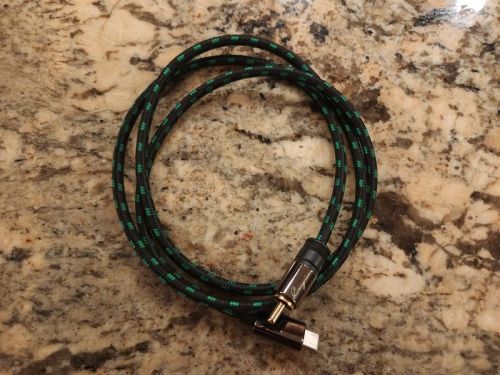
I’m sure Hiby recognized that most of today’s chargers are usb-c based, so no more usb-A to usb-c cable, though maybe it would have been a good idea to include usb-A adapter. Also, usb-c to RCA coax cable was not included, probably another “corner” they had to cut, but those are not hard to get, a common cable used by Hiby/Cayin DAPs which bring out Coax output through unused usb-c pins. I did verify and R8ii is compatible with those cables. The case was something I didn’t expect. Yes, it is TPU, though it does use top quality Bayer UE95 TPU material infused with Alcantara side panels in matching color with R8ii Alcantara backplate.
Optional usb-c to RCA coax cable:
The TPU material itself is rather high quality, thicker, and more premium to the touch with a smooth exterior and textured interior where it comes in contact with the backplate of the DAP. Top side is solid, bottom has generous openings for PO, LO, and usb-c ports. But I still had to widen slightly the PO opening to accommodate larger PWA balanced cable plugs. The left side has indented volume button cover. The right side fully covers the micro-SD card (card replacement will require a removal of the case), has a cutout opening for a power button, and indented playback buttons covers.
While it is a fine secure case, it was probably the first time ever I didn’t mind using R8ii naked. Alcantara material on the backplate of the DAP already helps with a secure grip and adds a friction when you place the DAP on any surface. But, at the same time, Alcantara material is a dust and crumbs magnet, so I’m sure many will prefer to keep the case on.


Design.
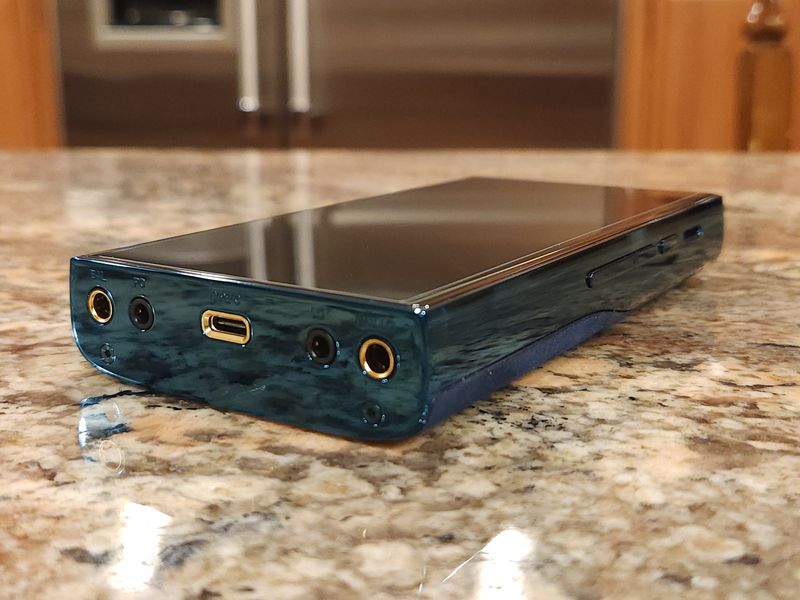
Following the trend of many latest flagship DAP releases, Hiby R8ii is also big and heavy. With dimensions of 149mm x 78mm x 23mm and the weight of 528g, it is 60g lighter (due to a different chassis material) and a bit taller (to accommodate bigger screen) than RS8. One of the main contributing factors of the addition weight here has to be a bigger battery and a copper case around the battery. But regardless of the weight and the size, one noticeable design change for me was a switch to volume buttons instead of a wheel. The advantage of a wheel is a faster adjustment, but using buttons makes chassis look cleaner. Besides, I often end up using on-screen volume adjustment anyway. Plus, by introducing a bigger display, Hiby would have to make the DAP even taller if they had volume wheel at the top.


The 3rd gen dual-curve design chassis of R8ii are made from a surgical-grade high-gloss 316LVM stainless steel and the backplate integrates Alcantara material matching the color of the chassis (blue in my review sample), the same Alcantara material used on side-panels of the matching TPU case. I didn’t know at first how to feel about this Alcantara material fusion. I always keep my DAPs inside the case, especially when dealing with bigger and heavier units to enhance the grip. Here, to my big surprise I ended up using R8ii without a case because it felt slimmer and the felted Alcantara material on the back gave me the grip enhancement, scratch protection, and friction “enhancement” by allowing me to place the DAP on any surface, either glass, wood, or metal.
The focus of R8ii front design is around a gorgeous 5.9” IPS 1080p HD display. While a film screen protector was already applied, though it only covers the visible portion of the screen, the glass itself is still the latest Corning Gorilla, so we are talking about a scratch resistant high-end glass display with oleophobic coating. The touch screen supports multi-finger gesture and double-tap to wake sensor.
While it is a basic rectangular shape DAP with a glass touch screen dominating the front, Hiby tried to add custom design touches to give it a more unique personality, courtesy of dual-curve design. The sides are smooth and rounded, with a seamless integration of Alcantara backplate finish into the chassis. Nothing is at the top, just a flat metal surface. On the left side you will find a combined volume up/down single button with a tactile click response when you press its top/bottom. The right side has a spring-loaded micro-SD card slot (up to 2TB), followed by a separate power button with LED multi-function status light, and 3 side-by-side Skip and Play buttons. All buttons also have a nice tactile response, though only a very faint bump for Play/Pause button which sometimes not as easy to feel when using R8ii without a case.
At the bottom you have 4.4mm BAL (6Vrms, 7.5Vrms in Turbo, 710mW @32ohm max) and 3.5mm SE (3Vrms, 225mW @32ohm) headphone ports to the left, and 4.4mm BAL and 3.5mm SE Line Out ports to the right. Each port has a dedicated functionality without a need to switch between PO/LO. In the middle at the bottom, you have usb-c (USB3.2 gen 2) multi-function port for charging, data transfer, USB DAC in and Digital Out, and Coax Out with an optional custom cable.


Under the hood.
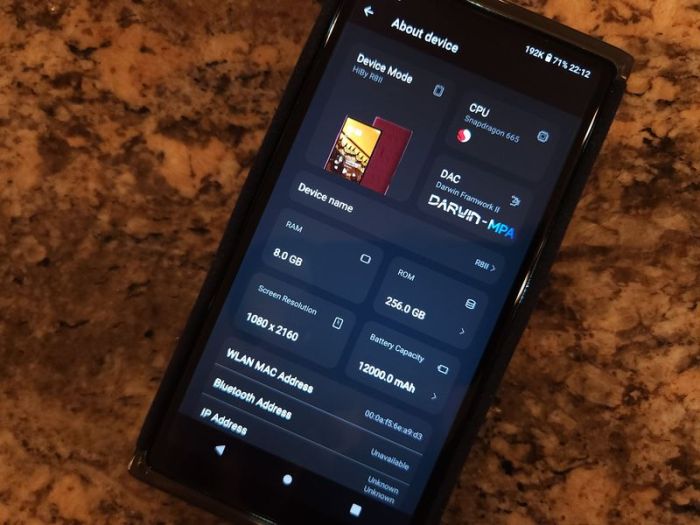
R8ii proudly showcases the next gen Darwin-MPA design where MPA stands for Multiphase PWM (pulse-width modulation) Array. Of course, many are familiar with the original Darwin-R2R design featured in RS6 and RS8, having most of the signal processing inside the FPGA which drives external R-2R discrete DACs. Here, Hiby went back to Delta-Sigma modulation design architecture where the signal processing and D-S modulation is done inside the FPGA while 16 channels of current-mode D/A conversion are done externally.
R8ii processes PCM signal through their own custom Darwin Architecture chain, starting with FIR Filter (256-tap adjustable Impulse Response filter), Oversampling which has been enhanced to 128x (from 16x in RS8) through the updated v2 filter system (to remove any sound aliasing artifacts, and while including NOS to emulate non-oversampling functionality), Nonlinear Harmonics control (to increase some harmonics and to make the sound more natural), and Linearity Compensation (using algorithms to compensate some non-linearities to drive output stage). DSD signal processing bypasses that, going straight to the D/A output stage.

Other high end discrete components have been carried over from RS8, with top-shelf expensive caps, such as 4 Elna SILMIC II silk fibre audio Electrolytic Capacitors (for tube-like timbre) and 28 high-density, high-capacity tantalum capacitors, as well as new high precision crystal oscillators. Also, you will find a further improved and optimized partitioning of independent power supplies to keep the digital section separate from analog. And just like in RS8, you still have freely switchable Class A and Class AB headphone amp modes and access to Turbo mode which boosts the balanced output from 6V to 7.5V.
The system still runs on Qualcomm Snapdragon 665 and optimized Android 12. It comes with 8GB of LPDDR4 RAM, 256GB of internal storage, and microSD card expandable up to 2TB. The open Android 12 OS features Direct Transport Architecture (DTA, systemwide bitperfect audio) and a support for USB DTA (bitperfect USB audio). Not sure why Android 13 wasn’t implemented, but R8ii interface is as fast as other 660/665 based DAPs I tested. As a matter of fact, based on AnTuTu 3D Benchmark score, R8ii runs even faster than RS8, N7, and N30LE. All the popular audio formats are supported, including MQA 16x hardware decoding if you still care for it. Plus, R8ii supports the max sample rate going up to PCM 1536kHz and DSD1024, just like RS8.
As already mentioned, R8ii features a generous size 5.9” Display with Corning Gorilla Glass. This is a hi-res 1080p HD display with 2160×1080 resolution, widescreen aspect ratio and high pixel density. Plus, it features oleophobic coating and detection of double-tapping to wake up the screen. It is a great feature where you turn the display on by double-tapping on it, so you can give your power button a break.
Other standard features are dual-band WiFi with a support of 2.4GHz and 5GHz, Bluetooth 5.0 with two-way support of all popular hi-res codecs, including aptX HD, LDAC, and UAT, and two-way Bluetooth pair up with wireless headphones/speakers (as transmitter) and to your smartphone (as receiver) to function like a wireless BT DAC/amp. Also, as already mentioned, USB-C port (supporting USB3.2 gen2) is multi-functional for charging, data copying, USB DAC functionality, Digital out, and SPDIF output to bring out Coax signal with the optional custom cable.
And last, but not least, R8ii features a huge 12000mA battery in a custom pure copper heat dissipation case, exactly the same as in RS8, supporting fast PD2.0 charging. You can definitely see a lot faster charging when using PD chargers. In my battery test using average sensitivity IEMs at normal listening level in mid gain from 4.4mm BAL output with Class AB selected, and Turbo mode On, I was getting a solid 17hrs of playback time!!! Turning Turbo mode off will help you gain more time, while switching to less efficient Class A – less. But overall, this is a very impressive battery performance!
OS / GUI.
I do spend extra time talking about details of GUI in my Android DAP reviews, while here we are still dealing with a default popular HibyMusic app that many are already familiar with. Thus, no need to repeat myself. All Hiby Android DAPs come preloaded with HibyMusic app, regular version of which you can download and install on any smartphone or tablet device for free. R8ii comes with Professional Edition version of HibyMusic, v2.0.9.


While being the open Android DAP with preinstalled Google Play, you can install any app depending on their compatibility with a device. You must be aware that some devices or geographic locations have limitations set by Google of what you can download and install. If you ran into such problem, you could visit APKPure website to download and sideload apps. Another VERY important point. If you have to do a factory reset, either from Settings/System or through Android Recovery while re-starting the device and holding Skip button (above Play) to get into Android Recovery (and then Power + Skip to get into Recovery menu), after the reset you will not find Google Play until you go to Apps section and scroll down to Enable Google Play Store.
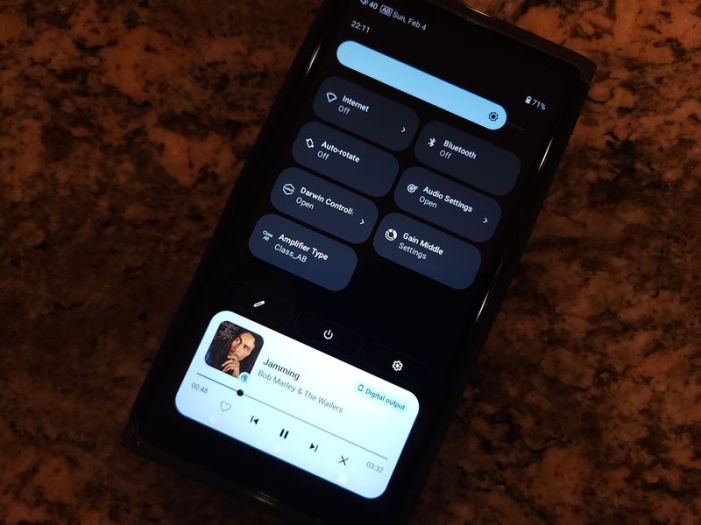
Relative to Android Settings, straight from the pulldown Notification bar you have access to different shortcuts, including Audio Settings menu shortcut where you can select Amplifier type (A or AB), enable Turbo mode, change the Gain (low, mid, high), Download and select plugins, access global MSEB (MageSound 8-ball DSP sound effects – very effective for sound shaping), select DSD gain compensation, Channel balance adjustment, Max volume cap setting, Volume Control setting (clockwise or counterclockwise), and MQA decoder (enable/disable). The MSEB settings are system wide and should work with any audio application. Meaning, for example, you can apply MSEB dsp sound effects to any audio app. You will also find a Gain setting shortcut in notification bar and Darwin Controller setting shortcut where you can change Low-pass antialiasing filter (11 settings), DSD filter, and change Harmonic Controller.


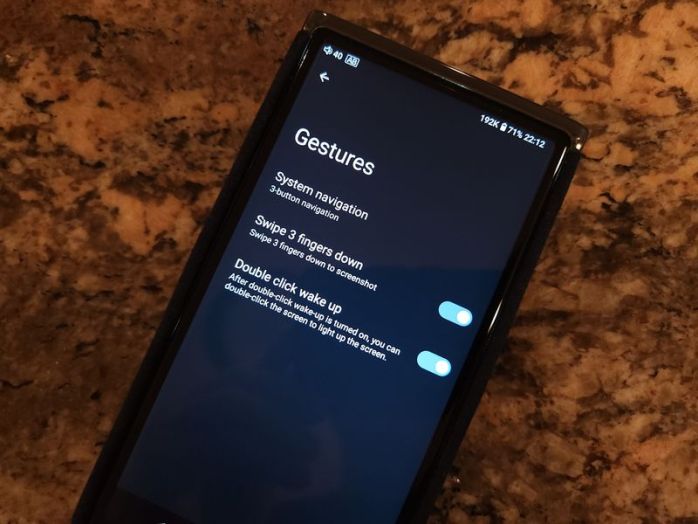
There are a few other interesting menu options which some might not be familiar with or forget about. For example, under Battery setting there is Idle Shutdown feature where you can set a timeout to shut down the DAP after idling for predefined period. Hiby has it in their other Android DAPs as well, but not everybody remembers to enable it which comes in handy when we treat the DAP like a smartphone and forget to turn it off. Under Security you can config Lock-screen button settings. In Settings under System go to Gestures to configure System navigation (gesture or traditional 3-button), enable Swipe 3-fingers down to take a Screenshot, and enable Double-click to wake up. These are all very useful features.
Another new addition is HibyCast which allows system wide remote control of the DAP from another device such as your smartphone after you install HibyCast app on your phone.
Page 2 – Sound Analysis, Comparison.
Page 3 – Pair up, Wired/wireless connections, and Conclusion.

 Twister6 Reviews
Thank you very much for a thorough brain massage for a whole 3 pages, I gotta go lay down…
LikeLike
Hi Alex,
Can you compare the sound of R8ii to that of LPGT? They are both considered neutral sounding, and they are at about the same price point (when LPGT is on sale), so this could be of common interests.
In particular, I’m very interested in this comparison for the pairing with RN6.
Thank you,
Lean
LikeLike
With Turbo on and Class AB, I definitely prefer the pair up with R8ii because of the sound sig of RN6 being more balanced in comparison to L-shaped with LPGT. And relative to this change, RN6 mids are more forward, clear, detailed…
LikeLike
How does it compare sonically to the AK se300? Similar price, both r2r and class A/AB.
Thank you
LikeLike
Sorry, I don’t have SE300, only borrowed it a year ago for review, and I can’t compare it by memory. Also, R8II is not R2R, a completely different modulation/dac architecture.
LikeLike
Hello, is it possible to compare this device – HiBy R8 II with such outstanding devices as Chord Electronics Hugo 1,2 or even Chord Electronics Hugo TT2. And if possible, in your subjective opinion, which device would you prefer in terms of sound?
LikeLike
Sorry, don’t have access to any of the Chord products. But from talking to some other reviewers and some of my readers, they always refer to Hugo as under powered and having a more neutral/sterile tonality. Can’t judge it myself, but if that is the case, R8II will add more natural coloring to the sound in comparison to Hugo.
LikeLike