
Under the Crown.
PROs: Newly updated advanced Darwin III R2R/FPGA DAC architecture, naturally resolving tonality with many sound-shaping tools, new Adaptive AMP mode in addition to Class A and AB, powerful output with Turbo boost, next gen SoC processor that brings performance closer to smartphone level, high-voltage battery with outstanding playback time (in Class AB), 16GB RAM/512GB storage, DSD1024 / PCM1536 support, a lot of analog and digital input/output options, Sankofa AI sound transformation presets (still work in progress), decent ergonomics of the relatively lighter (compared to other flagships) chassis, high quality leather case.
CONs: price, some waterfall hiss with sensitive IEMs, a toll on battery when switching to Class A.
The product was provided to me free of charge for review purposes in exchange for my honest opinion.
The manufacturer’s website: Hiby. It can be purchased directly or from authorized retailers, such as Musicteck.
Intro.
With so many models to choose from, expanding beyond a typical entry, mid-fi, and summit-fi 3-tier selection, it can become a bit overwhelming when it comes to audio player choices in Hiby’s DAP line-up. At the same time, such a wide selection, with some models updated annually, can also be helpful if you are on a budget and need to narrow down to the exact features you want, or if you are planning to upgrade and are very specific about your needs. But when you reach the level of no expense spared, looking into the TOTL Summit-Fi offerings, there are noticeably fewer choices because every manufacturer takes its time with each flagship DAP release, offering the best from accumulated years of design experience.
Three years after its release, Hiby’s RS8 was right on time for the update, as they announced the RS8ii. A few years back, flagship releases benefited from the latest DACs, including discrete designs, higher power outputs, doubled internal storage, and more RAM, mixing it up with Tubes, and so on. Today, it is more challenging, since even mid-fi models use flagship chipsets and discrete DACs, while Tube amps are everywhere, and everybody is using the same Snapdragon SoC. How do you make your Summit-Fi product stand out from the crowd and shine? It’s not easy to reinvent the wheel, and, for some, raising the price to be taken seriously isn’t enough; you need to back it up with improved sound performance and other features that set you apart.
Was RS8ii up to the challenge and did it rise to the occasion? I spent a month testing this DAP, going from beta to fw1.10, 1.30, and the recent 1.50, with each release sending me back to update my notes due to optimizations resulting in sound fine-tuning and technical improvements, as well as added features. Now, without further ado, I’m finally ready to share my findings!
Unboxing and Accessories.
I would say that the unboxing experience of RS8ii, from a packaging perspective, is rather modest. There is no fancy wooden box or a leather case. It comes in a compact black cardboard box with a hi-res photo of the RS8ii. Under the cover is an insert with a metal card bearing a serial number. With that one removed, you will find another tray with a foam cutout and RS8ii securely inside. Removing it reveals the bottom of the box with a high-quality USB 3.0 Type-C to Type-C charging/data cable. Next to it is a leather case, and a cardboard envelope with two tempered glass protectors, a user guide, and a warranty card. I also found in there a small plastic baggie with 4 rubber HDMI-shaped port dust plugs for the I2S port. And when the leather case is removed, its foam insert contains another small square pocket with a tiny purple cardboard box and 2 sets of 3.5mm/4.4mm custom alloy dust plugs.


I think it was a great idea to include dust plugs for the ports. Not everybody uses 3.5mm output, and with a dedicated 4.4mm PO and LO ports, it could get confusing sometimes. I wish the USB-C to Coax cable were included, since this is a flagship release like RS8, but I’m not sure about their demand, which could be the reason it wasn’t included. But I was VERY pleased with a leather case.


RS8ii has a very unique shape, top-to-bottom and front-to-back. When the pictures of the DAP started to circulate, I didn’t see the leather case and was wondering how it going to cover all its distinct chassis details. The case fits like a glove, wrapping around every side, corner, and faceted edge. It’s a beautifully crafted, genuine, aged-brown leather case with fine exterior stitching and soft felt lining. The DAP slides from the top, which is fully open, and gives you generous access to the volume knob. The left side and the back are solid and covered, and the bottom has a generous opening for all the digital and analog ports, with plenty of room even for bulkier connector housing. The right side is covered where the microSD card is, so you will need to remove the DAP to access it for replacement. The Power and Playback buttons are also covered, but only in felt-leather material for easier access, shaped and indented to match their corresponding playback functionality, and a small cutout slit for the status LED over the power button.


Design.
With dimensions of 148.5 x 75.7 x 24.1mm and a weight of 411g (464g with a case), the RS8ii is currently one of the lightest flagship Android DAPs. Again, I’m talking about the relative comparison to other flagships. It was quite a relief when I first got it out of the box, expecting a bulkier brick, only to find a uniquely shaped, elongated, easier-to-handle, elegant design. The aerospace-grade, solid aluminum chassis, available in starlight gold (my review unit) or classic black, probably contributes to a lighter weight than some other stainless-steel flagships. I’m not sure what else contributed to a lighter weight, since it still uses 2x 6,000 mAh cell batteries, just like the RS8, although connected in series instead of parallel. By no means is it a small DAP, but the design and ergonomics, along with its weight, made it closer to portable than transportable, going in the opposite direction of many recent flagship releases.
As mentioned earlier, the RS8ii chassis is made of aluminum, a seamless monoblock unibody metal chassis that utilizes 6 CNC machining processes, including 17 advanced manufacturing steps and 19 hours of polishing. It’s quite a time-consuming process, but the results speak for themselves. Btw, the back panel also features a small glass backplate insert. On the other side, the focus of the RS8ii front design is around a gorgeous 5.5” 1080p HD display. I don’t believe my unit came with a film screen protector on, and I haven’t applied the tempered glass screen protector yet. But I think the glass itself is still the latest Corning Gorilla Glass, so we are probably talking about a scratch-resistant, high-end glass display with a typical oleophobic coating. The touchscreen supports multi-finger gestures and a double-tap-to-wake sensor.


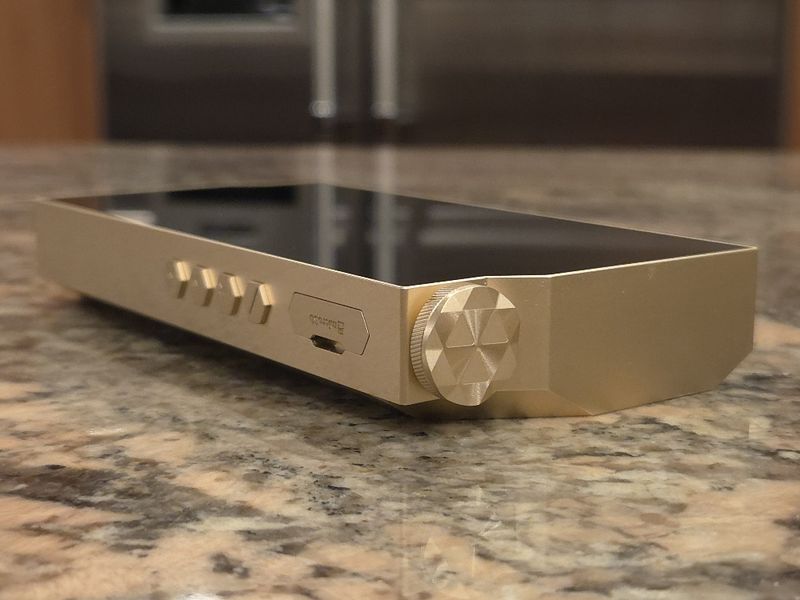
Featuring a brand-new industrial design, RS8ii is not your typical basic rectangular DAP with a glass touchscreen dominating the front. Hiby came up with a unique asymmetric shape, featuring a cutout in the upper right corner to accommodate its crown-shaped volume knob (w/3D geometric cuts and carved texture). The volume wheel feels solid, with smooth rotation and a soft click at each of its 100 adjustment steps. At the bottom, in the lower left corner, there is a symmetric cutout for a Type-C USB 3.2 Gen 2 (10 Gbps bw) port, which supports USB DAC in/out and S/PDIF digital out (with optional Coax custom cable), as well as PD3.0, 80W/12A high-speed charging. To the right of the USB-C port, you will find an I2S output port. Then, 4.4mm dedicated LO port (4Vrms), a shared 3.5mm port with LO (2Vrms) and PO (Class A/AB @32ohm with 2.73Vrms and 210mW), and a dedicated 4.4mm PO (Class A/AB @32ohm with 5.08Vrms and 812mW with Turbo enabled).
There is nothing on the left side, while the right side features a spring-loaded micro-SD card slot (up to 2TB) with a cleverly designed hex-shaped dust cover. Below it are 4 Power/Control buttons, also hexagonal, which symbolize Darwin architecture. Each button has faceted edges and textured lines in the upper half. The lower half of the 3 Control buttons has etched symbols for Play/Pause and Skip Next/Prev playback controls, while the Power button has a narrow slit in the middle with a multi-function LED status light. All buttons also have a nice tactile response. The back of the DAP features large faceted edges, enhancing grip ergonomics. However, I would still recommend using the included gorgeous leather case, which doesn’t hide any of the shape details except for covering the micro-SD card slot and control buttons. The case still has a cutout for a status LED and shaped/indented covers for playback control buttons.


Page 2 – Under the hood, and GUI.
Page 3 – Sound Analysis, Comparison.
Page 4 – Pair up, Wired/wireless connections, and Conclusion.

 Twister6 Reviews
The comparision with SP4k is bit off imho. It was very obvious for me that SP4k is much higher res dap with better imaging and staging in direct A/B with Storm, HEX and APX OG. I am not sure if its about higher res transducers that can show that difference, but the RS8ii lacked that special sauce factor for me that some daps got.. it was good though, just not 3.5-4k good.
LikeLike
Are you talking about RS8ii with fw1.50, burned in for 150hrs or something else? RS8ii with the latest fw1.50 is night and day in comparison to what people heard at CanJam shows a few months ago with a beta fw. I literally had to redo the sound analysis of RS8ii twice, first time when they updated to fw1.30, and then to fw1.50. Fw1.50 raise the resolution and retrieval of details, making RS8ii treble response more revealing, to the point where you need to switch back from Class AB to A if you want to match SP4k. Also, you need to make sure Harmonic Controller is set to 255, just like DAR has to be on. Ultra Filter completely changed from beta to 1.3 to 1.5, totally different sound. Thus, make sure we are comparing the same thing. And of course, there is pair-up synergy dependency with your particular IEMs.
LikeLike
I’m on the fence between the SP4000 and the RS8ii. Based on everything I’m reading, it sounds like the RS8ii may be the better option given the recent firmware updates.
How is the Line Out on the RS8ii compared to the SP4000?
LikeLike